[Description] Defines a downloaded bit image using the number of dots specified by x and y
• x specifies the number of dots in the horizontal direction.
• y specifies the number of dots in the vertical direction.
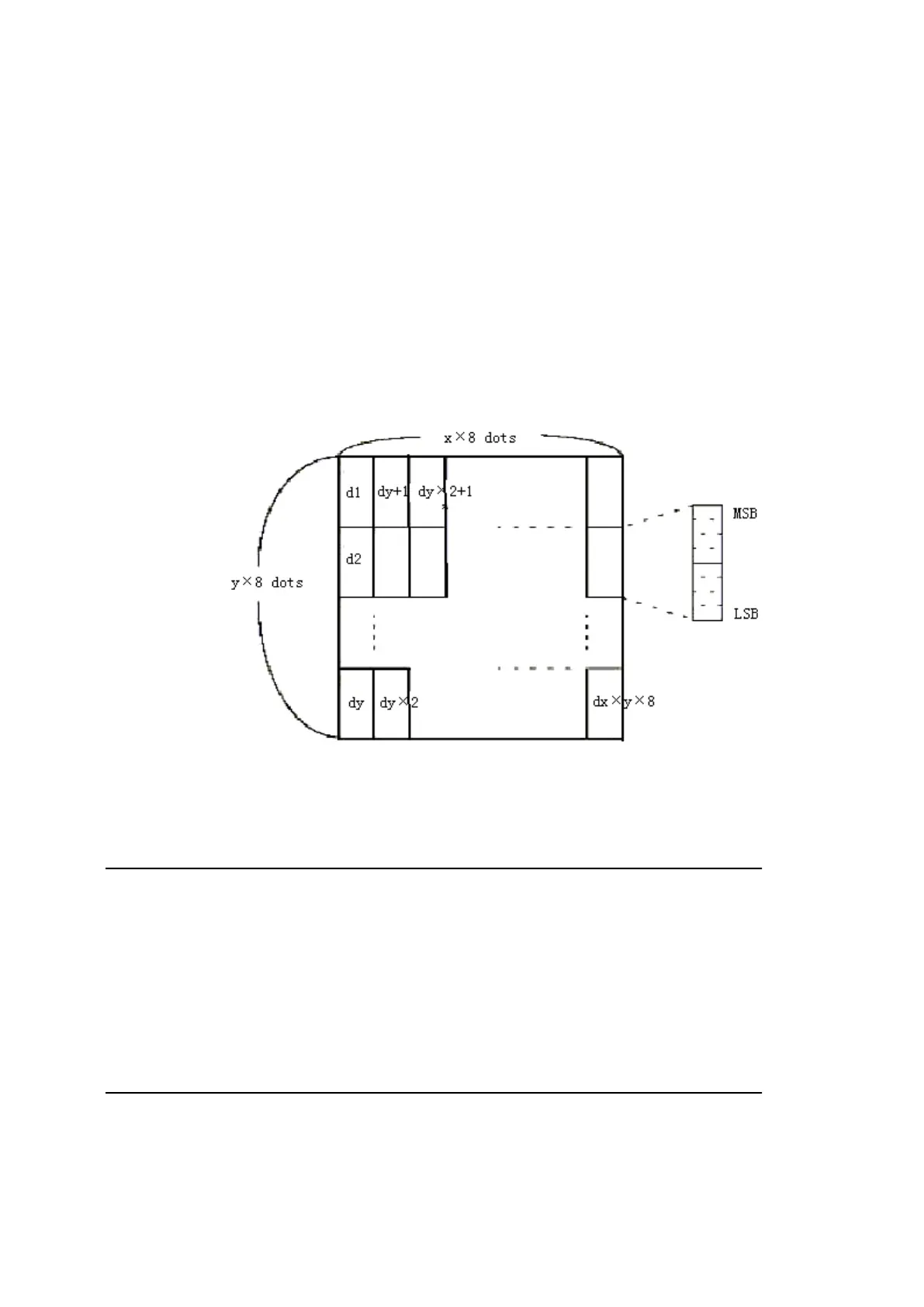
[Details] • The number of dots in the horizontal direction is x
╳
8, in the vertical direction it
• If x
╳
y is out of the specified range, this command is disabled.
• The d indicates bit-image data. Data ( d) specifies a bit printed to 1 and not
• The downloaded bit image definition is cleared when:
④ Printer is reset or the power is off.
• The following figure shows the relationship between the downloaded bit image
[Reference] GS /
46. GS ( A pL pH n m
[Name] Save printed hex data
[Format] ASCII GS ( A pL pH n m
Hex 1D 28 41 pL pH n m
Decimal 29 40 65 pL pH n m
[Range] pL=2,pH=0;
n=0,48 ;m=1,49;
47. GS / m
[Name] Print downloaded bit image
[Format] ASCII GS / m
Hex 1D 2F m


 To Next Page