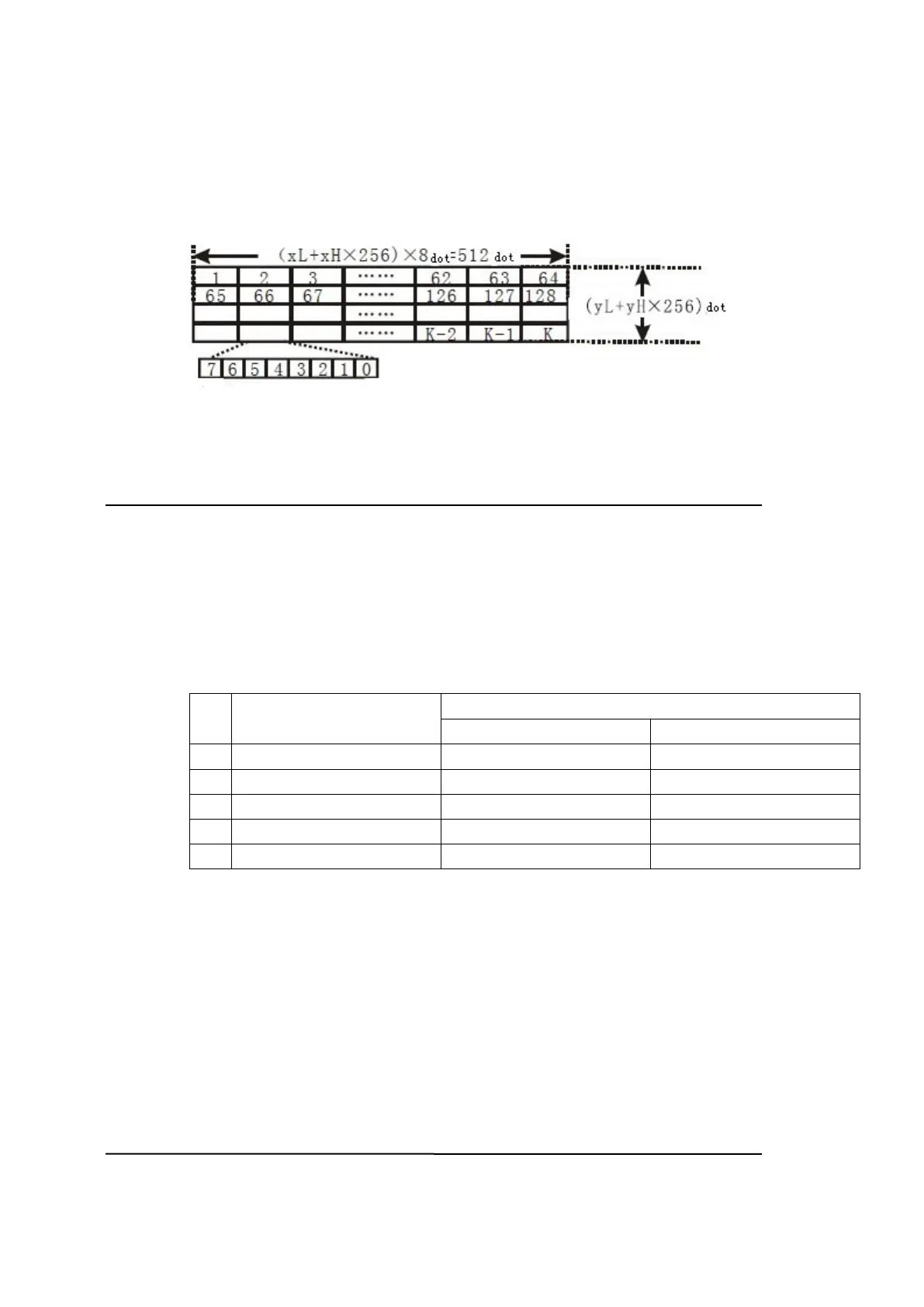
d indicates the bit-image data. Set time a bit to 1 prints the dot and setting it to 0
does not print the dot.
[For example] xL+ xH × 256 = 64
63. GS w n
[Name] Set bar code width
[Format] ASCII GS w n
Hex 1D 77 n
Decimal 29 119 n
[Range] 2
n
6
[Description] Set the horizontal size of the bar code.
n specifies the bar code width as follows:
n Module Width (mm) for
Multi-level Bar Code
Binary-level bar codes
Thin element width (mm) Thick element width (mm)
2
0.25 0.25 0.625
3
0.375 0.375 1.0
4
0.5 0.5 1.25
5
0.625 0.625 1.625
6
0.75 0.75 1.875
Multi-level bar codes are as follows:
UPC-A, UPC-E, JAN13 (EAN13), JAN8 (EAN8), CODE93, CODE128
Binary-level bar codes are as follows:
CODE39, ITF, CODABAR
[Default] n = 3
[Reference] GS k
Kanji charaters command list
64. FS ! n
[Name] Set print mode(s) for Kanji characters


 To Next Page