iDirect Satellite Router Installation and Commissioning Guide 89
iDX Release 3.3
Optional Procedure to Determine PN Max Power
•Video BW: 1 kHz
• Averaging: 10 sweeps (This is required to smooth out in-band ripple)
3. Start the Tra
nsmit Power at the CW P1dB power level. (Refer to Figure 50 on page 87.)
4. Wait until the access controller is ready.
5. If using iSite:
a. Click Start Modul
ated in the Cross Polarization dialog box to open the Specify
Modulated Carrier dialog box.
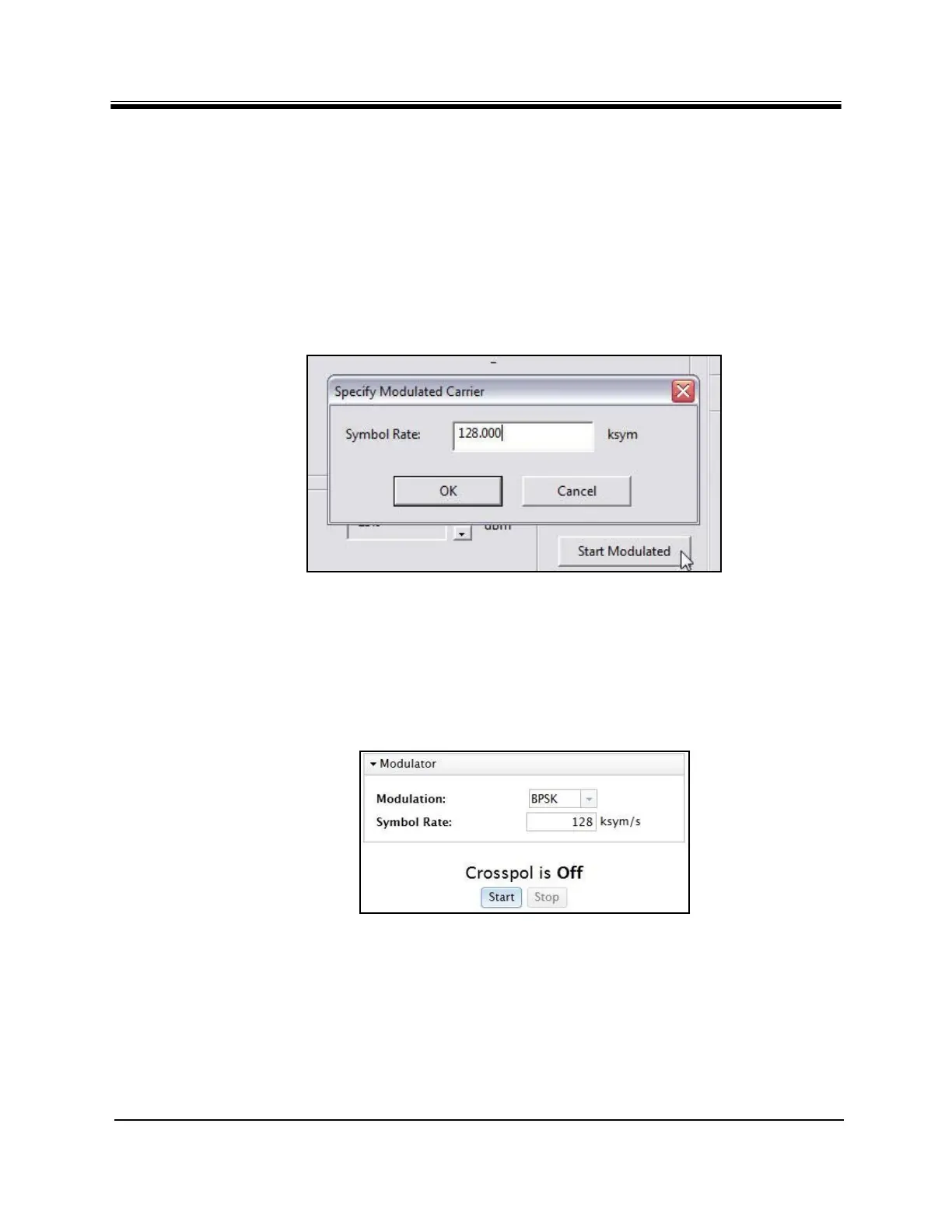
b. In the Specify Modulated Carrie
r dialog box (Figure 51), accept the default Symbol
Rate of 128 kilosymbols per second.
Fi
gure 51. iSite: Transmitting a Modulated Carrier
c. Click OK to transmit the
modulated carrier.
6. If using Web iSite:
a. In the Modulation field of the Modulator se
ction, select BPSK (Figure 52).
b. Accept the default S
ymbol Rate of 128 kilosymbols per second.
c. Click Start to tran
smit the modulated carrier.
Figure 52. Web iSite: Transmitting a Modulated Carrier
7. While the access controller observes the
spectrum analyzer, increase power in 1 dB
increments.
8. After each 1 dB power increase, have the access
controller clear the averaging mode set
in Step 2 and restart averaging.



 To Next Page