Part 2 - Conguration
47
– Zoom ( ): Zoom in and out.
– Focus ( ): Adjust camera focus to far or near.
– Speed: Specify the camera’s panning and tilting
speed.
● Test: Select a pattern prole and then click Test to test
it.
● Edit: Used to edit the selected pattern prole.
● Remove: Used to remove the selected pattern prole.
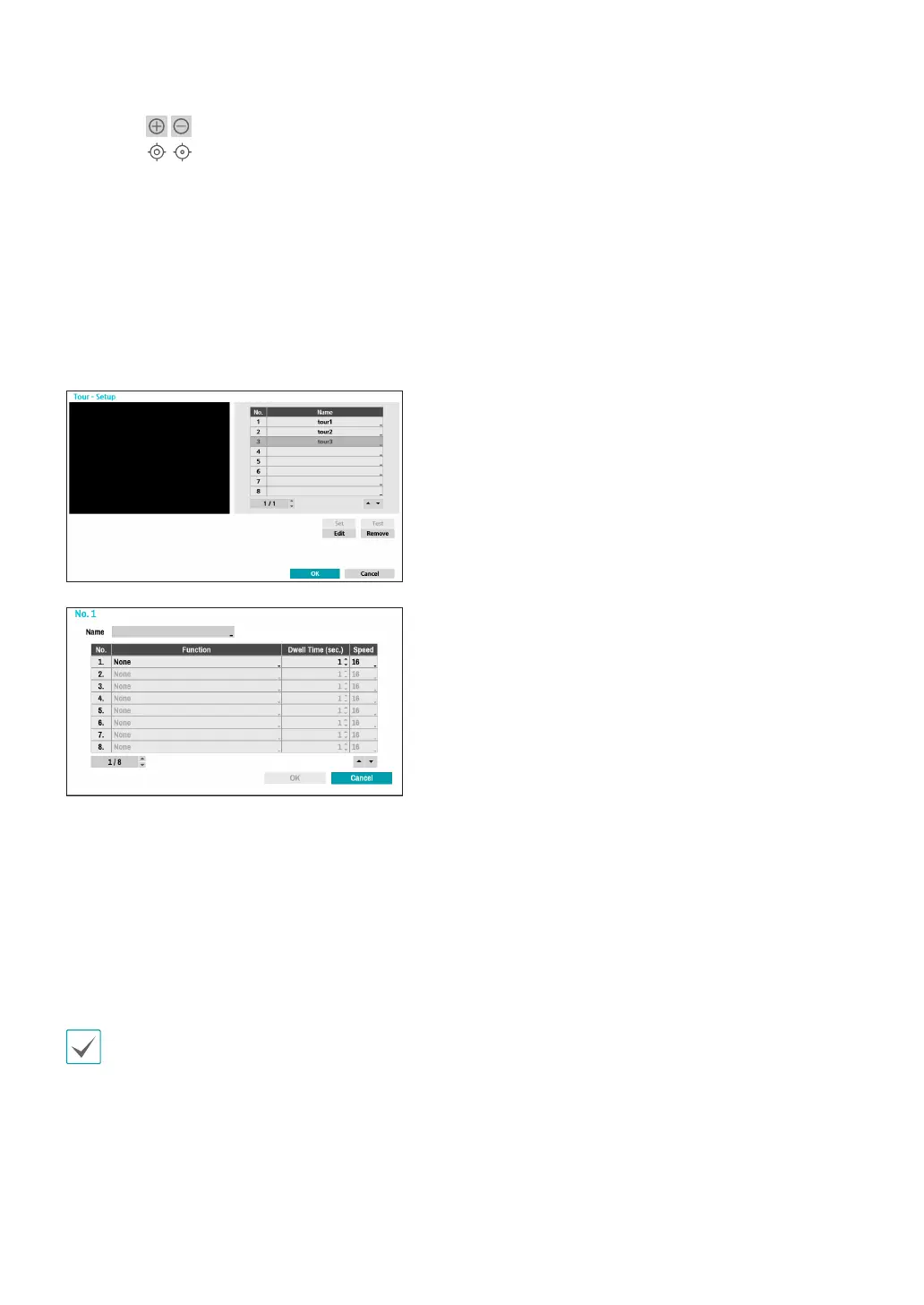
4 Tour
Used to set up a tour prole of multiple functions in a
designated sequence.
Set: Used to set up a tour prole.
– Name: Enter a name for the tour prole.
– Function: Indicates the order of the function in the
tour sequence.
– Dwell Time (sec.): Specify how long to perform the
selected function for.
– Speed: Specify the preset speed.
● Test: Select a tour prole and then click Test to test it.
● Edit: Used to edit the selected tour prole.
● Remove: Used to remove the selected tour prole.
Select Apply after setting up a preset, scan, pattern, or
tour prole to see images from the concerned camera
on the left side of the screen. Selecting Apply or OK
displays a popup screen that indicates whether the
prole has been set up successfully.
5 PTZ Reset: Reboots the camera’s panning / tilting
and zoom settings.
6 Home Position: Specify the camera’s home position.
● Default: Uses the factory-default position as the
camera’s home position.
● Custom: Uses the user-dened position as the
home position.
● Select Set to change the home position.
7 Auto Run: Specify which action to take if the camera
has not been controlled for the specied duration of
time.
8 Auto Pan: Specify the camera’s panning direction.
When Auto Pan is selected from a remote program,
the camera pans in the direction selected here.
9 Auto Flip: Automatically ips the image when the
camera tilts past 90° to prevent the objects from
appearing upside down.
● Digital: Flips the image left to right or top to
bottom.
● Mechanical: Automatically pans or tilts the
camera.
● O: Disables Auto Flip.
0 Tilt-Range: Specify the camera’s tilting range.
!Restore: Specify whether to restore the camera to
its last position or function. Enabling this option
restores the camera to its last position or function
after being restarted.
@ Wiper: Operate the wipers connected to the camera
(stop after three round trips).
# Periodic Moving: Operate the PTZ camera at each
operation cycle for the specied schedule period.



 To Next Page