Part 2 - Conguration
84
HTTP
Notify or forward the events on remote HTTP servers.
The event and NVR information are sent to HTTP servers
in a JSON format.
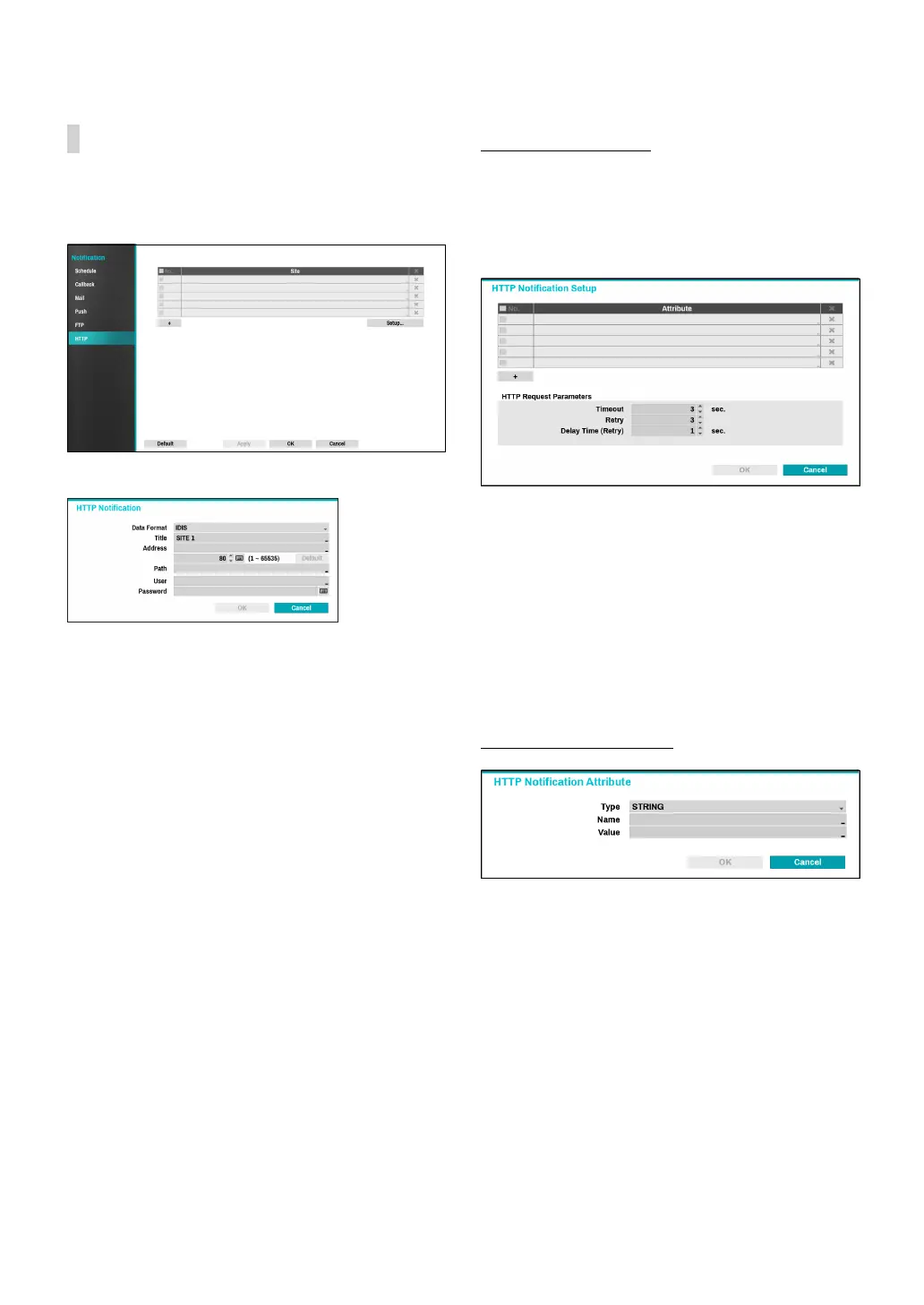
Click the + icon at the bottom of the list to enter the
HTTP server information.
● Data Format: Set the data format of transmitted
messages.
● Title: Enter the name of the HTTP site.
● Address: Enter the address of HTTP notications.
● Path: Enter the path of HTTP server address.
● User / Password: Enter the user and password to
access the HTTP site.
HTTP Notication Setup
An attribute and parameters must be included when
sending the http requests. Click the Setup... icon at a
bottom right corner of the window. When the following
window appears, click the + button to set the HTTP
attributes such as the type, name and value.
● HTTP Request Parameters: Set a specic response
to an HTTP request.
– Timeout: Set the maximum time allowed for
connection.
– Retry: Set the number of times to reconnect when
a connection fails.
– Delay Time (Retry): Congure the time interval
between each retry attempt (initial delay between
retry attempts)
HTTP Notication Attribute
● Type: Select the corresponding type such as BOOL,
INT32, FLOAT32 and STRING.
● Name: Enter the name of HTTP notication attribute.
● Value: Enter the value of HTTP notication attribute.



 To Next Page