23
UK
10.2 Changing the parameter value
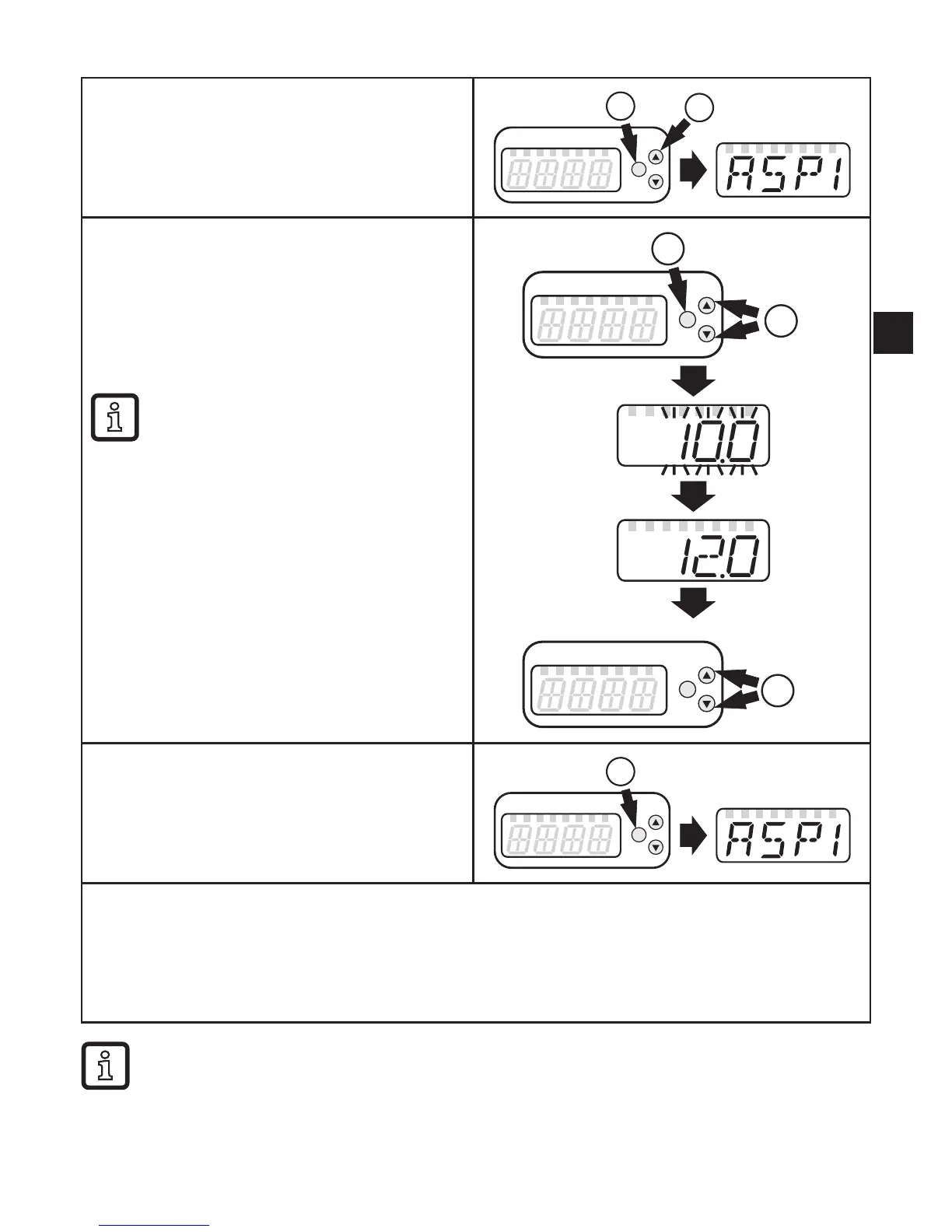
Select parameter
1� Press [Enter] briefly�
2� Press[▲]or[▼]untiltherequested
parameter is displayed.
2
1
Changing the parameter value
3� Press [Enter] briefly�
> The currently set value is displayed�
4� Keep[▲]or[▼]pressedfor1s.
> Display flashes first, then permanent�
5� Changevaluebypressing[▲]or[▼].
Keep[▲]or[▼]pressed.
> Faster cycle of the numerical
values�
4
5
3
Confirm the parameter value
6� Press [Enter] briefly�
> The parameter is displayed again� The
new setting value is saved�
6
Finish parameter setting and change to the process value display:
► Wait for 30 seconds
or
► Change from the submenu to the main menu, from the main menu to the process value
displaywith[▲]or[▼].
If [C�Loc] is displayed when an attempt is made to modify a parameter
value, an IO-Link communication is active (temporary locking)�
If [S�Loc] is displayed, the sensor is permanently locked via software� This
locking can only be removed with a parameter setting software�










 To Next Page