29
UK
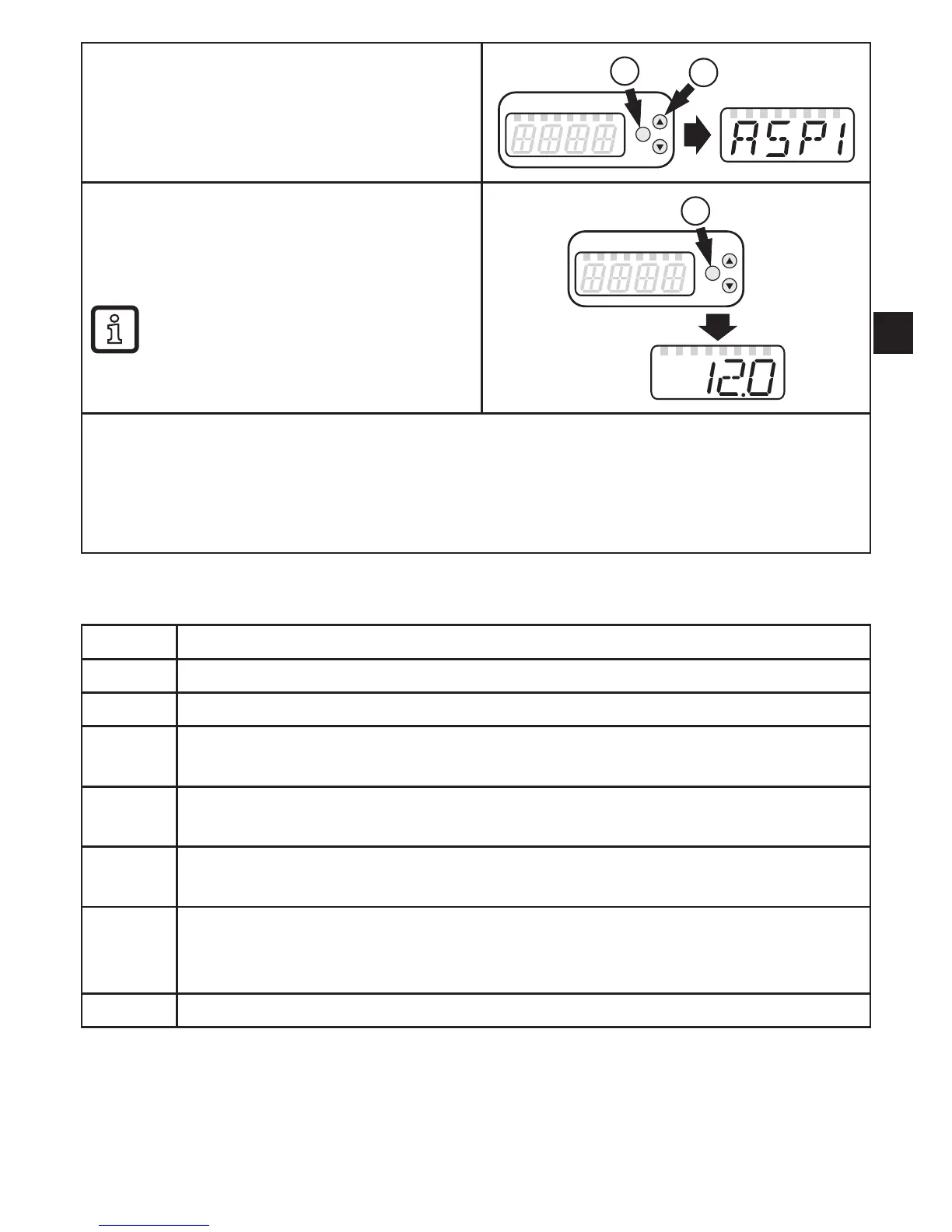
Select parameter
1� Press [Enter] briefly
2� Press[▲]or[▼]untiltherequested
parameter is displayed.
2
1
Display the parameter value
3� Press [Enter] briefly
> The currently set value is displayed for
30 s�
By pressing [Enter] briefly several
times, the display switches between
parameter and parameter value�
3
Switching to the process value display
► Wait for 30 seconds
or
► Change from the submenu to the main menu, from the main menu to the process value
displaywith[▲]or[▼].
11.3 Error indications
Warning message
[OL] Detection zone of volumetric flow or temperature exceeded�
[UL] Below the detection zone of volumetric flow or temperature�
[Err] •Unit faulty / malfunction�
•Measured value outside the detection zone�
[C�Loc] Setting pushbuttons locked, parameter change rejected�
Active IO-Link communication�
[S�Loc] Setting pushbuttons locked, parameter change rejected�
Unlock using parameter setting software�
[SEnS] Sensor signal invalid�
•Measuring pipe not sufficiently filled�
•Medium with a too low conductivity�
[IOE�n] Malfunction� The unit is faulty and must be replaced�
12 Technical data
Technical data and scale drawing at
www.ifm.com→Datasheetsearch→Articlenumber.










 To Next Page