19
UK
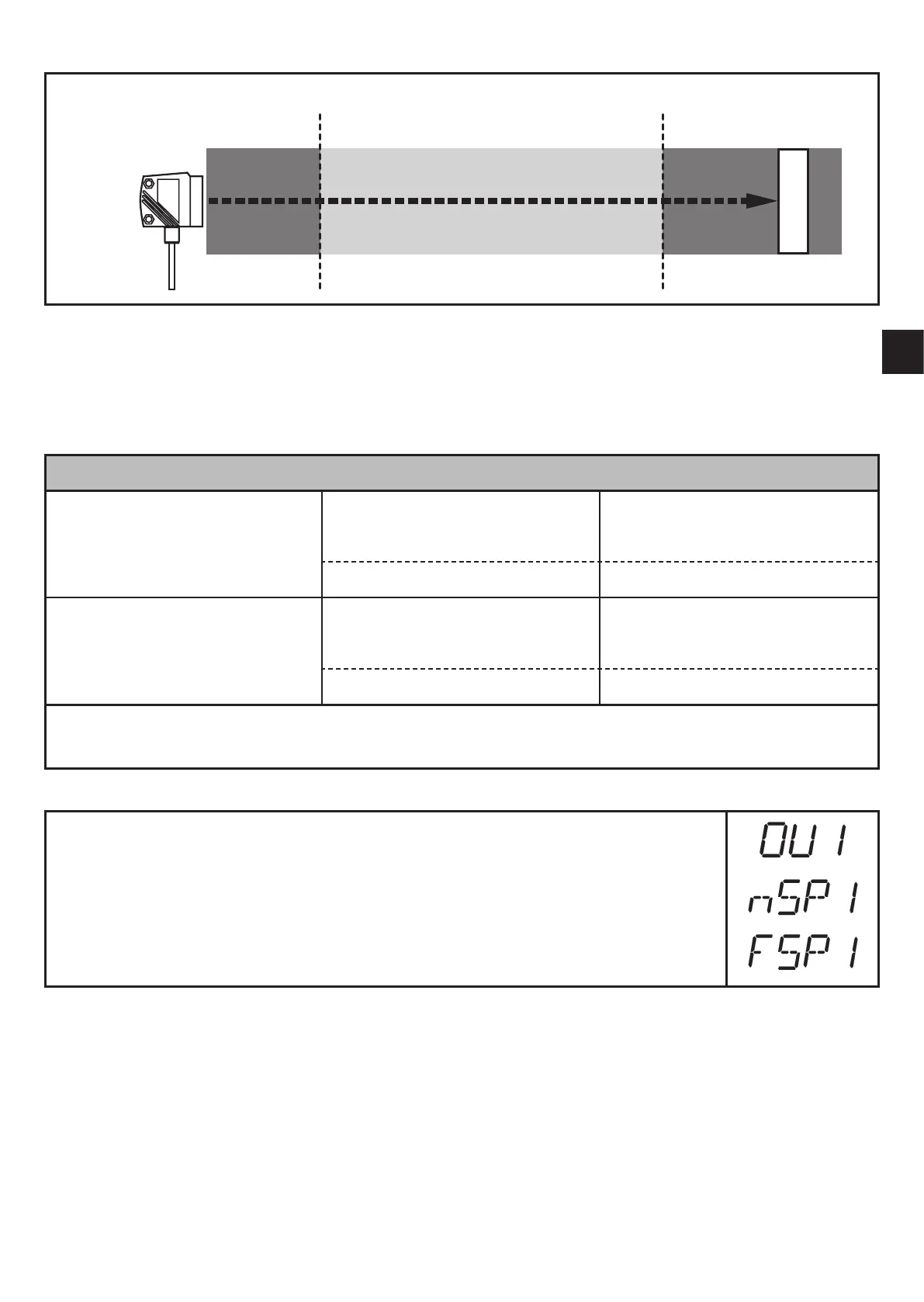
Switches when the object is detected
[nSPx] =
switch point
"
near
"; [FSPx] =
switch point
"
far
"; FE = window
If the measured value is between the switch point "near" [nSPx] and the switch
point "far" [FSPx], the output is closed (when [OUx] = [Fno])�
Switching status of the outputs
Output function Object distance (D) Output status
[Fno]
D < [nSPx]
Open
D > [FSPx]
[nSPx] < D < [FSPx] Closed
[Fnc]
D < [nSPx]
Closed
D > [FSPx]
[nSPx] < D < [FSPx] Open
Both window limit values ([nSPx] and [FSPx]) work with a switching hysteresis
→ 10.2.4 Hysteresis function / example of the output function [Hno].
10.2.7 Setting of the switch points for window function OUT1
► Select the output function [Fno] or [Fnc] at [OU1]�
► Confirm with [MODE/ENTER]�
► Select [nSP1] and set the switch point "near"�
► Confirm with [MODE/ENTER]�
► Select [FSP1] and set the switch point "far"�
► Confirm with [MODE/ENTER]�






 To Next Page