Troubleshooting
2014-04-15 77
8.3 USB-HID
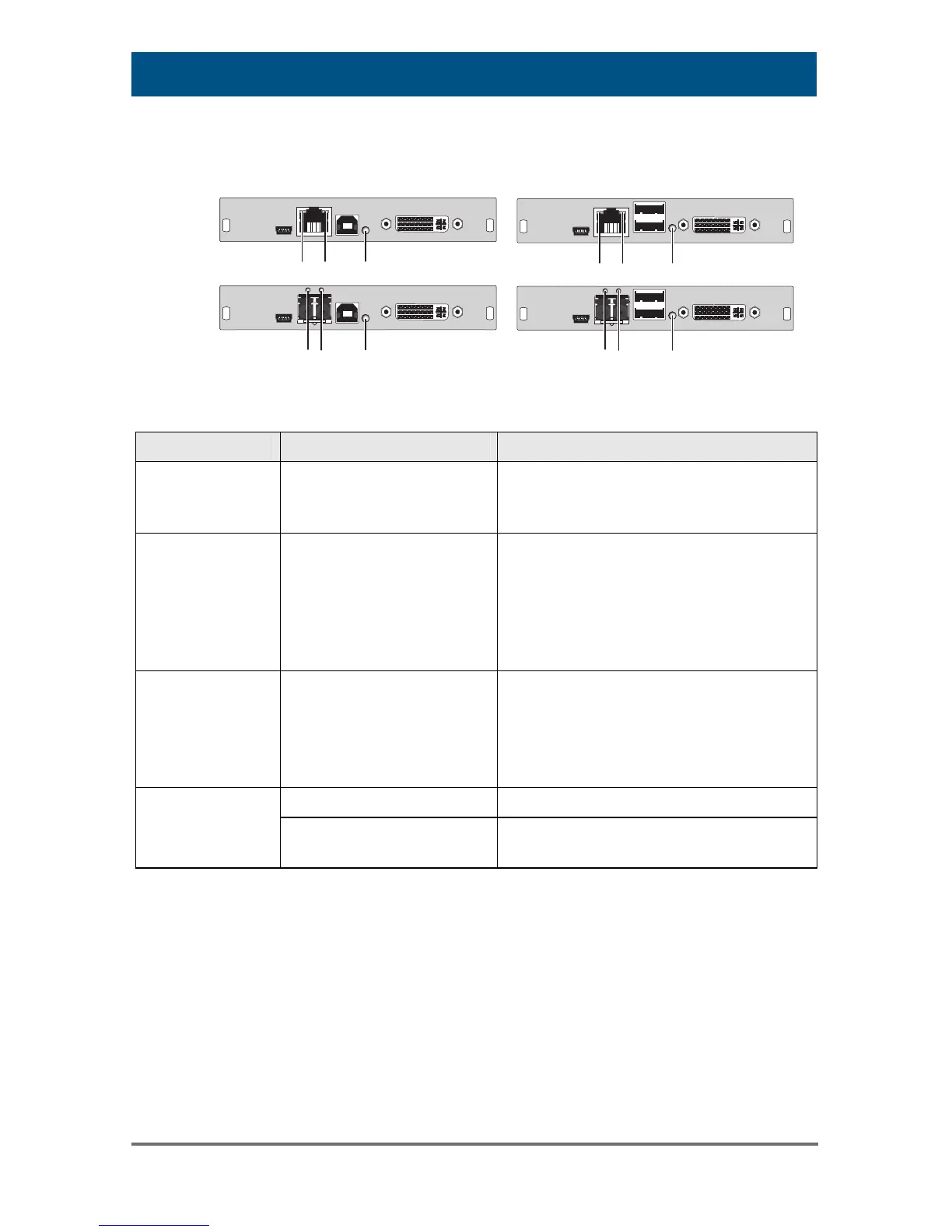
CPU Module CON Module
2
3
1
12
3
2
3
1
2
3
1
Rear View Rear View
Diagnosis Possible Reason Measure
Keyboard LEDs
Shift and Scroll
are blinking
Keyboard in Command
Mode
Press <Esc> to leave Command
Mode.
CPU Unit:
LED 3 green or
violet
No USB connection to
CPU
Check connection of USB cable
to CPU; select another USB port
if necessary.
Remove USB and power cable
and restart CPU. Connect power
cable first.
CON Unit:
LED 3 green or
violet
Problems with USB
connection
Check connection of USB cable
to USB-HID device.
Remove DVI and power cable
and restart CON Unit. Connect
power cable first.
No USB-HID device Connect USB-HID device.
USB device
without function
USB-HID device is not
supported
Contact dealer if necessary.
Pos: 119 /806-IHSE/ Hilfe im Problemfall/ Störung am seriellen Ansc hluss/474- xx @ 6\mod_1304586713332_6.doc @ 51418 @ @ 1



 To Next Page
 Loading...