MDtest (100-140 V) - User’s Manual 4 Measurements
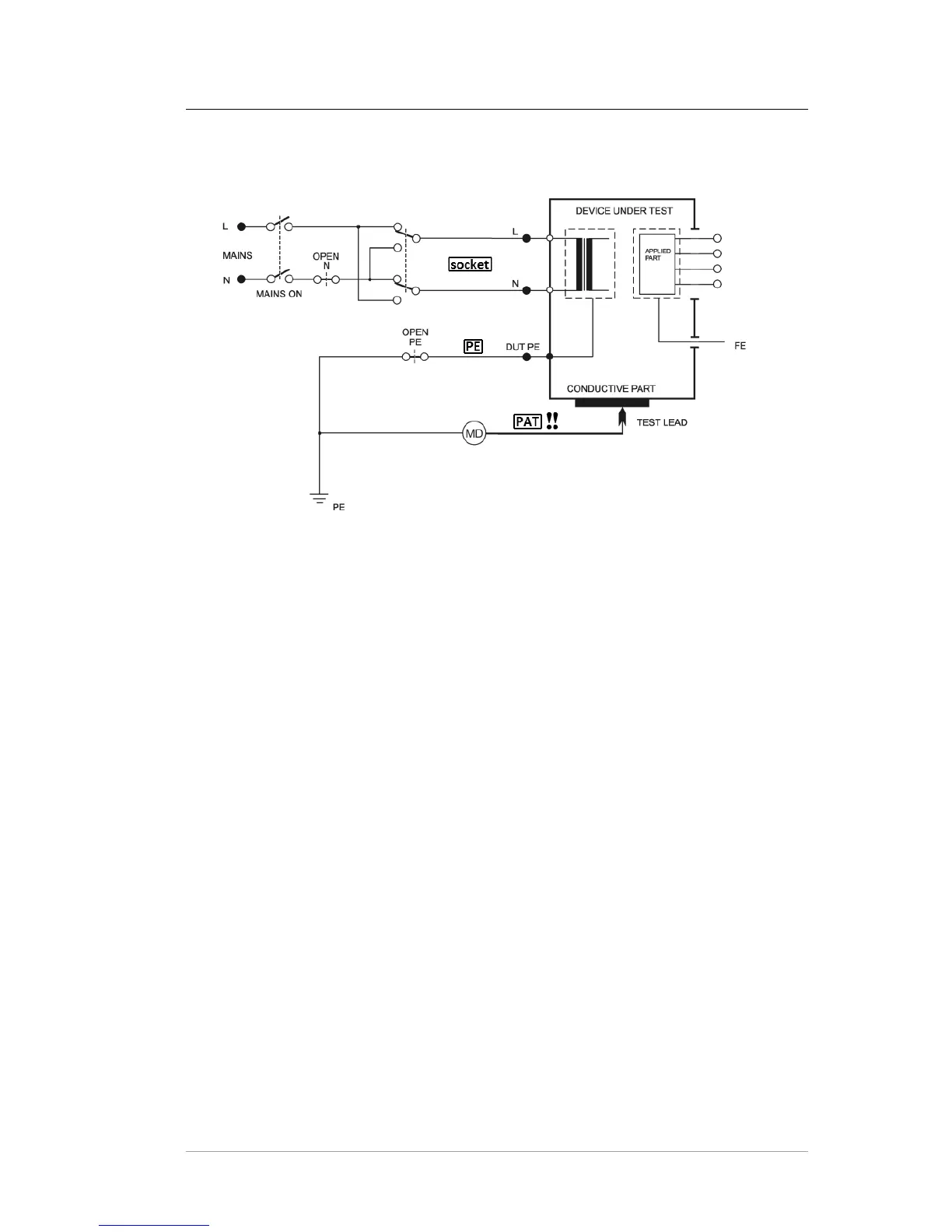
4.7.2 Enclosure (chassis) leakage current (direct method) - I60601Touch
Figure 15: I60601Touch measurement
Outlet conditions:
- Normal Polarity - Reversed Polarity
- Normal Polarity, Open Neutral - Reversed Polarity, Open Neutral
- Normal Polarity, Open PE - Reversed Polarity, Open PE
Procedure:
• Press the [* UTIL] key and release it. Then press the [2] key and release it.
• If the measurement with open N can be performed, press the [OpenN] key.
• If the measurement with open PE can be performed, press the [OpenPE] key.
• Press the [Default], [OpenN] or [OpenPE] keys repetitively in order to
measure with L-N reversal. Symbol L-N reversed is displayed.
• Connect the tested appliance: plug in its mains plug into Test Socket 1. Plug
the test lead into the PAT terminal. Do not plug the applications parts!
• Press the [TEST] key.
• Switch on the tested appliance’s mains switch.
• Press the test tip against the exposed conductive part of the tested appliance.
• The HOLD function can be used (press the [H] key).
• Switch off the tested appliance’s mains switch.
• Finish the measurement (see chapter 4.2.1).
c
2018 ILLKO, s.r.o. www.illko.cz Page 36



 To Next Page