Chapter 4: Operations and Adjustments
RTMS Echo User Guide ©2019 Image Sensing Systems Inc. 4-8
Auto Detect Zones
This function is used to automatically detect and add zones to the
configuration. Zones are added as traffic is detected. For more information,
see “Detect and Adjust Zones” on page 3-7
.
Calibrate Tab
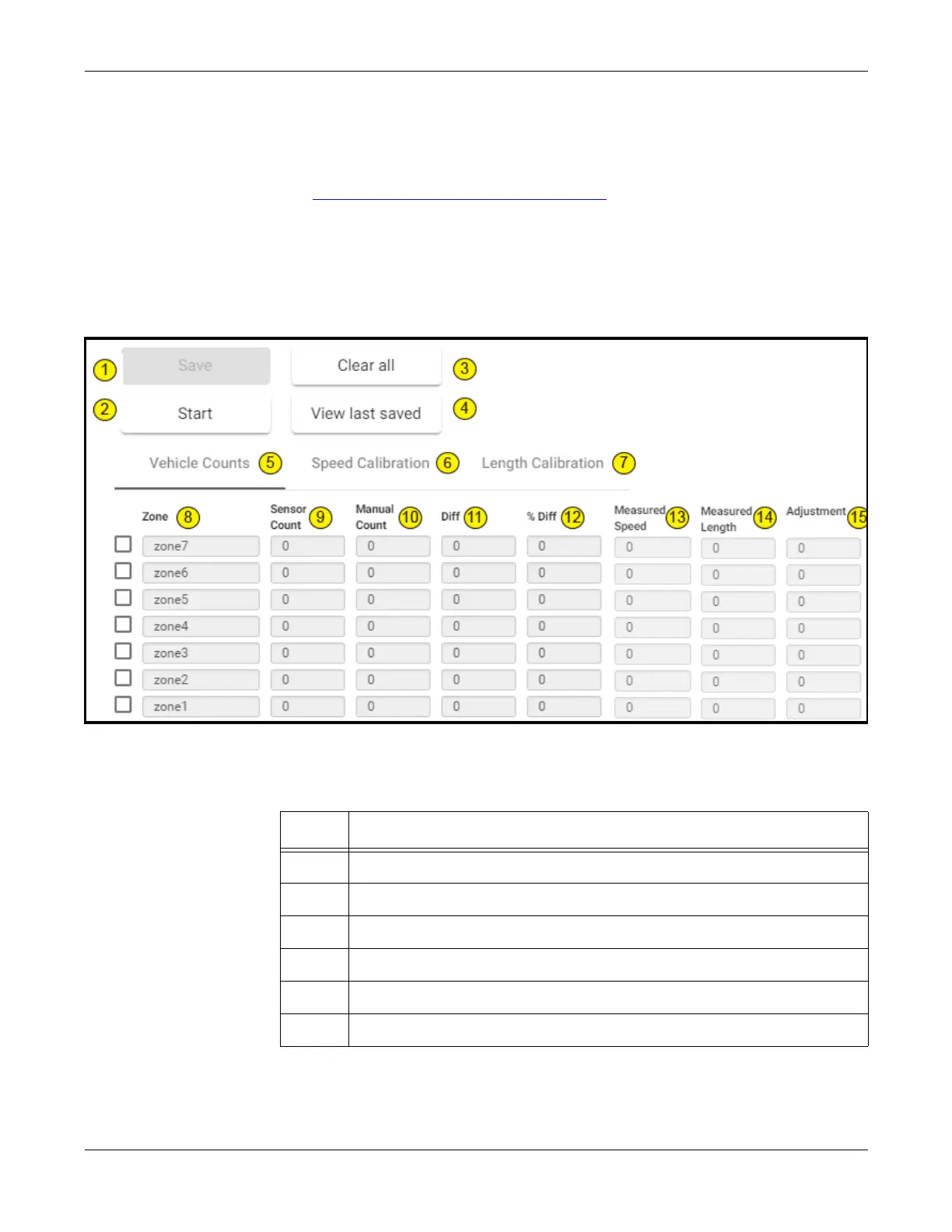
This tab is used to verify vehicle counts in the defined zones and to adjust the
calibration of vehicle speeds and lengths.
Figure 4-2: Calibration Page
Table 4-1: Calibration Page Descriptions
Item Description
1 Click to save the values in the sensor’s memory.
2 Click to start or stop the operation.
3 Click to clear all values.
4 Click to view the last saved set of values.
5 Select to perform lane count verification.
6 Select to perform vehicle speed calibration.
(Table continues on the next page.)


 To Next Page