HEADPHONES
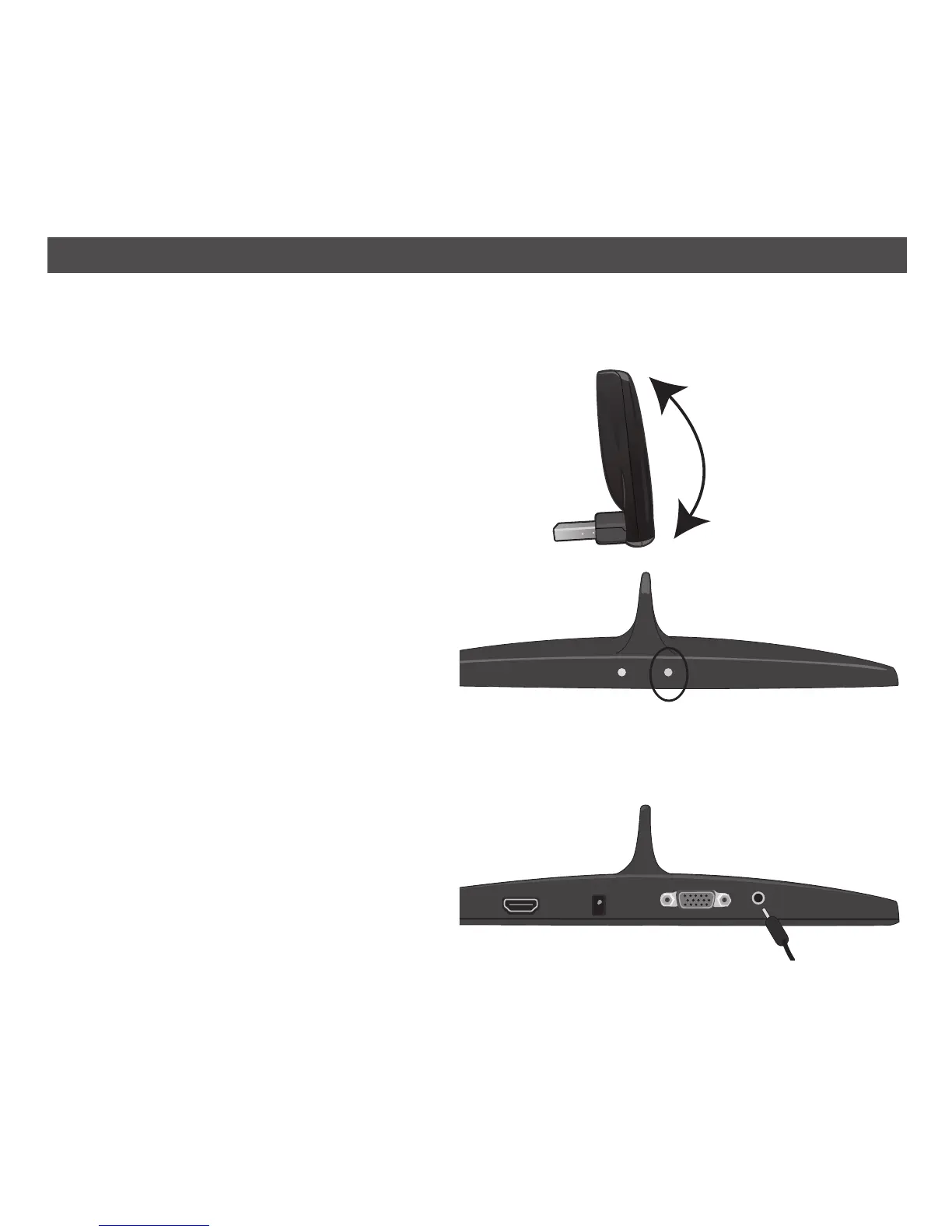
For private listening, connect 3.5mm (32 ohm)
stereo headphones (not included) to this jack. The
Stereo Audio Jack is active only when using a VGA
video connection.
Link™ USB Transmitter
The Link transmitter can be positioned upward or
straight depending on the space available. Optimal
performance is achieved when the length of the
dongle is aligned with the upright shark fin on the
Link Receiver.
NOTE: The Link transmitter must remain connected
to the USB port during operation.
14
OPERATION
SIGNAL INDICATOR
On the front of the Link Receiver, the indicator on
the right is the Signal indicator, which shows the
strength of the wireless signal after connection to
the host PC is made. When the indicator color is
green, the wireless signal is strong. If the indicator
is orange, there is a moderate signal that is marginal
for playback. If it is red, then the signal is too weak
for video playback. If the indicator is off completely, then there is no wireless link with the host PC.
NOTE: For optimum operation a green signal is desired. Try moving your PC closer or aligning the
dongle with the Link Receiver to achieve optimum performance.
Video playback performance depends on PC processor performance. When running on battery power,
many Microsoft OS systems default to maximize battery life. To improve video playback, adjust Power
Scheme to maximum performance. See your laptop owner’s manual for instructions.


 To Next Page