61
INSTALLER
USERMAINTENANCE TECHNICIAN
TECHNICAL DATA
3.13 P.C.B. PROGRAMMING
e boiler is prepared for possible programming of several opera-
tion parameters.
By modifying these parameters as described below, the boiler can
be adapted according to specic needs.
54
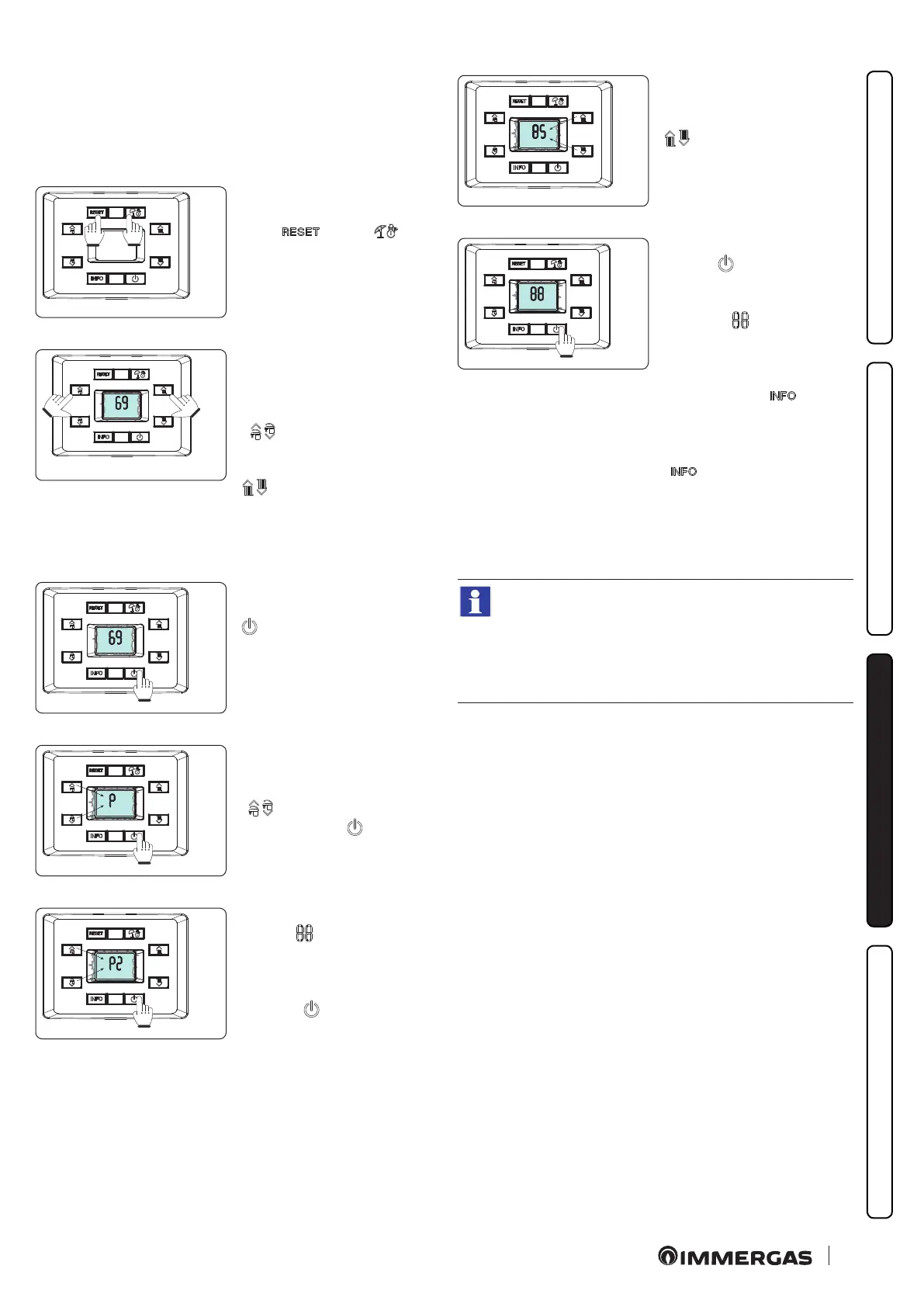
To access the programming
phase, press and hold the but-
tons “ ” and “ ” for
more than 5 seconds, the dis-
play shows two dashes “--”
ashing.
55
Now enter the password “69” to
access the parameter menu.
To enter the rst digit, use the
buttons to adjust the D.H.W.
“ ”; to enter the second dig-
it, use the buttons to adjust the
central heating temperature “
”.
56
To conrm the password “69”
and access the menu, press the “
”.
57
Once in the menu, you can cy-
clically scroll the submenus by
pressing the D.H.W. buttons
“ ”, to access the menu
press the button “ ”.
58
e rst digit of the central in-
dicator ( ) shows the family
of the parameter.
e second digit shows the pa-
rameter number.
Press the “ ” button to display
the value of the selected param-
eter.
59
Its value can be adjusted by
using the central heating tem-
perature adjustment buttons “
”.
60
Press the mode of operation
button “ ” for more than 1
second to store the parameter
value; conrmation is given by
the word “ ” which appears
for 2 seconds.
If you want to exit a parameter
without changing its value,
press the button “ ”.
Exit the programming mode by
waiting 15 minutes or by press-
ing the
“ ” button until you return
to the desired display.
If necessary the default values relating to parameters “S”
and “P0 ÷ P2” can be altered by temporarily modifying
the type of gas (parameter “G”) and by restoring it ac-
cording to the actual operating conditions (wait for ap-
proximately 10 seconds between the gas change and the
when it is restored).
e restored values will be those relating to the type of boiler set
in parameters “n” and “F”.
At the end of this operation, anomaly “E62” will appear and com-
plete calibration will be required.
Menus “G” - “S” - “n”.
ese menus are reserved for air-gas control settings.
Every time these parameters are altered, the complete calibration
function must be activated (Par. 3.9).






 To Next Page