2. Select the resolution and speed you want to calibrate from the combo box on the top of the dialogue (each
combination of resolution and speed has to be aligned separately).
3. Click the “Check Print” button to see the current result of calibration.
4. Click the “Calibration” button to calibrate if the test pattern printed is not good; the Origin to End Alignment
dialogue appears.
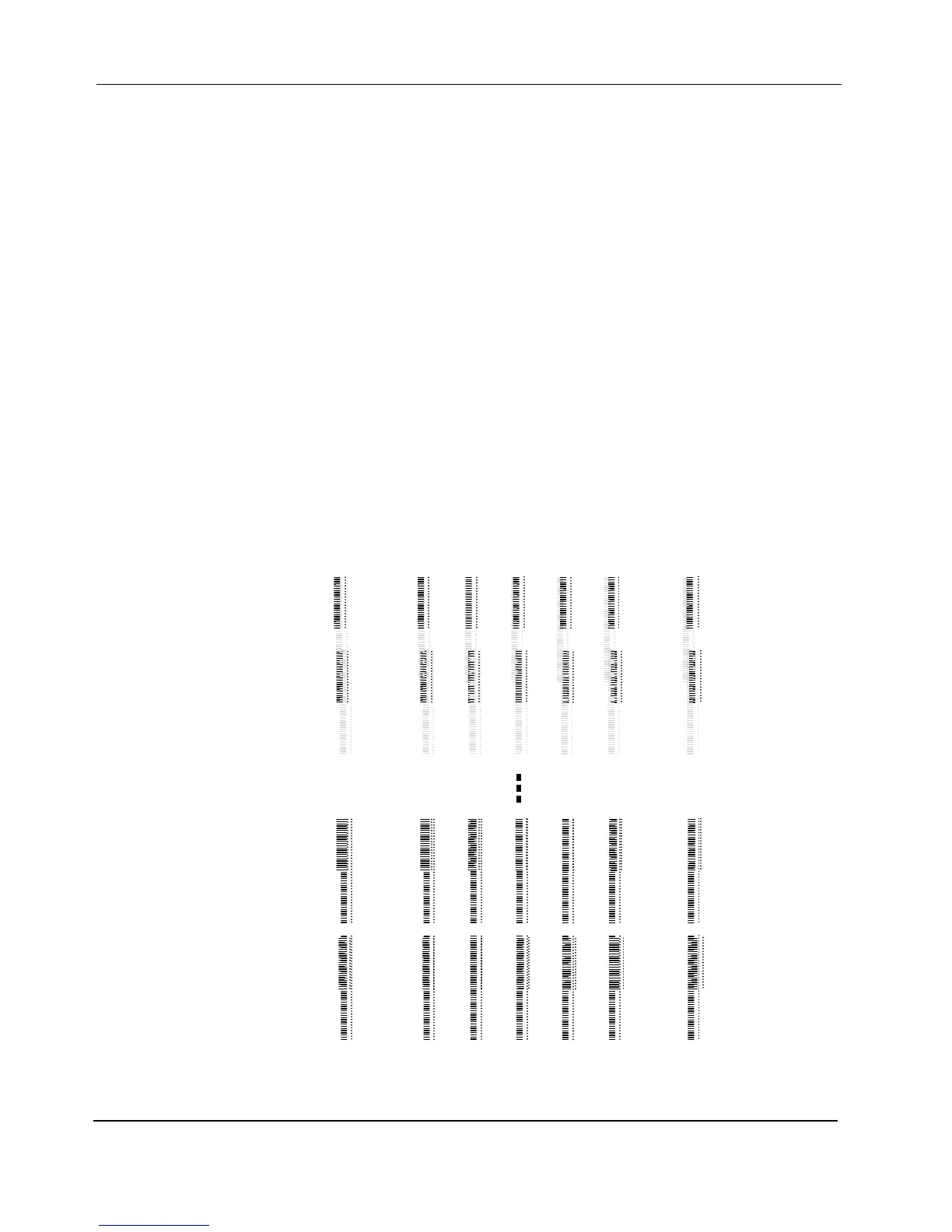
5. Click the Print button, the test chart for Origin to End Alignment will be printed, the following image is part of
it:
The first printheads of each color print groups of lines and long lines of dots. Shorter groups of black lines
and short lines of black dots by printhead K1 are printed at the same position. They are used for contrast.
The groups of lines and lines of dots printed by the second and third printheads of each color are
compared to the groups printed by the first heads.
For general adjustment of printheads, check the groups of lines printed and compare them with the short
groups of lines, either black or other colors. Select the group that short group overlaps with long group.
While for more accurate adjustment, especially when jobs have thin lines that have higher requirement of
accuracy, the lines of dots should be checked.
…
…
…
…
…
…
…
…
20 … 2 1 0 -1 -2 … -20
L1G2C4D1
L1G1C4D1
L1G2C1D1
L1G1C1D1


 To Next Page