GM OBD1 Systems
CODE RETRIEVAL PROCEDURE
92 3140d
Use the UP and DOWN
buttons, as necessary, to highlight
Review DTCs, then press the
ENTER
button.
4. To retrieve codes from the vehicle’s
computer:
Use the
and
buttons, as
necessary, to make menu selections.
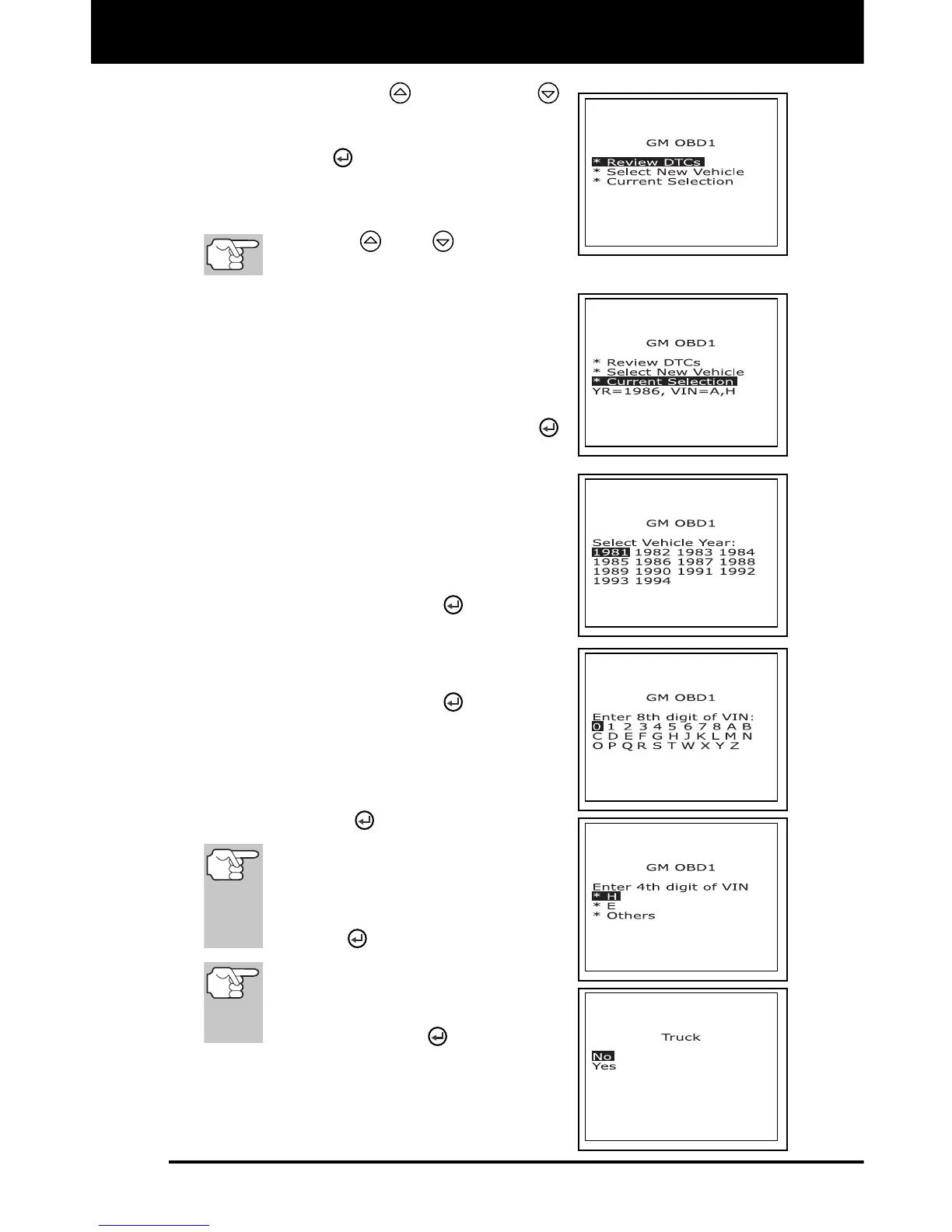
To retrieve DTCs from the vehicle
selection currently in the scan tool’s
memory:
- From the GM OBD1 menu, high-
light Current Selection, turn
ignition key ON (DO NOT start
engine) and press the ENTER
button.
- Proceed to step 5 to continue.
To retrieve DTCs from a new
vehicle:
- From the GM OBD1 menu,
highlight Select New Vehicle and
press the ENTER
button; the
“Select Vehicle Year” menu
displays.
- Highlight the desired year, then
press the ENTER
button; the
“Enter the 8th digit of VIN” menu
displays.
- Highlight the 8th digit of the
vehicle’s VIN, then press the
ENTER
button.
If the “Enter 4th VIN Digit” screen
displays (not applicable to all
vehicles), highlight the 4th digit of
the vehicle’s VIN, then press the
ENTER
button.
If the “Truck” screen displays (not
applicable to all vehicles), highlight
Yes or No, as appropriate, then
press the ENTER
button.
- The GM OBD1 menu displays for
your confirmation.



 To Next Page