14
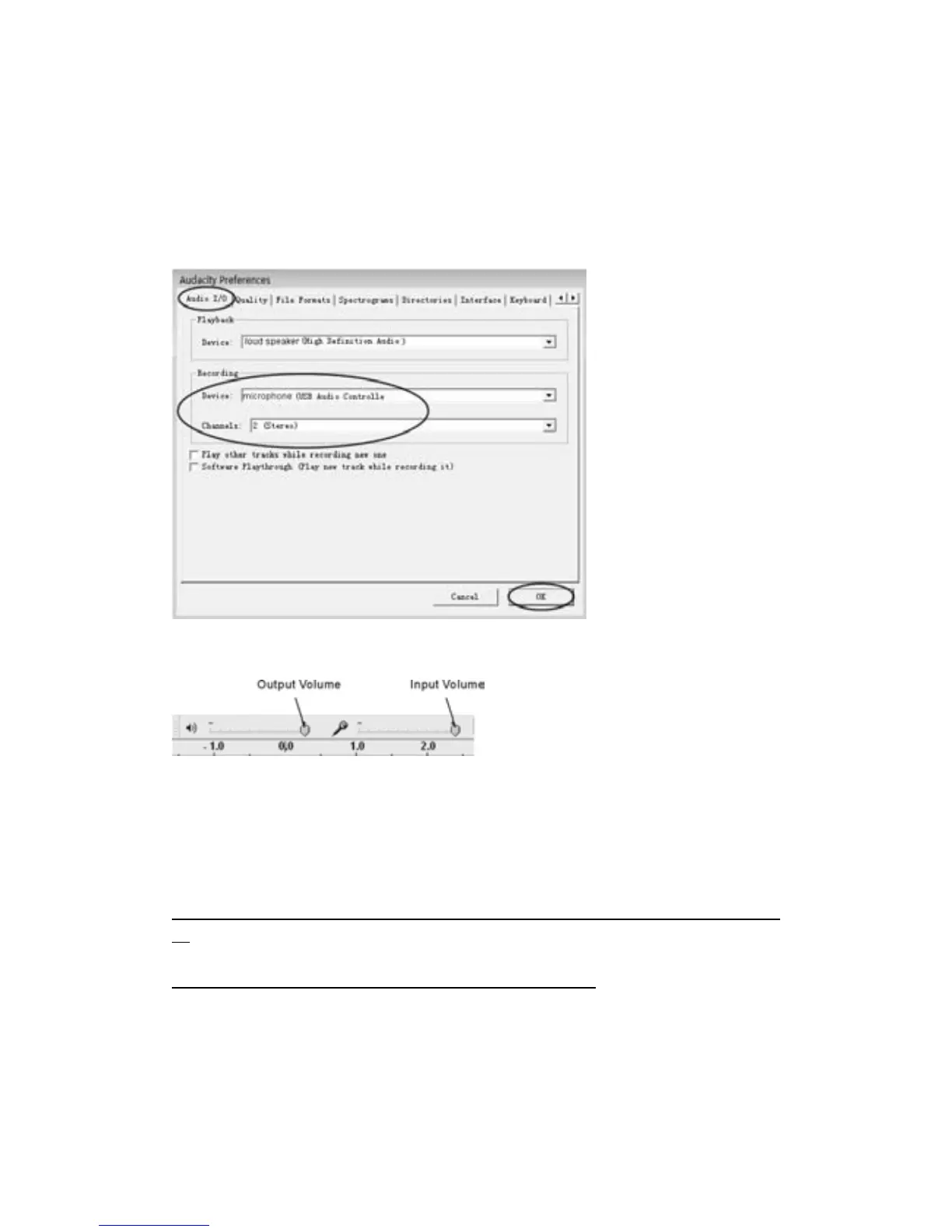
2.Selecttherecordingdevice:microphone(USBAudiocontroller)
z Clickthe“AudioI/O”attheAudacityPreferencesinterface.
z Clickthe
Recording“Device”andselect“microphone(USBAudiocontroller)”.
z Clickthe“Channels”andselect2(stereo).
z Tickthecheckboxesbelow“Channels”.
z Clickthe“OK”.
Note:Ifyoucouldn'tfindthe"microphone(USBAudiocontroller)"fromtheDevicelist,closethe
AudacitySoftwareandre‐openthen tryagain.
3.Adjusttheoutputandinputvolume.
NOTE:Becauseofthevariationofdifferentoperationsystems,theinputvolumecontrolmaynot
workonsomeindividualWindowsversions.WindowsVistaisrecommendedtoensuretheinput
volumecontrolworkingproperly.
Formoreinformationonsetup,pleasesee‘SettingupAudacity’onthewebsitebelow:
http://wiki.audacityteam.org/index.php?title=Transferring_tapes_and_records_to_computer_or_
CD
Andforanyqueryon‘MixerToolbar’pleasesee
http://wiki.audacityteam.org/index.php?title=Mixer_Toolbar_Issues



 To Next Page