Minimate Pro Operator Manual 9–1
9. UNIT MENU OVERVIEW
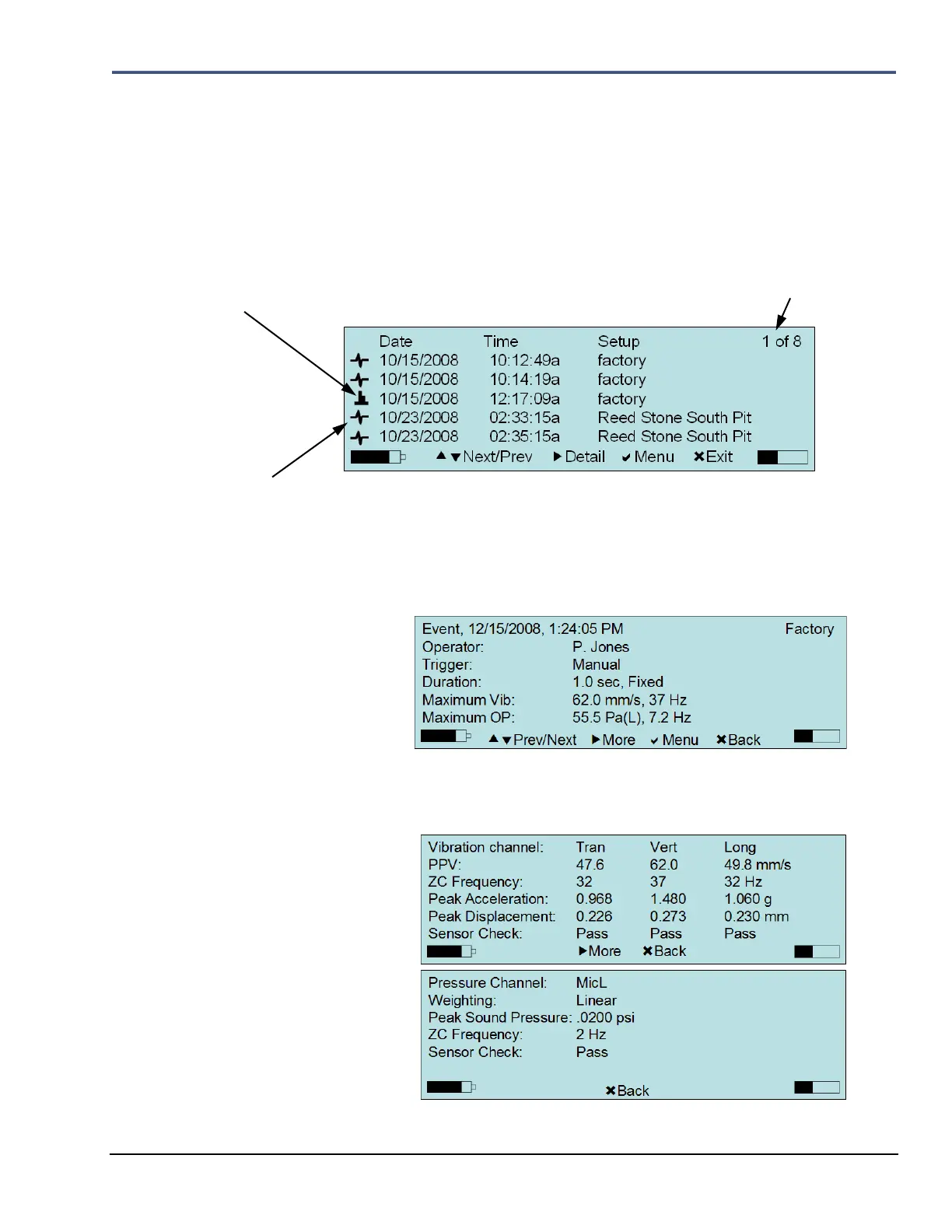
9.1. View Data Files
1. From the Main Display, select the Down Arrow key on the unit to access View Data Files.
2. A list of recorded Events will appear. Press the Up or Down Arrow keys on the unit to
highlight and select Next/Prev Events. Press and hold the Down or Up Arrow key to scroll
through Events more quickly. Each Event type that is recorded with a particular Record
Mode, Waveform or Histogram, has a different icon:
a. Within the View Data window, select the Right Arrow key to display the
Detail of a selected Event. Below is an example of the Detail feature for a
Waveform Event:
i. Press the Right Arrow key to review More data associated with the
selected Event, or the Cancel key to go Back to the previous menu:
ii. Each Event has several pages of data. Continue to press the Right
Arrow key to review more data associated with the selected Event, or
the Cancel key to go Back to the previous menu:
SYMBOL REPRESENTING A RECORDED HISTOGRAM
EVENT
SYMBOL REPRESENTING A RECORDED WAVEFORM or OPTIONAL SOUND LEVEL MICROPHONE


 To Next Page
 Loading...