10
Front & Rear Panels—Continued
Dynamic EQ (104):
Lights when “Dynamic EQ” is enabled.
Vol (104, 120):
Lights when “Dynamic Volume” is enabled.
Vol (103, 120):
Lights when “Dolby Volume” is enabled.
c NETWORK indicator (123)
Lights when the Net input selector is selected.
d Tuning indicators
RDS (Australian models) (78):
Lights when tuned to a radio station that supports
RDS (Radio Data System).
AUTO (65):
Lights when Auto Tuning mode is selected for AM
or FM radio. Goes off when Manual Tuning mode is
selected.
TUNED (65):
Lights when tuned to a radio station.
FM STEREO (65):
Lights when tuned to a stereo FM station.
e SLEEP indicator (62)
Lights when the Sleep function has been set.
f Bi AMP indicator (20)
Lights when the “Speakers Type(Front)” setting is
set to “Bi-Amp”.
g Headphone indicator (62)
Lights when a pair of headphones are plugged into
the Phones jack.
h Message area
Displays various information.
i USB indicator (130)
Lights up when a USB mass storage device is
detected.
j Volume level (60)
Displays the volume level.
k MUTING indicator (62)
Flashes while the AV controller is muted.
l Audio input indicators
Indicate the type of audio input that’s selected as the
audio source: HDMI, ANALOG, or DIGITAL.
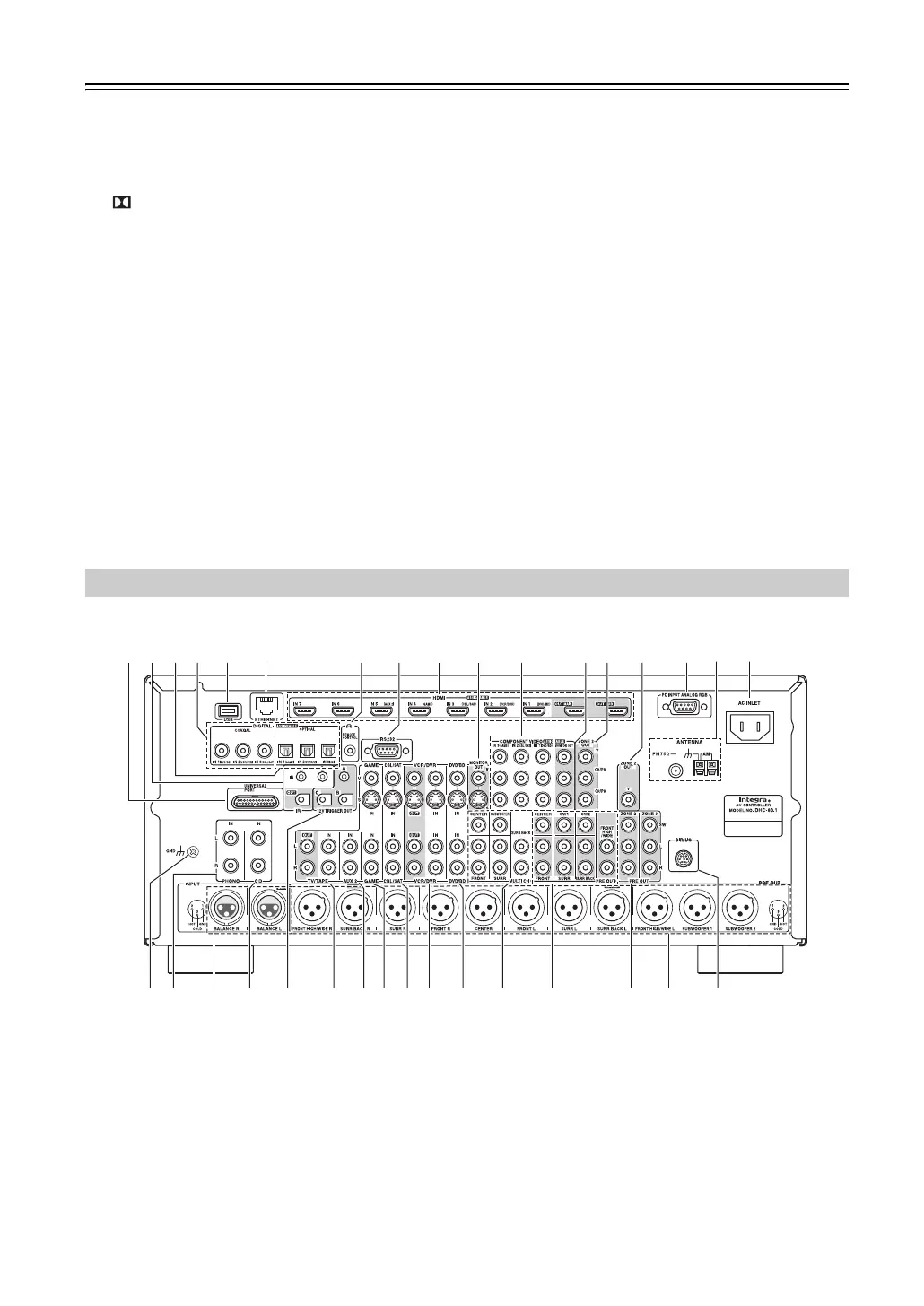
a UNIVERSAL PORT
This port is for connecting the component with the
Universal Port option such as UP-A1 Dock.
b IR IN/OUT
A commercially available IR receiver can be con-
nected to the IR IN jack, allowing you to control the
AV controller while you’re in Zone 2/3, or control it
when it’s out of sight, for example, installed in a
cabinet.
A commercially available IR emitter can be con-
nected to the IR OUT jack to pass IR (infrared)
remote control signals through to other components.
c DIGITAL OPTICAL IN 1, 2, and 3
These optical digital audio inputs are for connecting
components with optical digital audio outputs, such
as CD and DVD/BD players. They’re assignable,
which means you can assign each one to an input
selector to suit your setup. See “Digital Audio Input
Setup” on page 49.
Rear Panel
d k
e
l
nm o
p
q
z
AB C
vt xw y D
b hg
i
j
a c f
r
s
u
E
F G*
* North American models


 To Next Page