14
ENTER
/
SCAN
PRESET
/
MODE
ADJ
DOW
NUP
or
ENTER
/
SCAN
ENTER
/
SCAN
PRESET
/
MODE
ADJ
DOW
NUP
2
3
1
SP
/
SYS
SETUP
ENTER
/
SCAN
Speaker setup
Follow the steps below before you start operating the unit.
TREBLE
BASS
PHONES
OFF
ON
S
T
A
N
D
B
Y
/O
N
S
T
A
N
D
B
Y
S
PEAKER
S
A
B
F
M
A
M
P
H
O
N
O
C
D
T
A
P
E
D
V
D
M
U
L
T
I
C
H
IN
P
U
T
V
ID
E
O
3
V
ID
E
O
2
V
ID
E
O
1
MASTER VOLUME
POWER
S
P
/
S
Y
S
S
E
T
U
P
M
O
D
E
T
UN
ING
U
PD
O
W
N
C
H
L
E
V
E
L
M
E
M
O
RY
FM
MUTE
/
MODE
D
IG
IT
A
L
/
A
N
A
L
O
G
DIMMER
D
O
W
N
U
P
P
R
E
S
E
T
/
M
O
D
E
A
D
J
E
N
T
E
R
/
S
C
A
N
LATE
NIGHT
/
FRO
N
T
EFFECT
DISPLAY
LFE
LEVEL
CONTROL
S
T
E
R
E
O
5
C
H
S
T
E
R
E
O
D
S
P
L
IS
T
E
N
I
N
G
M
O
D
E
/DTS
SURROUND
Re
-EQ
PRESET/MODE ADJ √/® button
ENTER/SCAN button
SP SYS/SETUP button
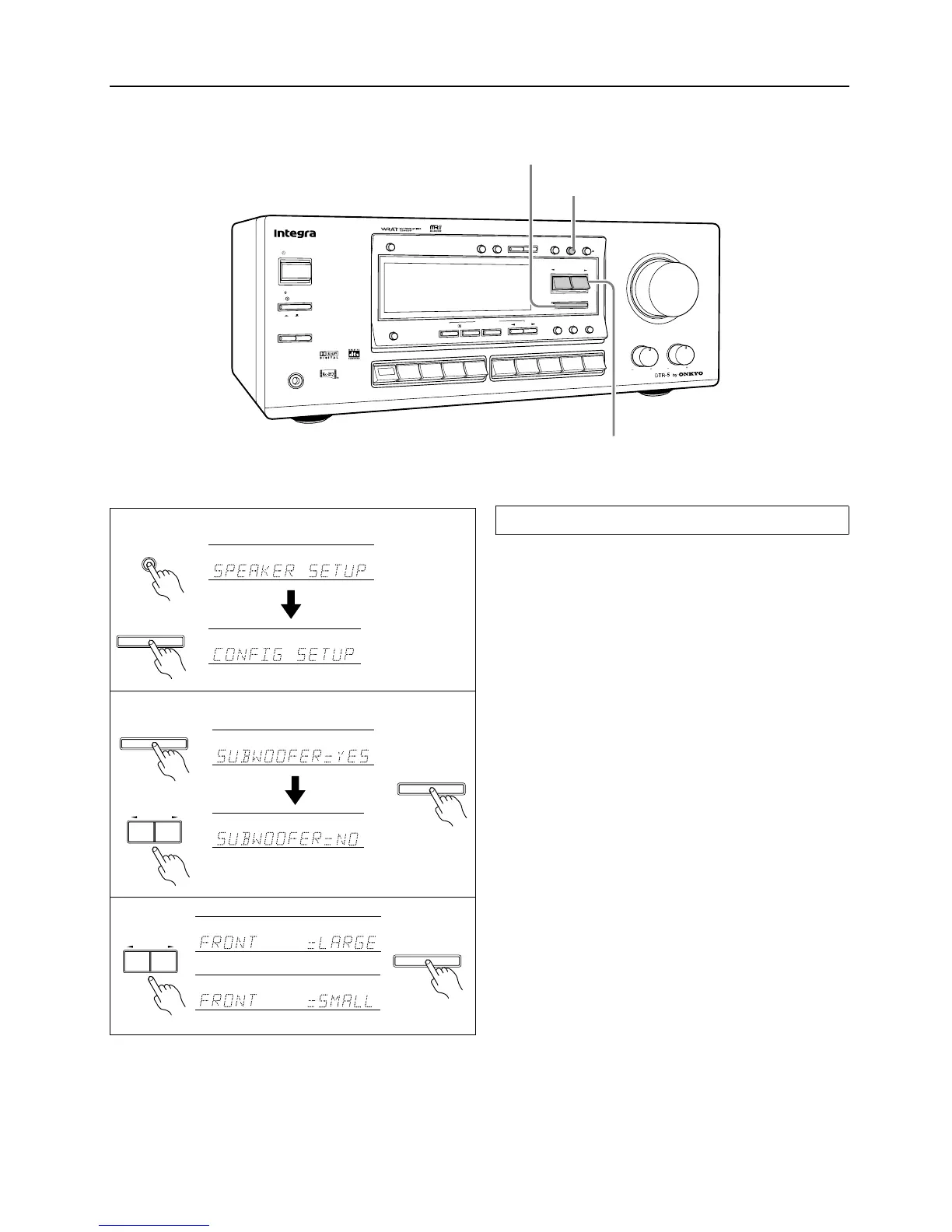
Set whether a speaker is used or not, and set the size of the con-
nected speakers.
1. Press the buttons in the following sequence to display
“CONFIG SETUP.”
2. Set whether a subwoofer is used or not.
When you press the ENTER/SCAN button while “CONFIG
SETUP” is displayed, the current setting (“SUBWOOFER
YES” or “NO”) appears. Press the PRESET/MODE ADJ
√
/
®
buttons to select “YES” or “NO.”
YES:
When the subwoofer is connected.
NO:
When the subwoofer is not connected.
Select whichever appropriate and press the ENTER/SCAN but-
ton.
3. Select the size of the front speakers.
If you have set the subwoofer parameter to “NO” in step 2, pro-
ceed to step 4. (At this time, the front speaker parameter auto-
matically sets to LARGE.)
Pressing the PRESET/MODE ADJ
√
/
®
buttons toggles
between “LARGE” and “SMALL.”
LARGE:
When large speakers are used as the front speakers.
SMALL:
When small speakers are used as the front speakers.
Select whichever appropriate and press the ENTER/SCAN but-
ton.
Setting the CONFIG parameters



 To Next Page