43
First Time Setup—Continued
If you connect a component to a digital input, you must
assign that input to an input selector. For example, if you
connect your CD player to OPTICAL IN 2, you must
assign OPTICAL IN 2 to the CD input selector.
Here are the default assignments.
* The front panel optical DIGITAL input.
• When HDMI IN 1 or 2 is assigned to an input selector
in the “HDMI Video Setup” on page 41, the input
selector assignment on this page is automatically set to
HDMI 1 or HDMI 2.
Note:
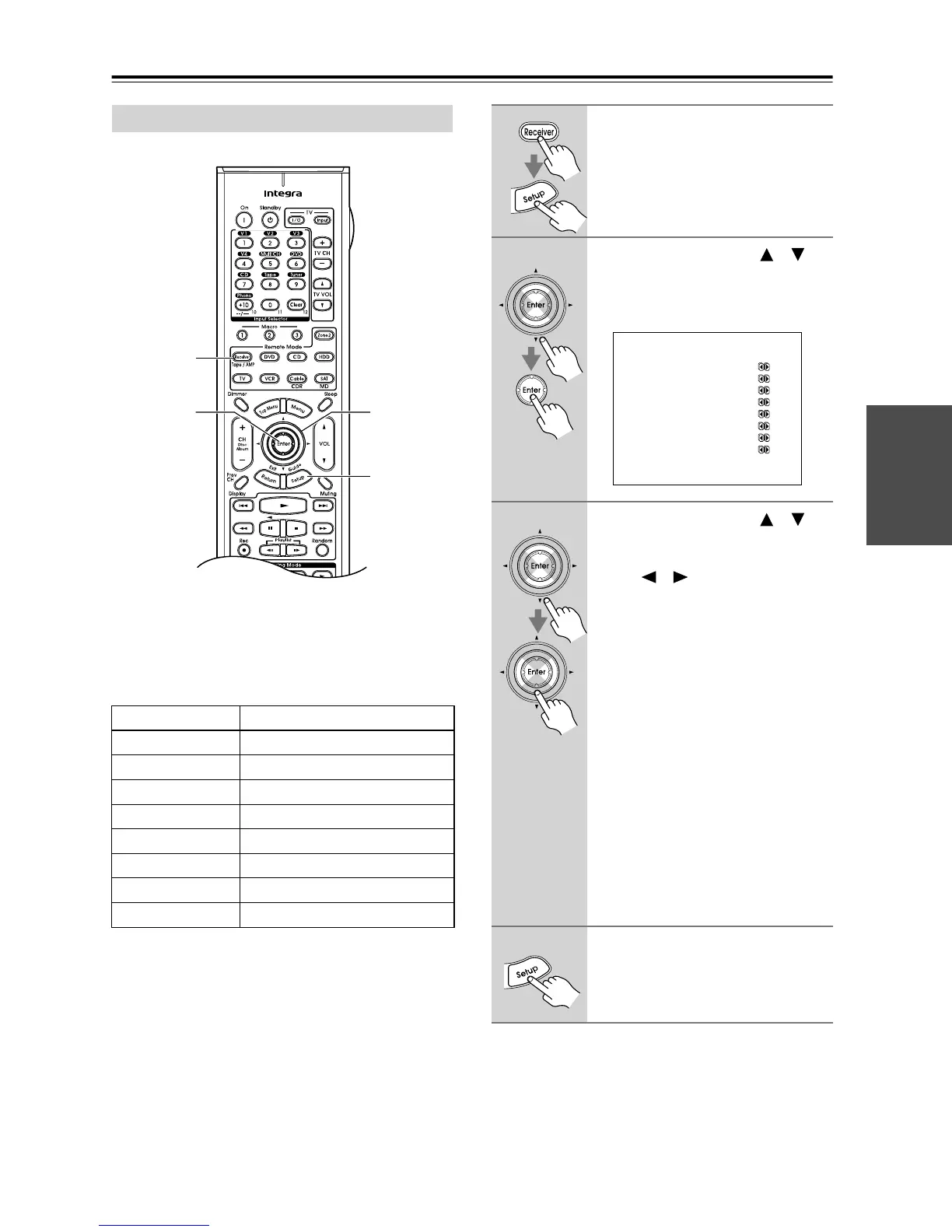
• This procedure can also be performed on the AV
receiver by using its [Setup] button, arrow buttons, and
[Enter] button.
Digital Audio Input Setup
Input selector Default assignment
DVD Coax 1
VIDEO 1 Opt 1
VIDEO 2 - - - - -
VIDEO 3 Opt 2
VIDEO 4 Front *
TAPE - - - - -
CD Opt 3
PHONO - - - - -
2
2, 3
1, 4
1
1
Press the [Receiver] button, fol-
lowed by the [Setup] button.
The main menu appears onscreen.
2
Use the Up and Down [ ]/[ ]
buttons to select “2. Digital
Input,” and then press [Enter].
The Digital Input menu appears.
3
Use the Up and Down [ ]/[ ]
buttons to select an input selec-
tor, and then use the Left and
Right [ ]/[ ] buttons to select:
Coax 1, Coax 2, Opt 1, Opt 2,
Opt 3, Opt 4, or - - - - - (analog).
For input selectors that you want to use
with an analog input, select “- - - - -.”
• Inputs cannot be assigned to the
TUNER input selector.
• The front panel optical DIGITAL
input (i.e., Front) can only be
assigned to the VIDEO 4 input selec-
tor.
• Only “Front” or “- - - - -” can be
selected for the VIDEO 4 input selec-
tor.
• An input selector that’s been
assigned to IN1 or IN2 in the “HDMI
Video Setup” (page 41) can be set to
HDMI here.
4
Press the [Setup] button.
Setup closes.
2.Digital Input
------------------------
a.DVD :Coax1
b.VIDEO1 :Opt1
c.VIDEO2 :-----
d.VIDEO3 :Opt2
e.VIDEO4 :Front
f.TAPE :-----
g.CD :Opt3
h.PHONO :-----



 To Next Page