44
First Time Setup—Continued
If you connect an -capable Onkyo MiniDisc
recorder, CD recorder, or next generation HDD-compat-
ible component, such as the Remote Interactive Dock, to
the TAPE IN/OUT or VIDEO 3 IN jacks, for to
work properly, you must change this setting.
This setting can only be changed on the AV receiver.
Note:
HDD can be selected for the TAPE input selector or
VIDEO 3 input selector, but not both at the same time.
If the impedance of any speaker is 4 ohms or more but
less than 6, set the Minimum Speaker Impedance to 4
ohms.
Note:
Before you change this setting, turn down the volume.
Notes:
• This procedure can also be performed on the AV
receiver by using its [Setup] button, arrow buttons, and
[Enter] button.
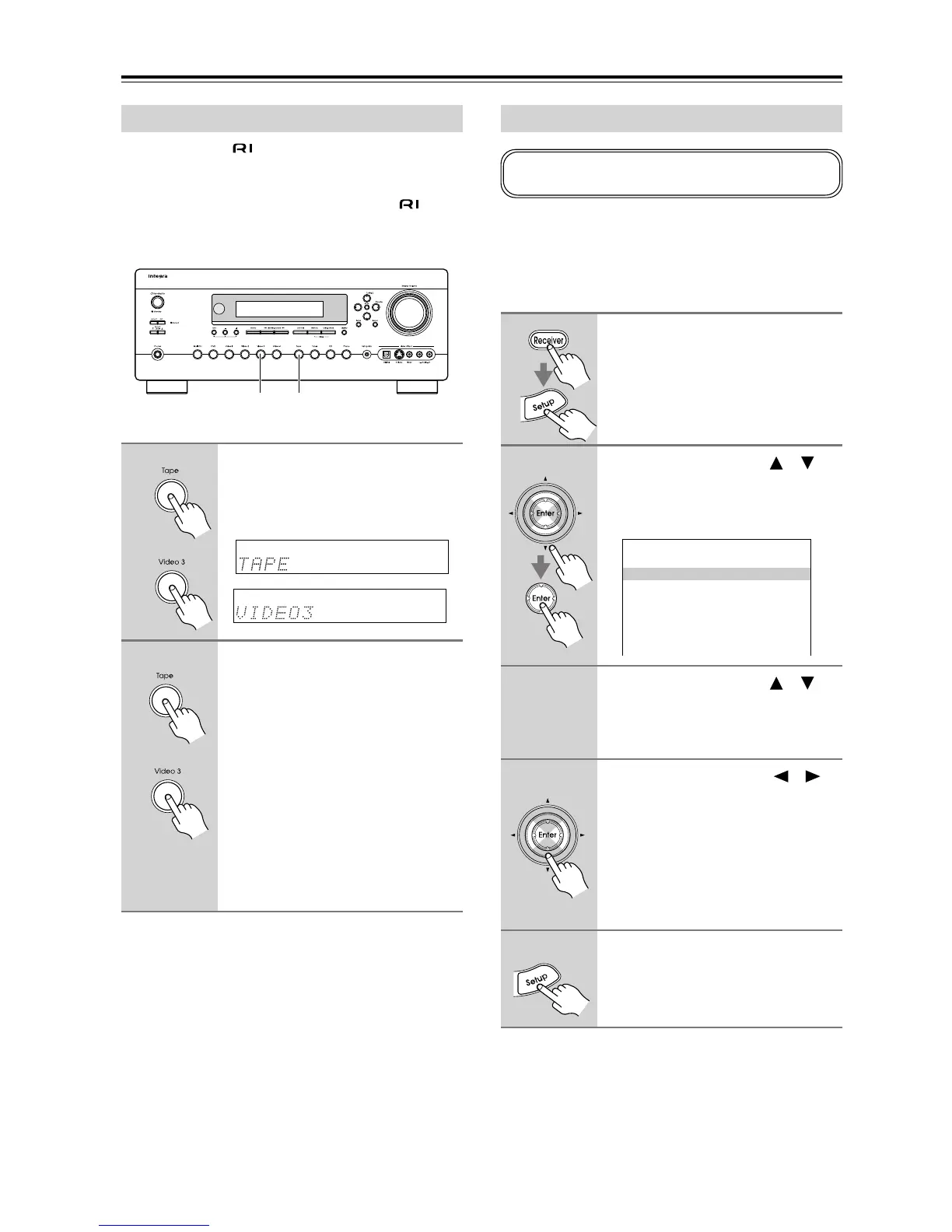
Changing the Input Display
1
Press the [Tape] or [Video 3]
input selector button so that
“TAPE” or “VIDEO3” appears on
the display.
2
Press and hold down the [Tape]
or [Video 3] input selector button
(about 3 seconds) to change the
setting.
Repeat this step to select MD, CDR, or
HDD.
For the TAPE input selector, the setting
changes in this order:
TAPE
→ MD → CDR → HDD →
For the VIDEO 3 input selector, the set-
ting changes in this order:
VIDEO 3
→ HDD → VIDEO 3 →
1, 21, 2
or
or
Minimum Speaker Impedance
1
Press the [Receiver] button, fol-
lowed by the [Setup] button.
The main menu appears onscreen.
2
Use the Up and Down [ ]/[ ]
buttons to select “3. Speaker
Setup,” and then press [Enter].
The Speaker Setup menu appears.
3
Use the Up and Down [ ]/[ ]
buttons to select “Speaker
Impedance,” and then press
[Enter].
4
Use the Left and Right [ ]/[ ]
buttons to select:
4 ohms: Select if the impedance of any
speaker is 4 ohms or more but
less than 6.
6 ohms: Select if the impedances of all
speakers are between 6 and
16 ohms.
5
Press the [Setup] button.
Setup closes.
If you change this setting, you must run the automatic
speaker setup again (see page 38).
3.Speaker Setup
------------------------
0.Speaker Impedance
2.Speaker Configuration
3.Speaker Distance
4.Level Calibration
5.THX Audio Setup
6.Equalizer Settings
1.Speaker Impedance



 To Next Page