Chapter 7: Playback functionality
TruVision DVR 15HD User Manual 41
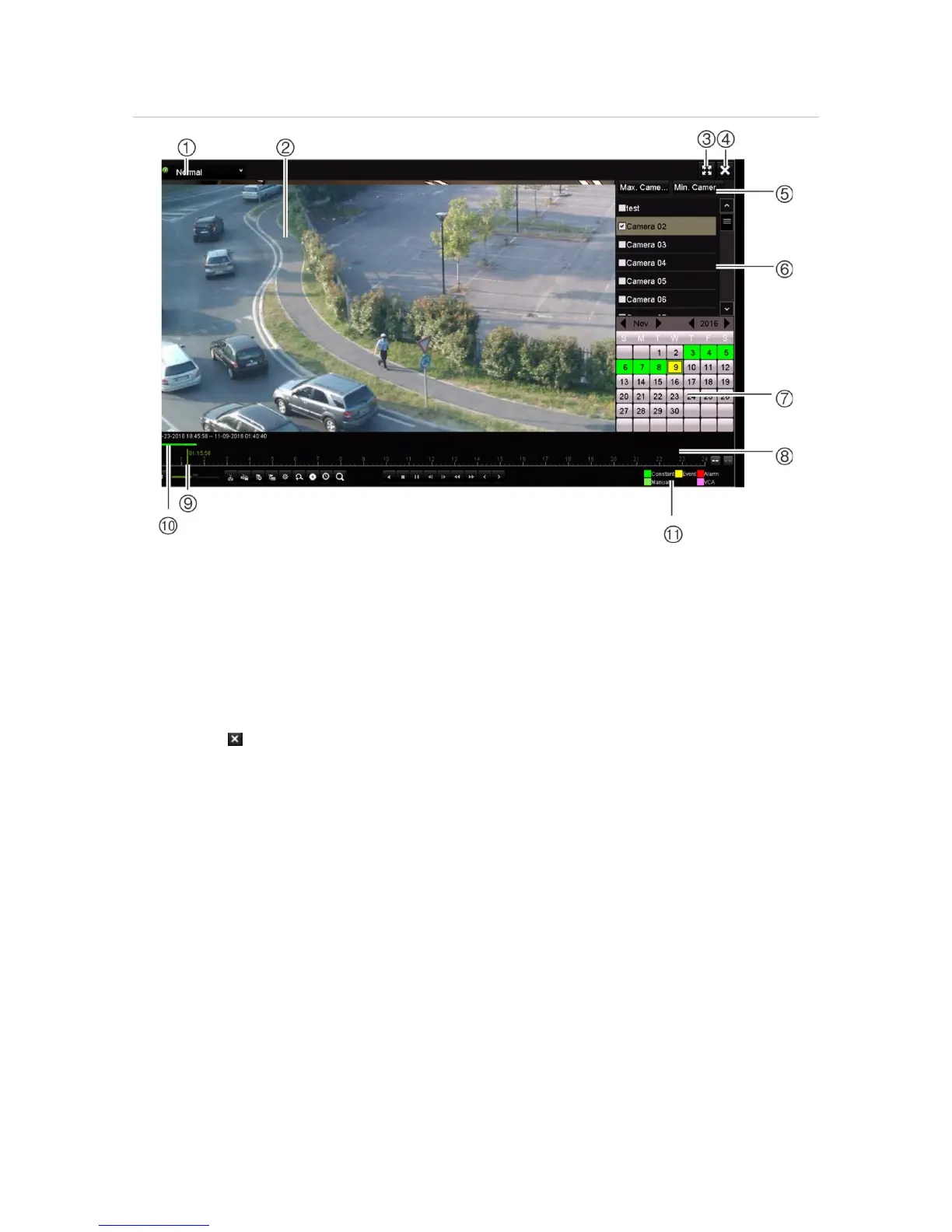
Figure 13: 24-hour playback window
1. Playback mode: Select one of seven
playback modes to view: Normal, Event,
Bookmark, Smart, Sub-periods, External
File, or Snapshot. See “24-hour playback”
on page 43 for more information.
2. Playback viewer.
3. Full screen.
4. Exit 24-hour playback recording.
Click Exit or right-click the mouse to
return to live view.
5. Quick camera select:
Max. Camera for Playback: From the
camera list, automatically selects the first
16 cameras with recordings.
Min. Camera for Playback: From the
camera list, automatically select the first
camera with recordings.
Note: Cameras can also be selected
manually. The maximum number of
cameras that can be selected is 16,
whether selected automatically or
6. Camera panel. Select the cameras for
playback. Move the mouse over the area to
display the list of cameras available.
7. Calendar panel.
White: No recordings.
Green/Yellow/Red/Pale green/Magenta:
Recordings available on the recorder.
8. Playback control toolbar. See Figure 14 on
page 42 for more information.
9. Time bar: Time of actual playback. This is only
displayed in 24-hour playback.
10. 24-hour recording progress bar: This bar
displays how much of the 24-hour period has
been recorded.
11. Recording type: Description of the color coding
of recording types that appear in the playback
progress bar. Green indicates constant
recording. Yellow indicates motion recording.
Red indicates alarm recording. Pale green
indicates manual recording. Magenta indicates
VCA recording.
The 24-hour playback control toolbar
It is easy to manually control playback using the playback control toolbar. See
Figure 14 on page 42 below.
Note: The playback control toolbar does not appear for instant playback.


 To Next Page