ISLA Instruments S2400 User Manual
– 41 –
Paste
Press F7 to paste the clipboard into the current pattern at the current cursor position. Events
can be pasted into the same pattern they were copied from, a different pattern(s), or even a
different project because the clipboard is retained when a different project is loaded.
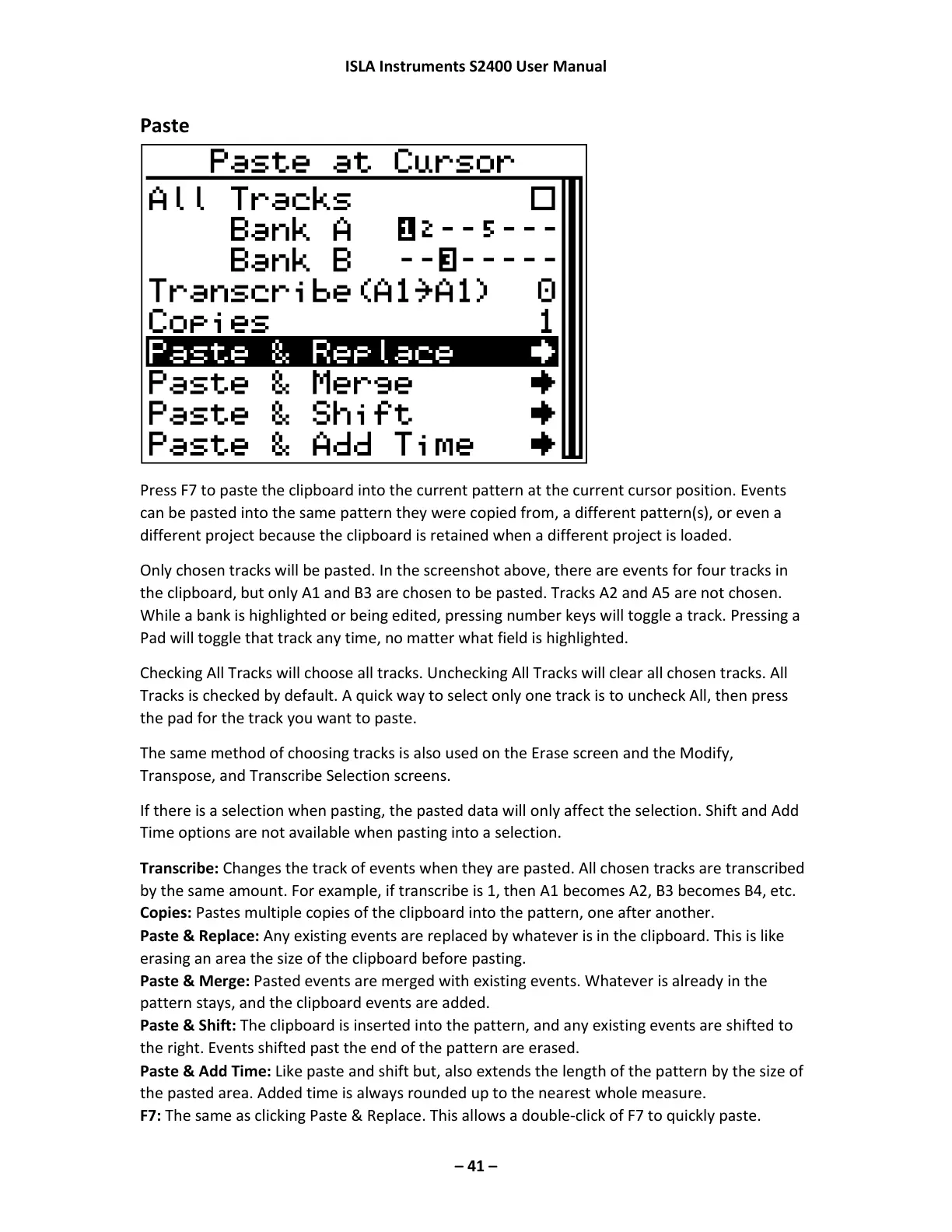
Only chosen tracks will be pasted. In the screenshot above, there are events for four tracks in
the clipboard, but only A1 and B3 are chosen to be pasted. Tracks A2 and A5 are not chosen.
While a bank is highlighted or being edited, pressing number keys will toggle a track. Pressing a
Pad will toggle that track any time, no matter what field is highlighted.
Checking All Tracks will choose all tracks. Unchecking All Tracks will clear all chosen tracks. All
Tracks is checked by default. A quick way to select only one track is to uncheck All, then press
the pad for the track you want to paste.
The same method of choosing tracks is also used on the Erase screen and the Modify,
Transpose, and Transcribe Selection screens.
If there is a selection when pasting, the pasted data will only affect the selection. Shift and Add
Time options are not available when pasting into a selection.
Transcribe: Changes the track of events when they are pasted. All chosen tracks are transcribed
by the same amount. For example, if transcribe is 1, then A1 becomes A2, B3 becomes B4, etc.
Copies: Pastes multiple copies of the clipboard into the pattern, one after another.
Paste & Replace: Any existing events are replaced by whatever is in the clipboard. This is like
erasing an area the size of the clipboard before pasting.
Paste & Merge: Pasted events are merged with existing events. Whatever is already in the
pattern stays, and the clipboard events are added.
Paste & Shift: The clipboard is inserted into the pattern, and any existing events are shifted to
the right. Events shifted past the end of the pattern are erased.
Paste & Add Time: Like paste and shift but, also extends the length of the pattern by the size of
the pasted area. Added time is always rounded up to the nearest whole measure.
F7: The same as clicking Paste & Replace. This allows a double-click of F7 to quickly paste.



 To Next Page