31
MENU 8 - DISPLAY
(POS. 8.8-9) Conversion factor for flow rate totalizers
Setting of the conversion/currency value for direct
(and reverse) flow totalizers
setting fields for this parameter, from left to right: 1) monetary symbol, 2) default/personalized
monetary symbol, 3 ) conversion coefficient. To select, se
t the cursor over the field to be modified.
Setting the monetary symbol can be achieved in two ways:
1. C
hoosing one of the 7 predetermined monetary symbols (standard ISO 4217
EUR=Euro; USD=USA
dollar; CAD=Canadian dollar; AUD=Australian dollar; GPB=English
pound; CHF=Swissfranc; JPY=Japanese yen.
2. Entering a three character (numbers or letters) personalized
characters, the cursor must be set on the symbol “/” (second field)
(POS. 8.10-11-12-13) Total/Partial totalizer reset
Activates the reset of total and partial flow totalizer. These f
unctions are activated by pressing the
key during the visualization
of the function itself. When "EXECUTE?" is required, press
proceed. Press any other key to delete the operation.
MENU 10 - DIAGNOSTIC
(POS. 10.1) Meter calibration
Enables the meter
calibration function. The activation of this function happens by pressing the key
during the function visualization, at t
he following question will be visualized: "EXECUTE?"
the key to proceed. Press any other key to delete the operation.
(POS. 10.2) Self test function
Meter auto test function. This function stops the meter
normal functions and performs a complete
test cycle on the measuring input c
ircuits and the excitation generator. To activate this function,
selecting it, by pressing the key , at the prompt: “EXECUTE?” press t
he key to start the test,
any other key will delete the operation. The test result is shown on t
return to one of the visualization pages at the test end. The
function is automatically performed
when the device is switched on. For any errors see the next page
(POS. 10.3) Flow rate simulation
Flow rate simulation enabling. This function allows for the possible generation of an internal signal
that simulates the flow rate, allowing the outputs and all the connected instruments to be tested.
After enabling it, a ‘S’ appears in the top right of the screen
and the flow rate simulation can be
set: by pushing the key from one of visualization pages,
to set the required % flow rate
(Fl.rate=%) and the same key to confirm the value;
finished: by pushing the key from visualization pages and then by
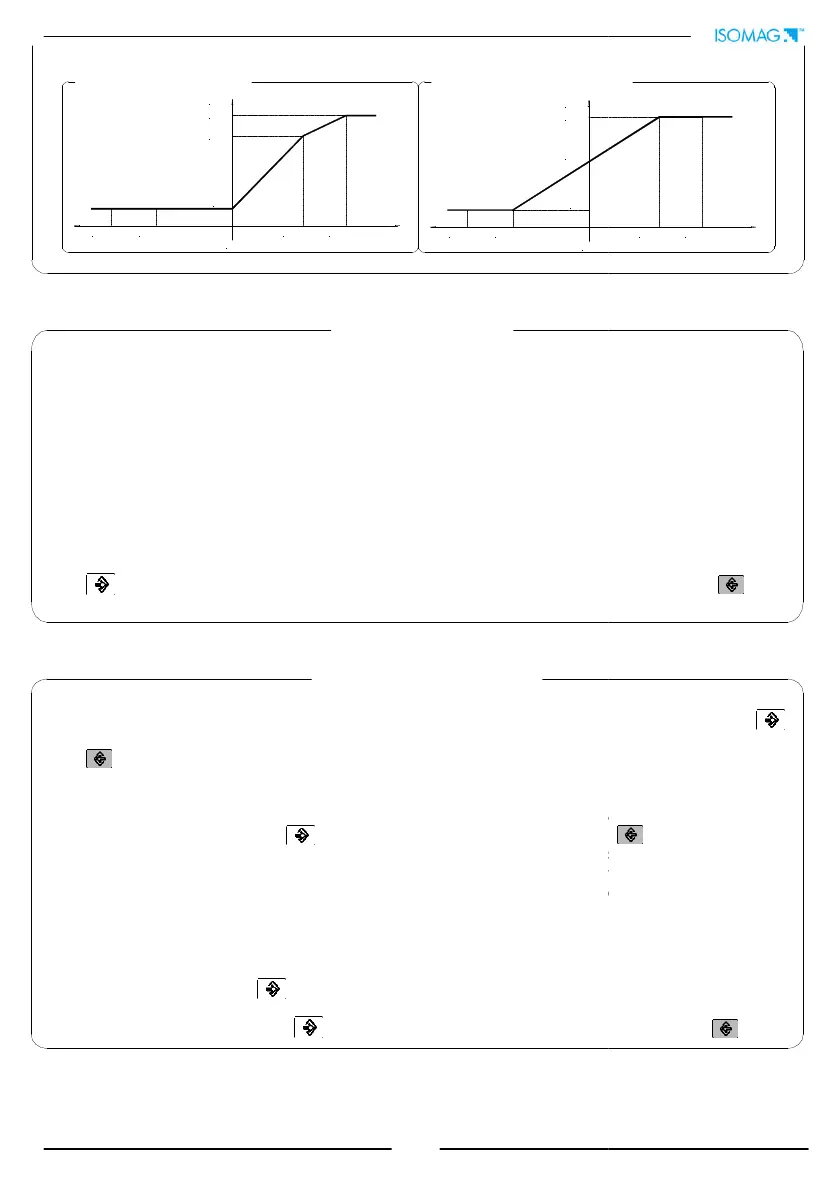
22 mA
20 mA
-110% F.S. -100% F.S. +100% F.S. +110% F.S.
zero
4 mA
I (mA)
I (mA)
20 mA
-110% F.S. -100% F.S.
zero
12 mA
4 mA
[EUR/dm³+/- =X]
(and reverse) flow totalizers
. There are three
setting fields for this parameter, from left to right: 1) monetary symbol, 2) default/personalized
t the cursor over the field to be modified.
hoosing one of the 7 predetermined monetary symbols (standard ISO 4217
-REV81):
dollar; CAD=Canadian dollar; AUD=Australian dollar; GPB=English
. To change the
[T/P/-/+ reset]
unctions are activated by pressing the
of the function itself. When "EXECUTE?" is required, press
to
[Calibration]
calibration function. The activation of this function happens by pressing the key
he following question will be visualized: "EXECUTE?"
, so press
[Self test]
normal functions and performs a complete
ircuits and the excitation generator. To activate this function,
he key to start the test,
display will
function is automatically performed
.
]
Flow rate simulation enabling. This function allows for the possible generation of an internal signal
that simulates the flow rate, allowing the outputs and all the connected instruments to be tested.
and the flow rate simulation can be
:
to set the required % flow rate
.
+100% F.S. +110% F.S.


 To Next Page