7
User guide
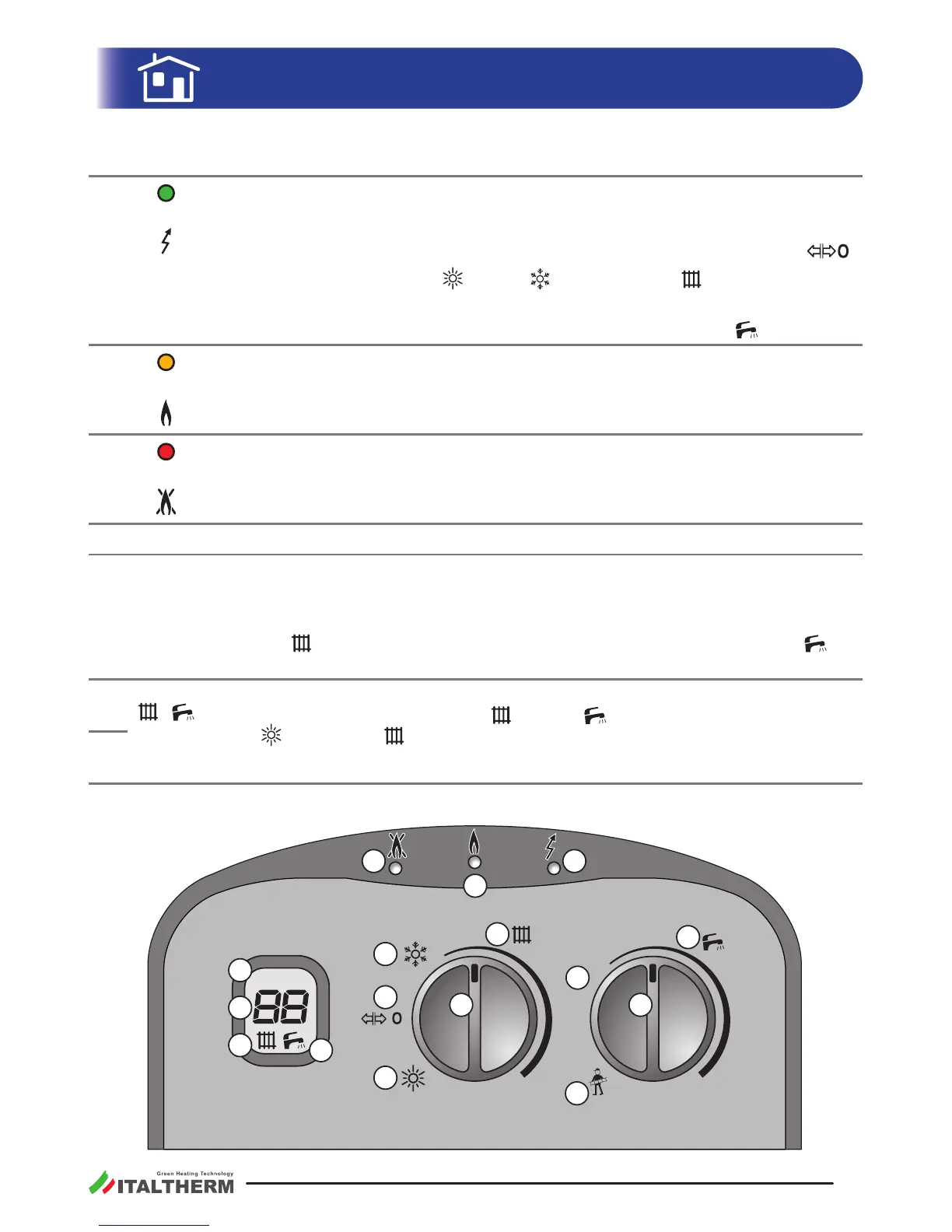
The front control panel
1
green
Electrical Supply Indicator Light
- boiler not electrically supplied.
Blinking - boiler electrically supplied, but not acve because the knob 12 is on
.
On - boler acve. Knob 12
or along the .
Flashing with short pulses - actuated for mistake, by the user, a funcon reserved to
the technician. Rotate immediately the knob 13 back on the scale
.
2
yellow
Burner Indicator Light
- the ame in the burner is o.
On - the ame in the burner is on.
3
red
Alarm Indicator Light
- no problems detected.
Blinking or Flashing - see "Alarms - boiler block" on page 30.
4
service Indicaon, on the display, for the Technician, usually not displayed.
5
2-digit
number
on the
display
Normally it indicates, in °C, the temperature of the water going out of the boiler (heat-
ing or domesc).
During the adjustment of the heang system temperature (rotang the knob 12 along
the scale
) or domesc hot water (rotang the knob 13 along the scale ) it
shows the set value, in °C.
6
-
on the
display
Usually, they are shown and they indicate that the boiler is ready to
supply heat to the relevant heang
or DHW When the boiler is in Summer
mode
, the symbol
They blink during the actual heat delivery, by the boiler, to the relevant system.
7
s
e
r
v
i
c
e
service
8
9
10
12 13
14
15
16
11
3
4
6
7
5
1
2
00037 A 00




 To Next Page