Page 32 LXi
™
Pool/Spa Heater Installation and Operation Manual
vanced microprocessor based controller that provides
a sophisticated yet simple interface to operate your
heater for maximum effi ciency and enjoyment of your
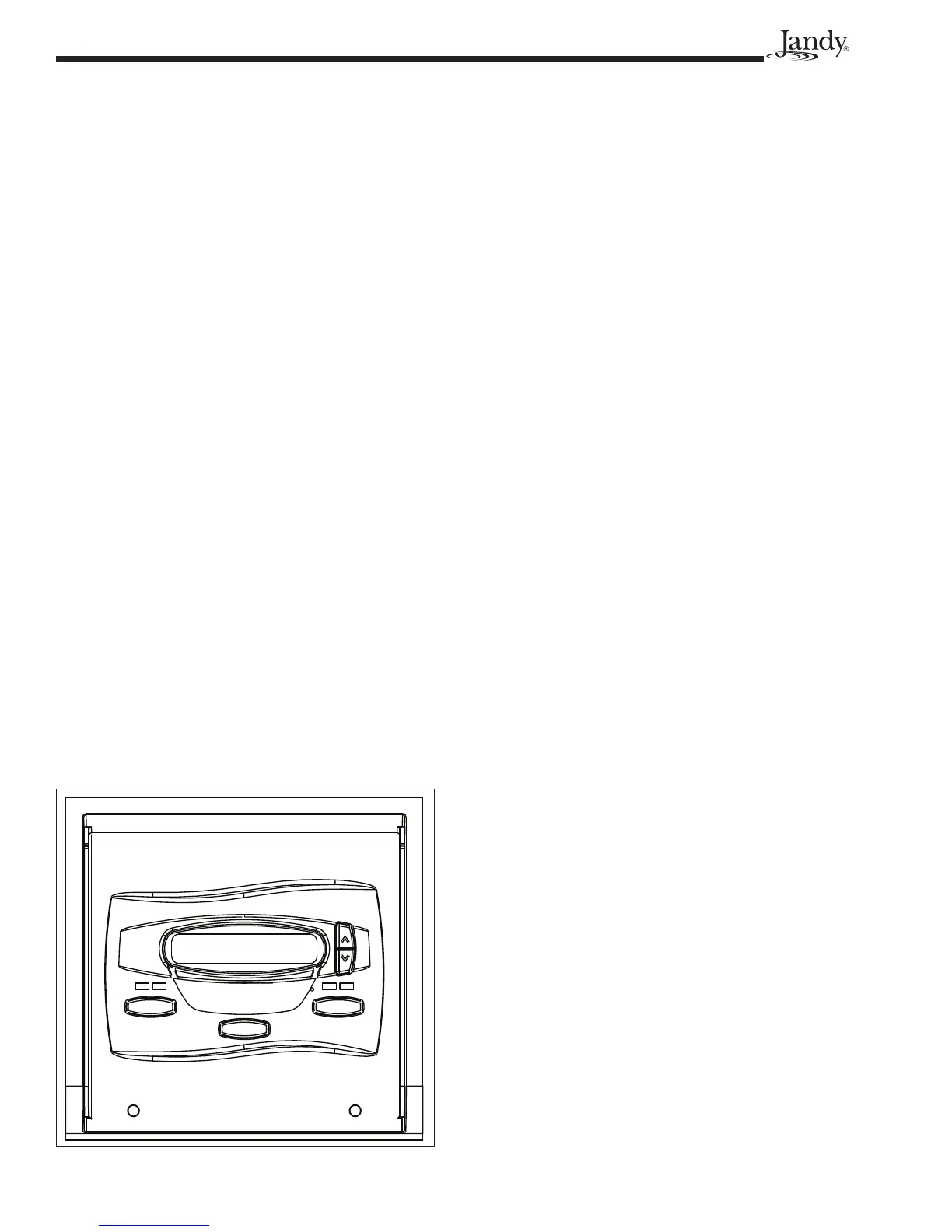
pool. To locate the control buttons, see Figure 28.
7.3.1 Off Mode
When the control panel is turned off, the screen
displays
GAS HEATER IS OFF PRESS POOL OR
SPA
.
7.3.2 Pool Mode - (Normal Heat)
To enable the pool mode, press POOL. The asso-
ciated left green LED indicator will light and the unit
will display
SET:XXX°.
NOTE XXX represents the current temperature
setting on the control. The default setting for
pool temperature is 80°F (26°C).
You can change the temperature set point by
pressing the
Up or Down button. Repeatedly press
the Up or Down
button until you reach the desired
temperature set point. After 5 seconds of inactivity, the
new set point is stored in memory.
When the water temperature falls to 1˚ below
the temperature setting, the control will start the heater
and the associated right LED will light RED
.
7.3.3 Pool Mode - (Optional Maintain
Heat)
If connected, the Maintain Heat mode allows
the heater to monitor the temperature of the water 24
hours a day by turning the pool pump on and sampling
the water temperature. When the water temperature
drops below the programmed temperature set point,
the control will start the heater.
To operate in pool mode with the Maintain Heat
feature, press
POOL, then press MENU, press the
Down
button until MAINTAIN POOL HEAT is dis-
played, press the
MENU button.
The associated left green LED indicator will light
and the unit will display
SET:XXX°. Change the tem-
perature set point by pressing the
Up or Down button
until the desired set point is displayed. After 5 seconds
of inactivity, the new set point is stored in memory.
7.3.4 Spa Mode - (Normal Heat)
To enable the spa mode, press SPA. The associ-
ated left green LED indicator will light and the unit
will display
SET:XXX°.
NOTE XXX represents the current temperature
setting on the control. The default setting for
spa temperature is 102°F (38°C).
You can change the temperature set point by
pressing the
Up or Down button. Repeatedly press
the
Up or Down button until you reach the desired
temperature set point. After 5 seconds of inactivity,
the new set point is stored in memory. When the water
temperature falls to 1˚ below the temperature setting,
the control will start the heater and the associated right
LED will light RED.
7.3.5 Spa Mode - (Optional Maintain
Heat)
If connected, the Maintain Heat mode allows
the heater to monitor the temperature of the water 24
hours a day.
When the water temperature drops below the
programmed temperature set point, the control will
start the heater.
To operate in spa mode with the Maintain Heat
feature, press
SPA, then press MENU, press the Down
button until MAINTAIN SPA HEAT is displayed, press
the MENU button. The associated left green LED in-
dicator will light and the unit will display
SET:XXX°.
Change the temperature set point by pressing the Up
or
Down button until the desired set point is displayed.
After 5 seconds of inactivity, the new set point is
stored in memory.
7.4 User Setup Options
The User Setup options allow the user to select
specifi c Languages, Temperature Scale, Spa Timer,
and Display Light options.
7.4.1 Language Setup
1. Make sure the control is in the OFF mode.
2. To enter the User Setup mode, press and hold the
MENU button for 5 seconds.
SPA
MENU
POOL
GAS HEATER IS OFF
PRESS POOL OR SPA
Figure 28. Main Control Panel


 To Next Page