122
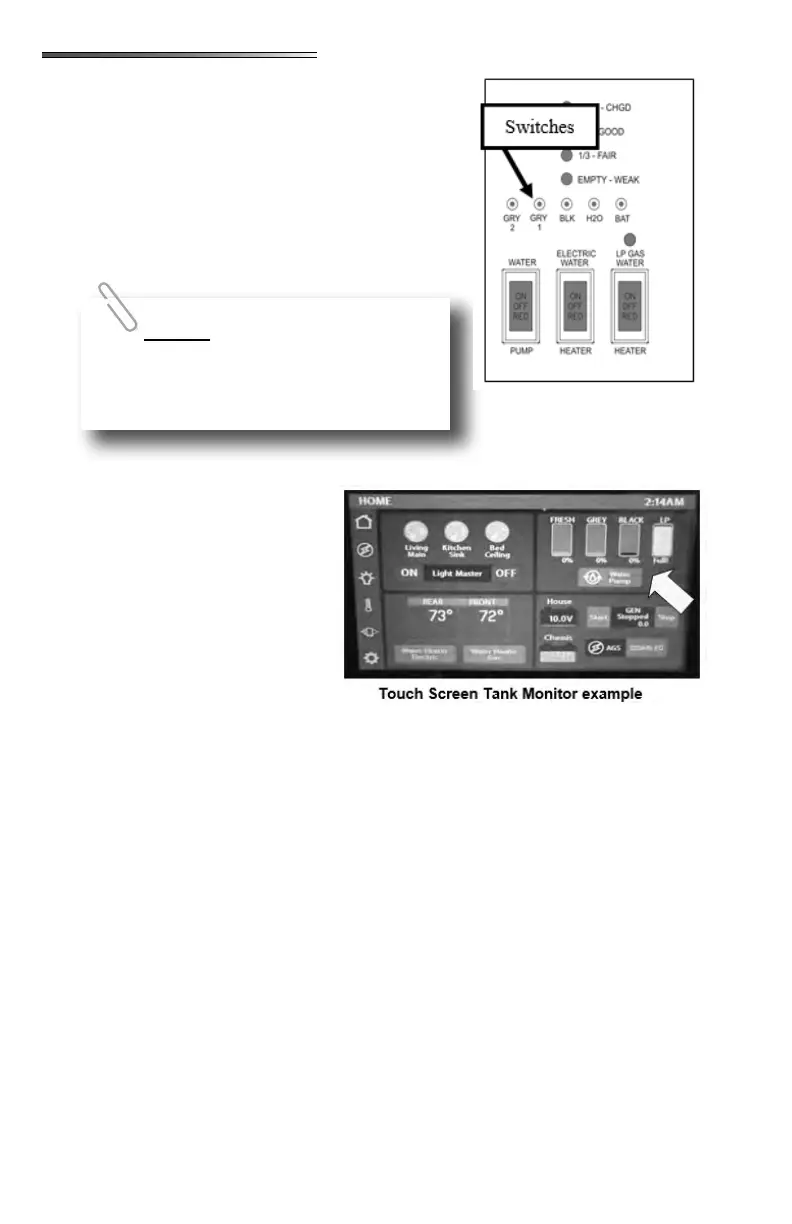
Press only one tact switch at a time. As you push either the
FRESH, BLK GREY1 or GREY2 switch, one or more
LED lights will illuminate (from left to right) indicating
the content level for that tank. When pushing the “BATT”
switch, the LED lights illuminate from left (lowest) to right
(highest) to indicate the estimated auxiliary battery condi-
tion.
The LEDs on the panel indicate the following:
= harge at 12.7 volts
= ood at 12.1 volts
= air at 11.6 volts
L = Low at 6.0 volts
Tank monitors on the touch screen have
a constant readout. There are no but-
tons to push. Tank levels are displayed
by percentage from 0% to FULL.
The
may be located on the moni-
tor panel, the utility center or both.
Again, on certain RVs there may be a touch screen system and the water pump control may
be on one of the selectable screens for the touch screen.
When the water pump switch is ON (it will light up), the water pump will run until it reaches
45 lbs. of pressure. It will recycle when pressure drops. Turn the switch OFF when the
water pump is not being used.
The are located on the monitor panel, or in the case
of a touch screen system, they can be found on one of the selectable screens of the touch
screen. Switches will will light up when turned on. The “LP GAS” water heater switch
(12V) enables propane operation of the water heater, and the “ELECTRIC switch (120V)
enables electric operation of the water heater. Normally both switches should be turned on
to provide the fastest hot water recovery time. The water heater can be operated in electric
only or gas only modes by pressing each switch independently. If the RV is equipped with
a tankless water heater, there will be only an LP Gas switch on the command center panel.
This light located between the
water heater switches will indicate a problem with the LP portion of the water heater. When
the LP GAS switch is turned on, the light will blink quickly 3 times and the water heater will
ignite. The light will then remain o. If the light comes on and stays on, it indicates the gas
side of the water heater has not red and there is a problem with the igniter.
When using shore power all 4
LEDs will light. If disconnected from shore
power, 3 LEDs will light to indicate a full
charge (4th LED may blink).











 To Next Page