90
When you are ready to leave, reverse the power cord connection process. Use care to pre-
vent damaging the power cord electrical connection pins when connecting or disconnecting
the shore line power cord. Grasp the plug to remove the power cord from the outlet; do not
unplug it by pulling on the cord.
Inspect the power cord for cuts, cracks and worn insulation. Have the power cord replaced
immediately if these symptoms are noticed.
Inverter (if so equipped)
A factory installed inverter converts 12-volts DC to useable 120-volts AC and supplies con-
tinuous AC power to the appliance plugged into it. It is important that you familiarize your-
self with the inverter function and operation. The inverter should be “o” when not in use.
If your recreation vehicle is equipped with a residential style refrigerator, the inverter may
be used to supply the 120-volts AC necessary to power the refrigerator.
There are no customer serviceable parts inside the inverter case and the manufacturer’s
warranty will be void if the case has been removed. The in-
verter cooling ns and the cooling fan should be kept clear of
any obstructions.
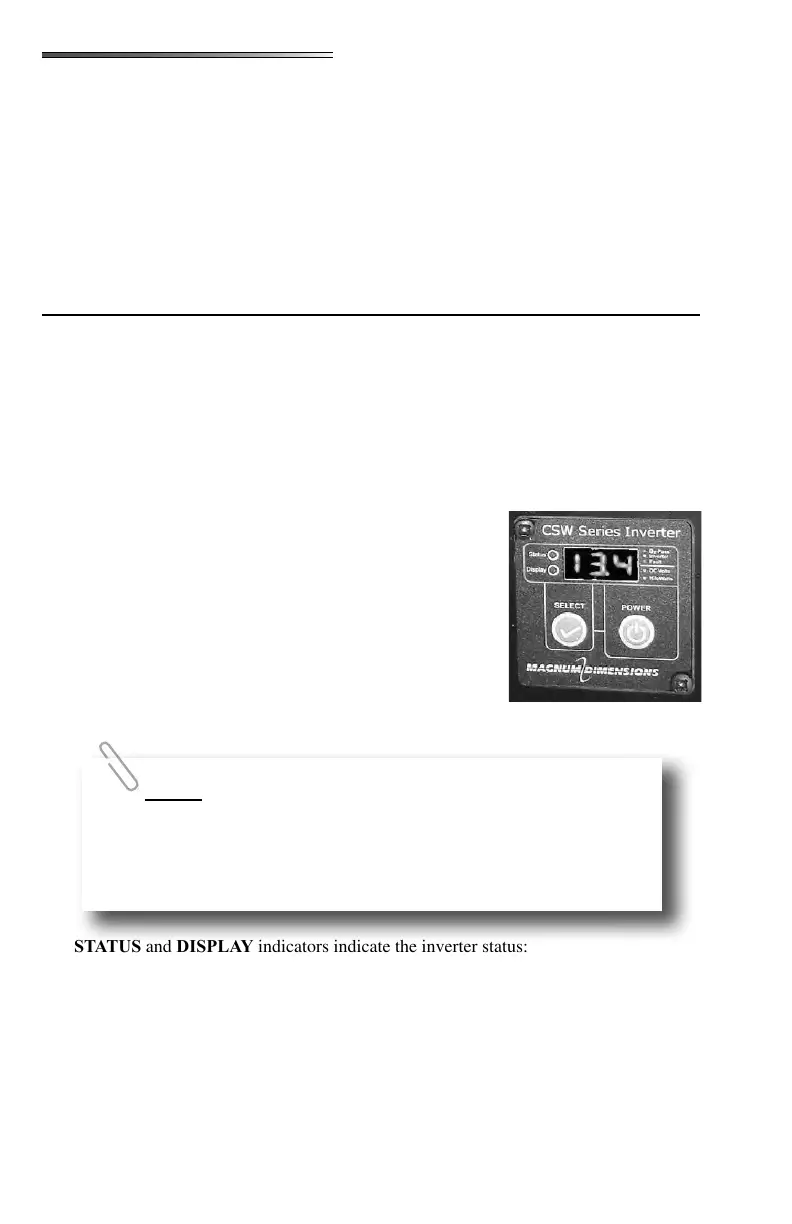
Your RV may have an inverter remote display like this one on
the Command Center switch panel. There are power and select
buttons, Status/Display indicators and a single line digital alpha
numeric display. The display can show measured battery volt-
age, AC output power, inverter settings and error codes.
POWER button is used to turn the inverter on and o. To turn
on the inverter and the LED display press and hold POWER for
1 second until you hear a beep.
The and indicators indicate the inverter status:
• STATUS & DISPLAY LEDS - both GREEN - Unit is plugged into shore power.
The panel is in Bypass Mode and will display battery voltage in DC volts.
• STATUS LED AMBER, DISPLAY LED GREEN - Inverter Mode is active. In-
verter is ON and will display battery voltage in DC volts. (Not connected to shore
power)
• STATUS & DISPLAY LEDS - both AMBER - Inverter Mode is active. Inverter
is ON, pressing the SELECT button will display inverter power output. Display
shows power output in KW.
When in Inverter Mode you will be able to cycle through Battery
Voltage, Inverter Power, inverter settings and error codes.
When in Bypass Mode you will be able to cycle through Battery Voltage,
inverter settings and error codes. Inverter Power will not be available
because the inverter is idle.











 To Next Page