86
LCI One Control® App(If So Equipped)
Certain models of RVs include a Bluetooth control
module that works in concert with the LCI One
Control App for your smartphone, tablet or other
smart device. When connecting to this app, cer-
tain systems in your RV can be controlled remotely
from your smart device. The free app is available
through Google Play Store or the App Store (for
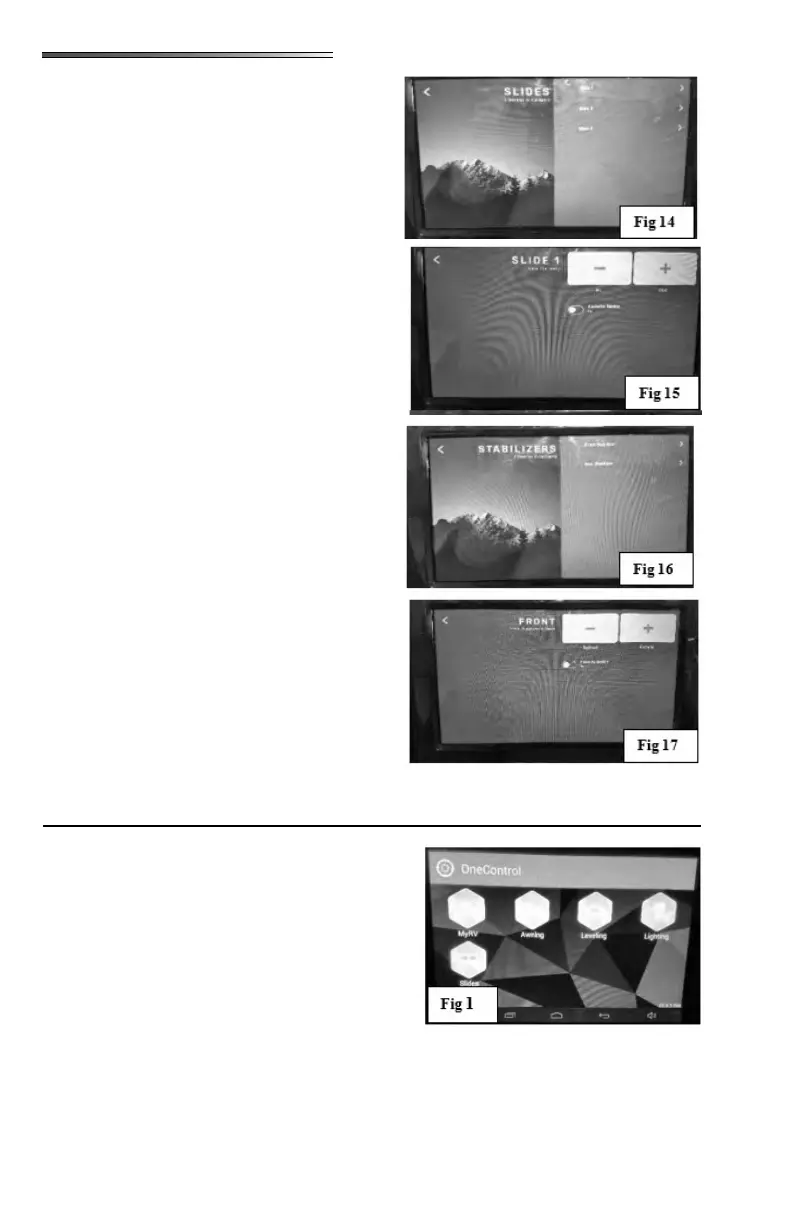
IPhone). The One Control Device Selection screen
will look similar to
The One Control System will NOT operate the hall
light, lights located inside each slide-out, exterior amber/red marker lights, or the LED lights
located on the front or rear caps.
Pressing the SLIDES button will open a selec-
tion screen showing all the slides on the RV (
). Selecting one of the slides will open an-
other screen which has In and Out buttons (also
labeled + and -). Pressing and holding either
button will extend or retract the slide ().
Back arrow at upper left returns you to the previ-
ous screen.
Pressing the STABILIZERS button will open a
selection screen showing available stabilizers.
Selecting a stabilizer will open the control screen
() that allows you to retract or extend the
stabilizers. Press back arrow at top left to go back
to previous screen. If your RV has Auto Level-
ing, refer to the One Control Manual in the war-
ranty packet for explanation of the operation of
that system.
: SETTINGS button will bring up
selections for Diagnostics, Re-sync Devices,
Units, Developer, and System Clock. Refer to
the One Control manual included in your war-
ranty packet for explanation of these buttons.
HELP button will bring up a link for
an electronic version of the manual (or manuals)
and any videos that may explain operation of the
system.











 To Next Page