87
A Bluetooth control module is mounted in the basement area of the RV. It transmits a Blue-
tooth signal for the LCI One Control app. A Password and a Device Name are required for
this Bluetooth connection. The Password and Device Name can typically be found on a
label located inside a cabinet near the entrance door of the RV . The password and
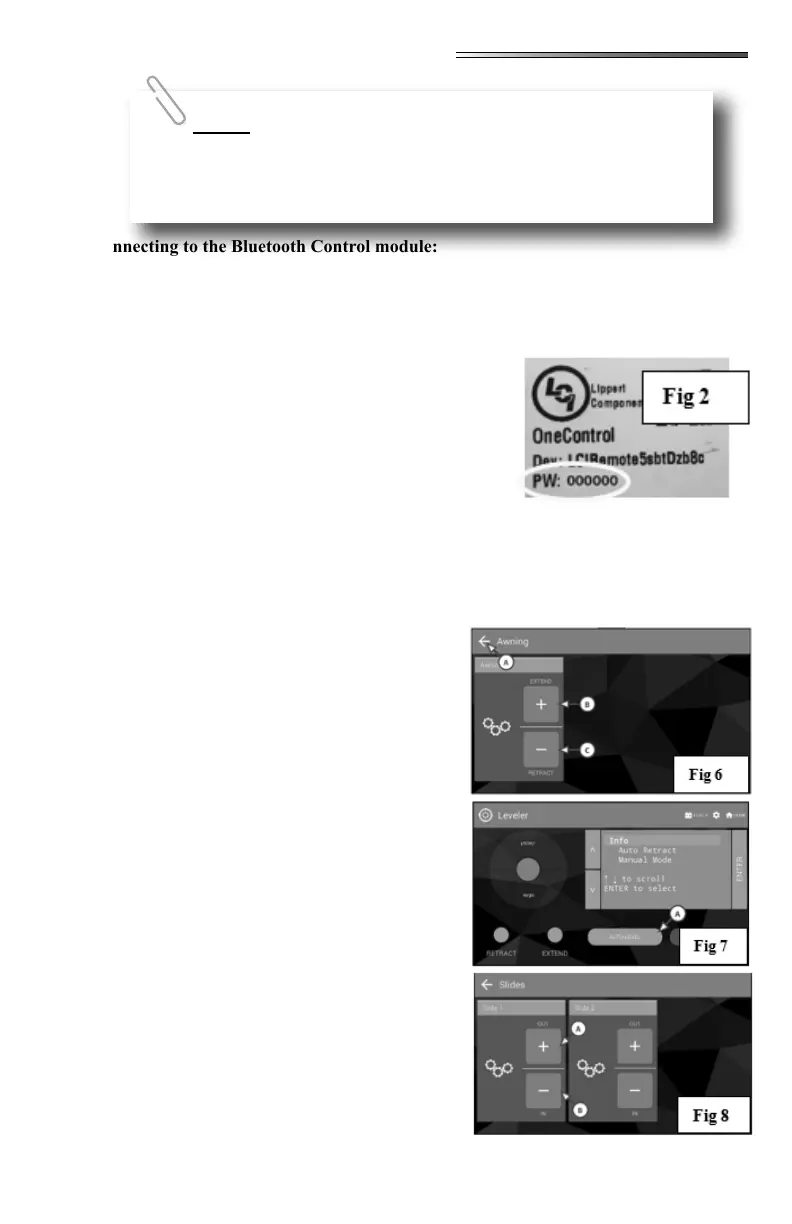
device name will also be located on a label on the control
module in the basement area although this may not be eas-
ily accessible.
The password is 6 numerical digits. Device name will be
LCIRemotexxxxxxxxx (x’s are 9 alpha numeric charac-
ters). To connect: enable Bluetooth on your smart device,
scan for available Bluetooth connections, and you should
see the LCIRemotexxxxxxxxx name appear as a connec-
tion. Select that, and it should then prompt for the 6 digit
password.
Select the AWNING icon; the screen opens showing the awnings (
). If there are multiple awnings, there will be a selection for each awning at the left of the
screen. Select the awning you want to control, then
press and hold the (B) or
(C) buttons. Select the back arrow (A) to return to
the Device Selection screen
Select the LEVELING icon,
the screen opens showing the Leveler Control
screen (). This screen will allow you to ex-
tend and retract the jacks and to auto level the RV.
Press the button (A) to begin lev-
eling the RV.
Refer to the Lippert User Guide for the One Control
system for more detailed information. Select the
HOME icon (upper right) to return to the Device
Selection screen.
Select the SLIDES icon
which will open the Slideout screen (). The
screen can display up to 4 slideouts. Slideouts will
be numbered 1-4 on the touchscreen. Press Slide
01, and then press (and hold) the (A) button
to extend the slide, or the (B) button to retract
it. Repeat this action on the remaining slideouts.
Select the back arrow to return to the Device Selec-
tion screen.
Not all the functions depicted here will necessarily be available on
your model RV. The systems shown are only a possible representation of
what you could see on your smart device. If specic apps are not displayed
on your device they are not installed and may not be available for your RV.











 To Next Page