180
A second antenna in the rooftop enclosure will also pick up any wireless Wi-Fi signals in the
immediate area and distribute those signals through the ceiling mounted Winegard Gateway
router box.
Presently the system works with the following wireless providers: Winegard, Verizon, T-
Mobile, and AT&T. A SIM card is available from your cellular provider.
Connection and setup information is located in the Winegard information in your warranty
packet.
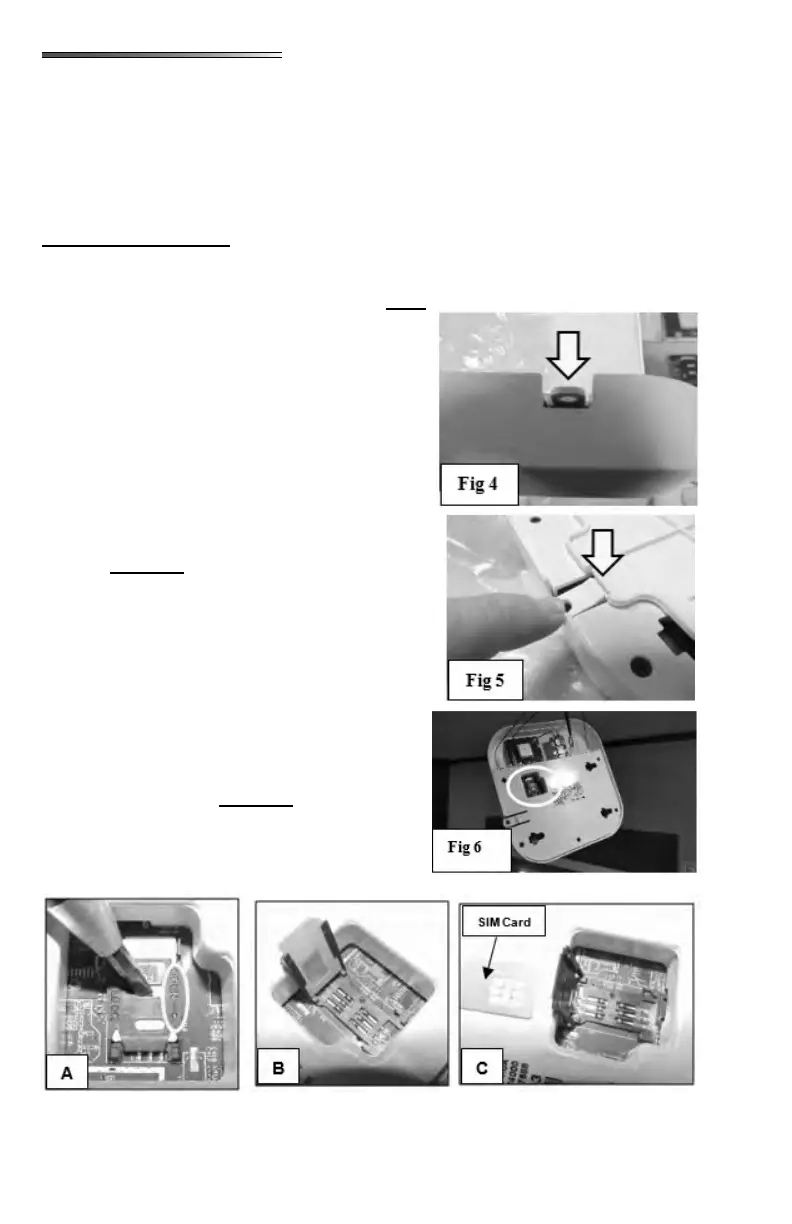
To install a SIM card, you must remove the router box from the ceiling. There is a plastic
tab in a notch on the plastic cover . Push this tab down, to release the catch
. Hold the tab down, and slide the box
from the plastic tab, and it should come o the ceiling
mounting plate. Gently pull the box o the mounting
plate, it will hang by the wires. The SIM card slot is
located in the large hole on the back of the box
.
Refer to Figures and below. To open the SIM
card slot place a small screwdriver in the slot of the
SIM card holder as shown. Make sure the holder is
facing the same as shown in . (Notch in plastic
case to the upper right)
To open, push the black holder in the direc-
tion of the arrow (circled in photo) on the SIM
card holder. It should “click” when it unlocks.
Flip up the SIM card holder ().
Pull out the Winegard SIM card ().
Insert a new SIM card from your cellular provider.
Slide it in the slots on the card holder. (Note the po-
sition of the angled corner of the SIM card)
Then ip the card holder back down.
To close the SIM holder, insert the screwdriver back
in the same slot (), push down on the
card holder and slide the card holder upward (oppo-
site the arrow) to lock the SIM card holder in
place. There will be another “click” when it locks in
place.











 To Next Page