138
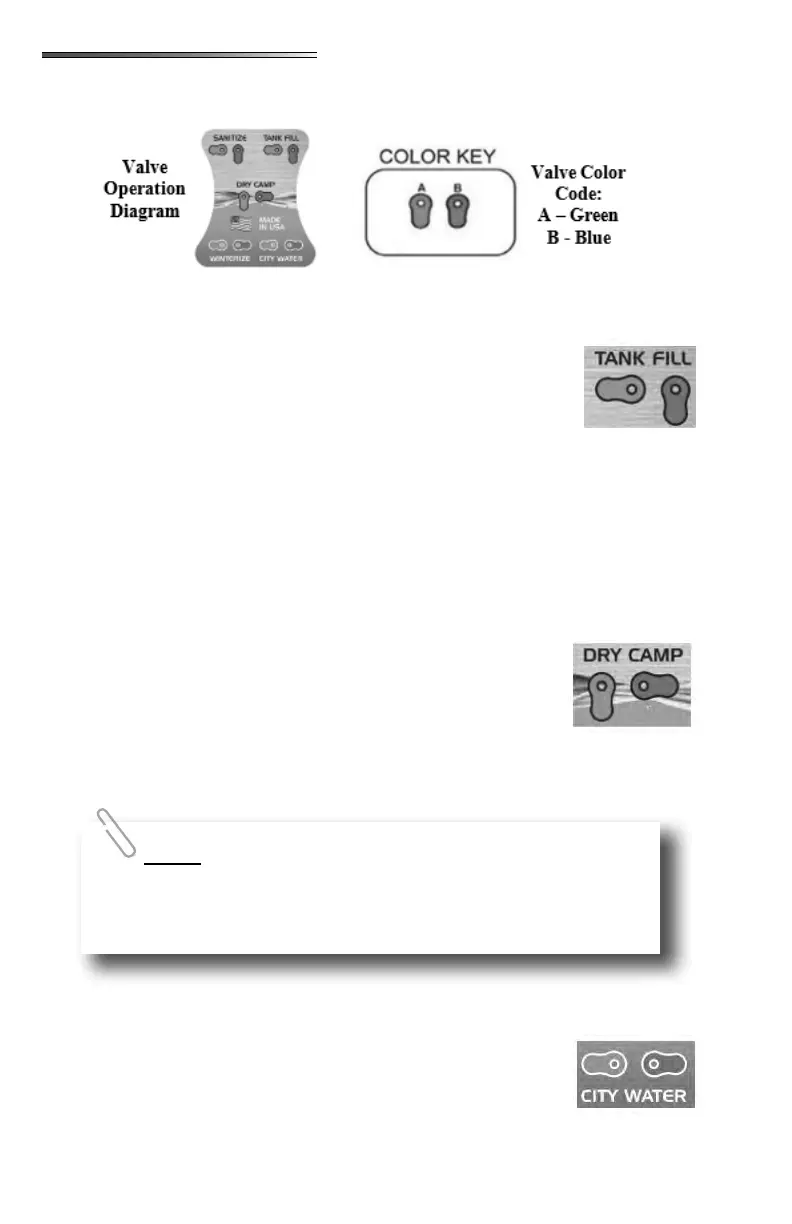
The following information details the functions of the utility center water valves as dis-
played on the valve operation label.
1. Connect the fresh water hose to the City water connection inlet on the utility center.
2. Set the color coded valves to POWER FILL TANK setting:
Green handle pointing left
Blue handle pointing down
Water heater bypass lever - NORMAL
3. Connect the other end of the hose to a pressurized fresh water source
(faucet or spigot).
4. Turn the pressurized water source ON, the tank should begin lling.
5. When water has reached the desired level, turn the pressurized water source OFF.
(tank level can be viewed on the monitor panel inside the RV).
6. Disconnect water source from the spigot/faucet rst, then disconnect from the city wa-
ter ll inlet on the utility center.
1. Make sure the fresh water tank has an adequate supply of water.
2. Set the color coded valves to the DRY CAMPING setting:
Green handle pointing down
Blue handle pointing right
Water heater bypass lever - NORMAL
3. Turn the pump switch ON.
4. Water should be available to all xtures. Pump runs when a xture
is opened.
5. Turn pump OFF when water is not being used.
1. Connect the fresh water hose to the city water inlet.
2. Set the color coded valves to the CITY WATER setting:
Green handle pointing left
Blue handle pointing right
Water heater bypass lever - NORMAL
To ll the fresh water tank without a pressurized water source,
refer to SANITIZE (Siphon Fill) section, and use a container holding fresh
potable water and your fresh water hose. Water will be drawn into the tank
by the pump. There is no gravity ll inlet on the recreation vehicle.











 To Next Page