GETTING TO KNOW YOUR VEHICLE 17
Key Fob
To Lock/Unlock The Doors And Tailgate
Push and release the unlock button on the key
fob once to unlock the driver’s door, or twice to
unlock all the doors. To lock all the doors, push
the lock button once.
When the doors are unlocked, the turn signals
wi
ll flash and the illuminated entry system will
be activated. When the doors are locked, the
turn signals will flash and the horn will chirp.
NOTE:
All doors can be programmed to unlock on
the first push of the unlock button through
Uconnect Settings Ú page 224.
The mechanical flip key can be used to lock
or unlock the doors, tailgate, glove compart-
ment, storage compartments (if equipped),
an
d rear seatbacks.
Using The Panic Alarm
To turn the Panic Alarm feature on or off, push
the panic button on the key fob. When the Panic
Alarm is activated, the turn signals will flash, the
horn will pulse on and off, and the interior lights
will turn on.
The Panic Alarm will stay on for three minutes
un
less you turn it off by either pushing the panic
button a second time or drive the vehicle at a
speed of 2
mph (4 km/h) or greater.
NOTE:
The interior lights will turn off if you place the
ignition in the ACC or ON/RUN position while
the Panic Alarm is activated. However, the
exterior lights and horn will remain on.
You may need to be less than 35 ft (11 m)
fr om the vehicle when using the key fob to
turn off the Panic Alarm due to the radio
frequency noises emitted by the system.
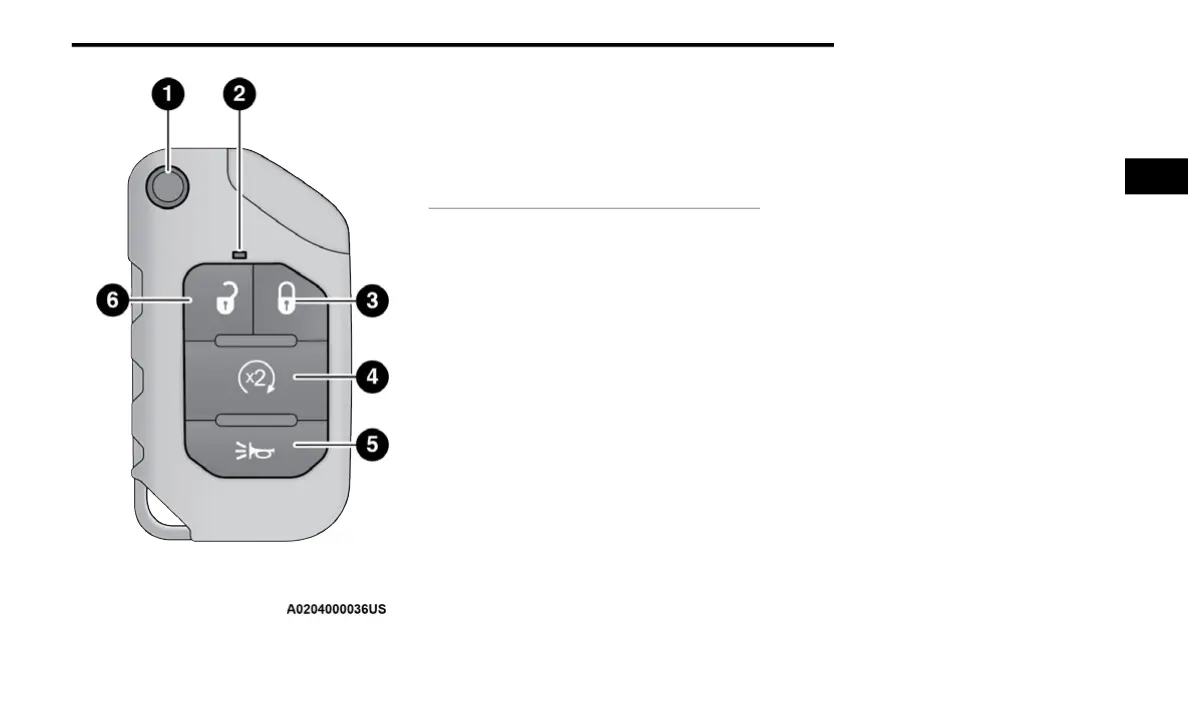
1 — Mechanical Key Release Button
2 — LED Indicator
3 — Lock Button
4 — Remote Start Button
5 — Panic Button
6 — Unlock Button
2















 To Next Page