MULTIMEDIA 245
The Satellite Mode is activated by a press of the
SXM button on the touchscreen.
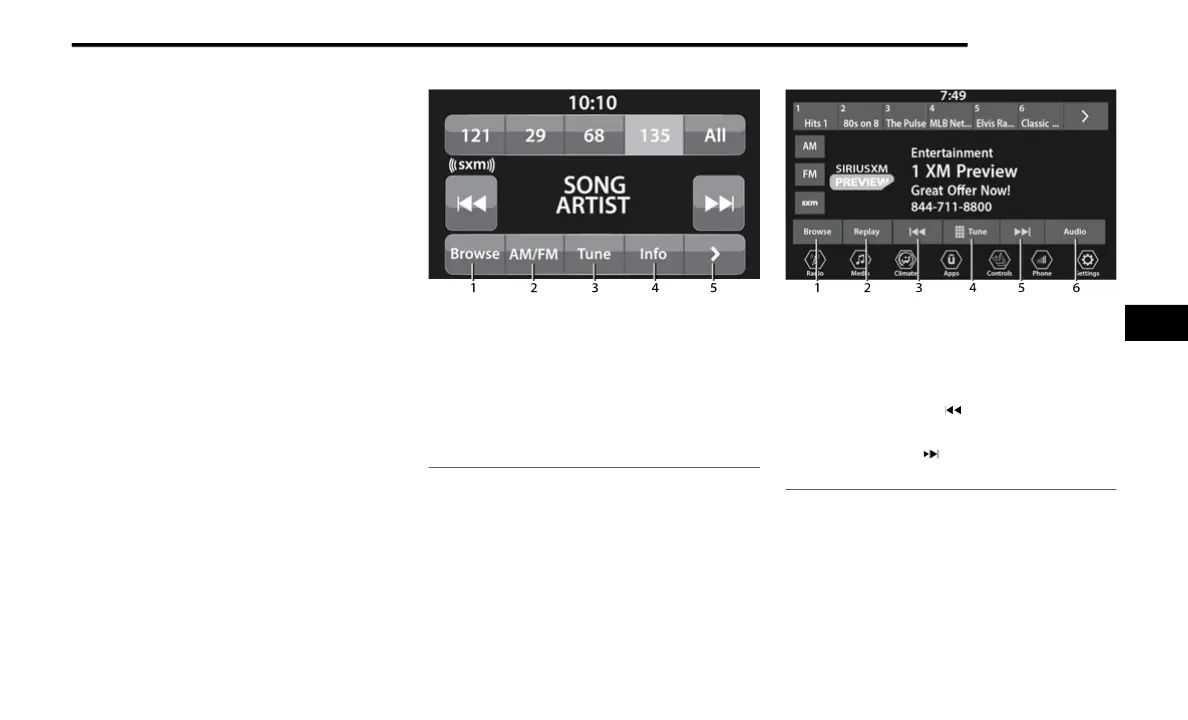
When in Satellite Mode:
The SXM button on the touchscreen is high-
lighted.
The SiriusXM® Presets are displayed at the
top of the screen.
The SiriusXM® Channel Number is displayed
in the center.
The Program Information is displayed at the
bottom of the Channel Number.
The SiriusXM® function buttons are
displayed below the Program Information.
Tuning is done by operating the Tune Knob or by
Di
rect Tune, similar to other Radio Bands.
In addition to the tuning operation functions
co
mmon to all radio modes, the replay, Traffic/
Weather button, and Favorite button functions
are available in SiriusXM® Mode.
Uconnect 3 With 5-inch Display SiriusXM® Satellite
Ra
dio
Uconnect 4 With 7-inch Display SiriusXM® Satellite
Ra
dio
1 — Browse
2 — Radio Bands
3 — Direct Tune
4 — Info Button
5 — Next Button
1 — Browse
2 — Replay
3 — Seek Down Button
4 — Direct Tune Button
5 — Seek Up Button
6 — Audio Settings Button
5















 To Next Page