MULTIMEDIA 247
Favorites
Press the Favorites button on the touchscreen
to
activate the favorites menu, which will time
out within 20 seconds in absence of user
interaction.
You can exit the Favorites Menu by a press of
th
e X button.
The favorites feature enables you to set a
fa
vorite artist or song that is currently playing.
The radio then uses this information to alert you
when either the favorite artist or song is being
played at any time by any of the SiriusXM®
Channels.
The maximum number of favorites that can be
st
ored in the Radio is 50.
Favorite Artist: W
hile the song is playing, to set
a favorite artist, press the Favorites button on
the touchscreen and then the Favorite Artist
button on the touchscreen.
Favorite Song: W
hile the song is playing, to set
a favorite song, press the Favorites button on
the touchscreen and then the Favorite Song
button on the touchscreen.
Browse In SXM
Uconnect 4 With 7-inch Display Browse Button
Press the Browse button on the touchscreen to
ed
it Presets, Favorites, Game Zone, and Jump
settings, along with providing the SiriusXM®
Channel List.
This Screen contains many submenus. You can
ex
it submenus to return to a parent menu by
pressing the Back arrow.
All
Press the All button on the Browse Screen.
Wh
en pressing the All button, the following
categories become available:
Channel List Press the Channel List to display
all the SiriusXM® Channel Numbers. You can
scroll the Channel List by pressing the Up and
Down arrows, located on the right side of the
screen. Scrolling can also be done by oper-
ating the Tune/Scroll knob.
Genre List Press the Genre button on the
touchscreen to display a list of Genres. You
can select any desired Genre by pressing the
Genre List. The radio tunes to a channel with
the content in the selected Genre.
Presets — If Equipped
Press the Presets button (if equipped) located
at
the left of the Browse screen.
You can scroll the Presets list by pressing the Up
an
d Down arrows located at the right side of the
screen. Scrolling can also be done by operating
the Tune/Scroll knob as well.
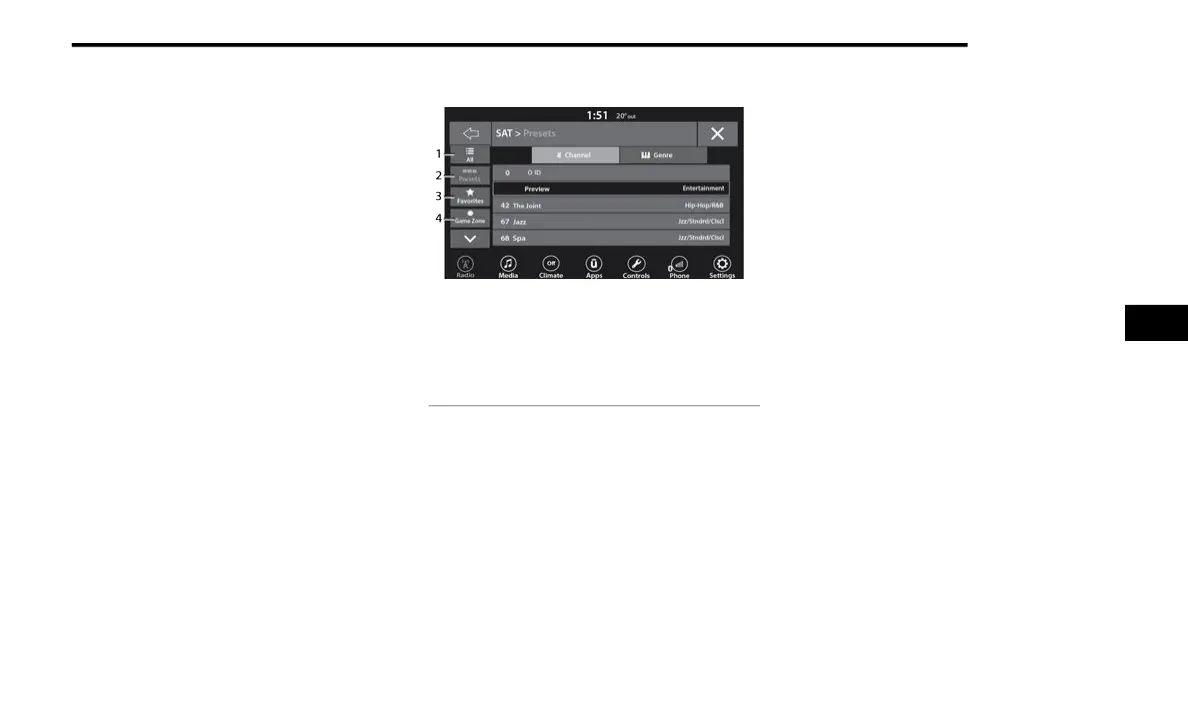
1 — All Button
2 — Presets Button
3 — Favorites Button
4 — Game Zone Button
5















 To Next Page