Note:The DNS setup must be configured correctly in the network setup.
[FTP settings]
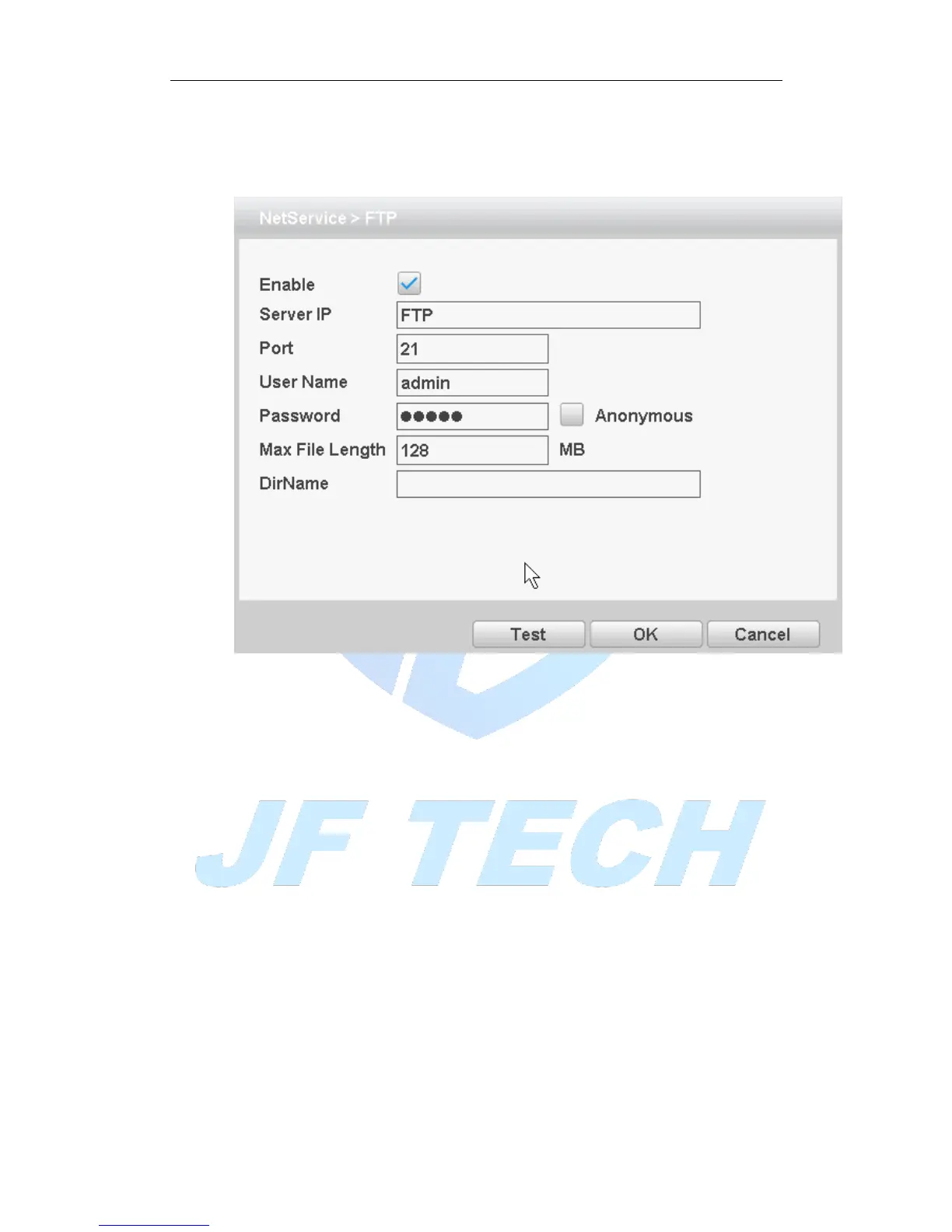
FTP is used when there is an alarm generated, or the alarm linkage video, capture
pictures, you can upload to a specified FTP server specific video and capture pictures.
Figure 4.23FTP settings
[Enable]: Anti ■ means, select Enable, set to take effect;
[Server IP]: IP address of the FTP server;
[Port]: FTP port number field when built, the default port 21;
[User name]: have permission to log onto the FTP user name;
[Password]: The user's password;
[Anonymous]: Anti ■ means, chose to be anonymous, you do not need to set the
user name and password;
[Max File Length]: Each package upload files maximum length, default is 128M;
[DirName]: file directory to upload files.
Note: The username is entitled to upload files to the server.
[ARSP]
By setting, you can start DDNS Sever add the device to the DDNS server for device
management



 To Next Page