20
X7
Operation Manual
3. Initiate aircraft
1) Select control mode
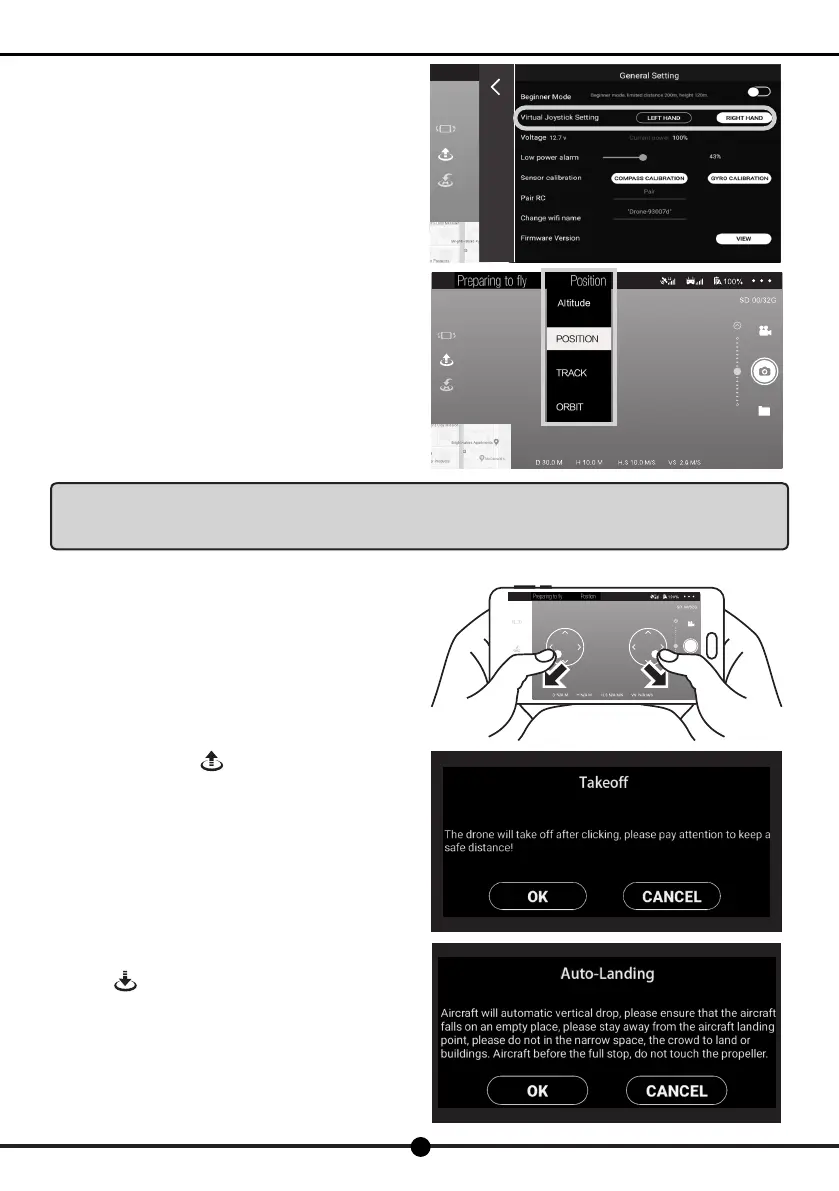
The default control mode is mode 2. Enter the "General
Setting" on the APP to switch the control mode.
2) Position hold mode by default
The aircraft's indicator light turns solid green or blue, indicating
good GPS signal and the aircraft already located.
The aircraft's indicator light turns ashing green or blue,
indicating the aircraft not located yet.
The ight mode on the APP is position hold mode by default.
When the aircraft's indicator light turns solid green, indicating
good GPS signal and the aircraft located, you can control it to
take off.
Notice:For novice pilot, please use the position hold mode for your rst ight, and switch to other control
mode after you have familiarized with the operation.
Please check the control mode before takeoff.
3) Takeoff( please stay away from the aircraft
during its takeoff)
Click the blank area of the screen, and the virtual joystick
will pop up on the screen. Toggle the left and right joysticks
outward (shown as the picture) to unlock the aircraft and get
the propellers to start rotating.
One key takeoff:Click and it will pop up with a conrmation
box on the screen.
Click "OK". And the propellers will speed up its rotation to make
the aircraft take off. Please stay away from the aircraft during its
takeoff.
Click and it will pop up with a conrmation box on the
screen.
Click "OK". And the propellers will automatically start to land.
Please stay away from the aircraft during its landing.


 To Next Page