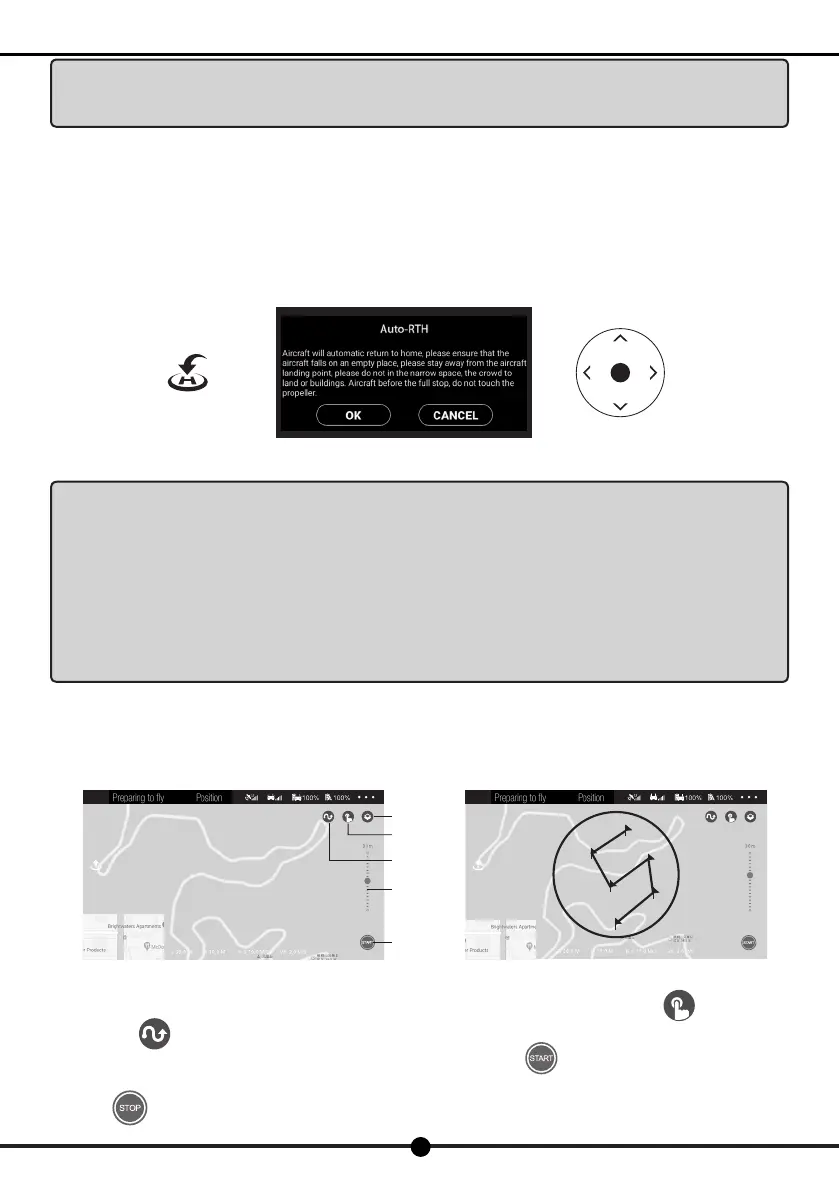
RTH button Confirmation box Forward/Backward
Map
Way point
ying
Flight planning
Flight altitude
Start
Tap waypoints
24
X7
Operation Manual
Warning:As for the return to home point as precise as possible, please fly the aircraft in open flat terrain (no
tall buildings in 50 meters of radius, flat terrain in 10 meters of radius) with the GPS working well. Thus the
return to home function will be able to activate.
6. RTH
Turn on the auto return to home function in mid-ight. When the conrmation box pops up, click "Conrm" to enter return to home
mode. And the takeoff point will be the home point to return. The joysticks can not be used during the process of ascent and return.
During its landing, you can toggle the joystick to control the aircraft and decide the landing site. During its return, press the "Return"
button again to exit auto return to home mode.
Press the "Return" button again to exit auto return to home mode and control other functions.
Notice:With the GPS positioning mode turned on (the aircraft’s rear light turns solid), control the aircraft
to take off in the area where there are no obstacles around as for precise home point. When aircraft under GPS
mode,it will automatically initiate the RTH as follows:
1 the aircraft disconnects with the RC
2 low battery level of aircraft
Once the auto return to home mode is enabled, if the aircraft flies below 30 meters of altitude, the aircraft
will automatically ascend to 30 meters before returning to home point. However, if the aircraft flies over 30 meters
of altitude, the aircraft will return to home point at the current altitude. Please do not control other functions
during the process of return. Please ensure there are no obstacles in way of return in case of any potential
accidents.
After the aircraft lands and the propellers stop rotating, long press the power switch for at least 2 seconds to turn off the aircraft and
the remote controller.
7 Waypoint ying
Click the map on the left corner at APP as shown,it will pop up map/Way point ight
Ensure high battery level of the aircraft and the mobile phone before enabling the waypoint ying mode. Click "Way point
Flying" or "Flight Planning" after its takeoff and read through the attention tips. Tap way-points on the screen and set the
altitude (30 meters of altitude by default) on the right side of the screen. Then click "Start" to enable waypoint ying mode.
You will see the aircraft y towards the designated point.
Click "Stop" to exit waypoint ying mode. When the aircraft ies towards the nal waypoint, it will hover at that point.


 To Next Page