– 101 –
1. The feed timing diers with the set value. (Image gure as observed from the face plate side)
2. The stitch length changes by adjusting the feed timing. Carry out adjustment while actually
carrying out sewing for the purpose of checking the stitch length.
When you have changed the stitch length, feed dog height or feed timing, run the sewing
machine at a low speed to make sure that the gauge does not interfere with the changed part.
5-4-2. Operating timing of the feed
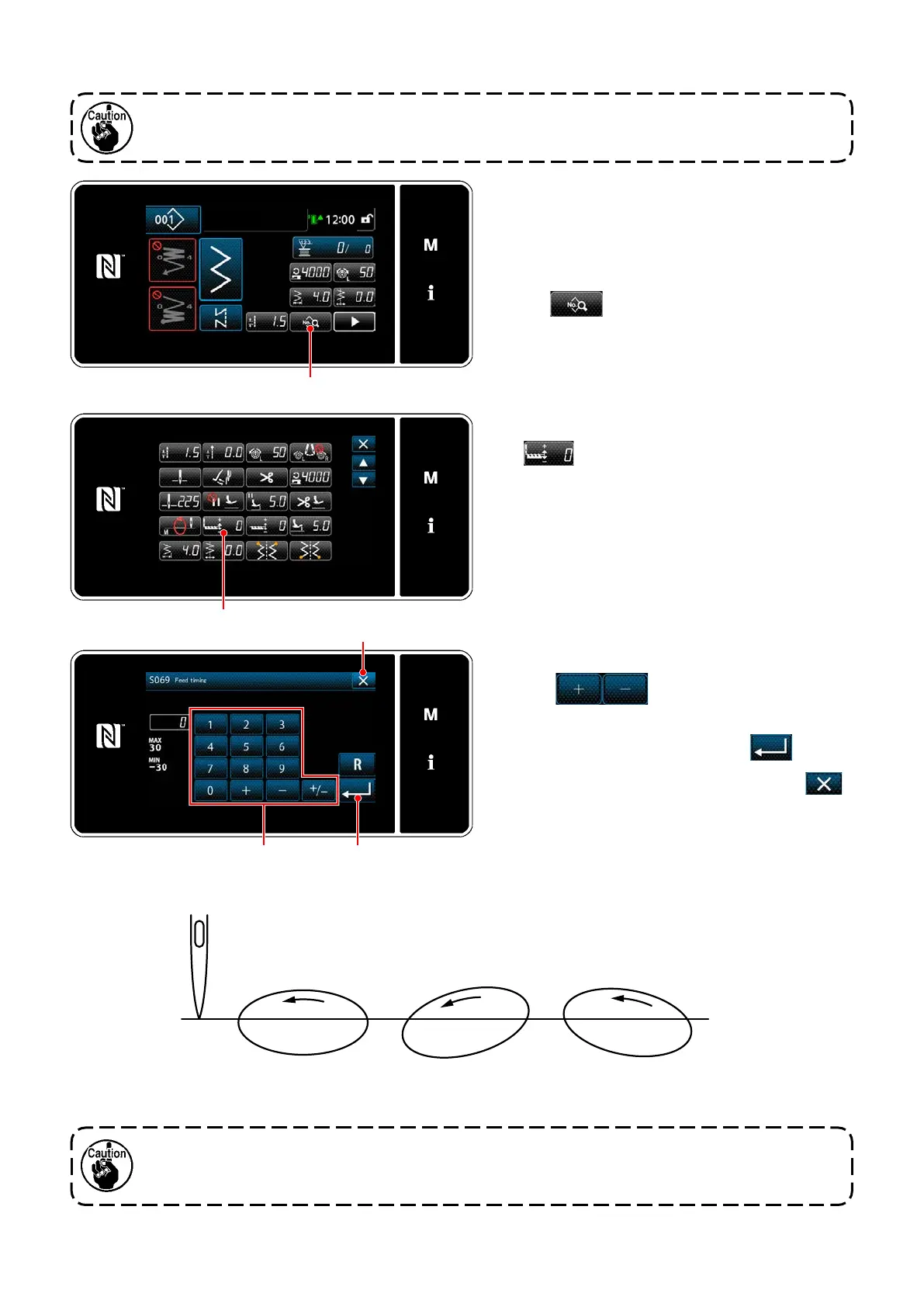
2) Display "S069 Feed timing" by pressing
.
Timing between the needle and feed can be ad-
justed on the operation panel.
[How to adjust]
1) Display the sewing data edit screen by press-
ing
.
3) Change the feed timing by pressing ten keys
and
.
(+ : To advance; - : To retard)
4) Conrm your entry by pressing
.
5) Display the sewing screen by pressing
.
* Range of input values on the panel is from
-30 to 30.
Standard : 0
Needle
To advance :
Adjust with the + key
To retard:
Adjust with the - key


 To Next Page
 Loading...