– 87 –
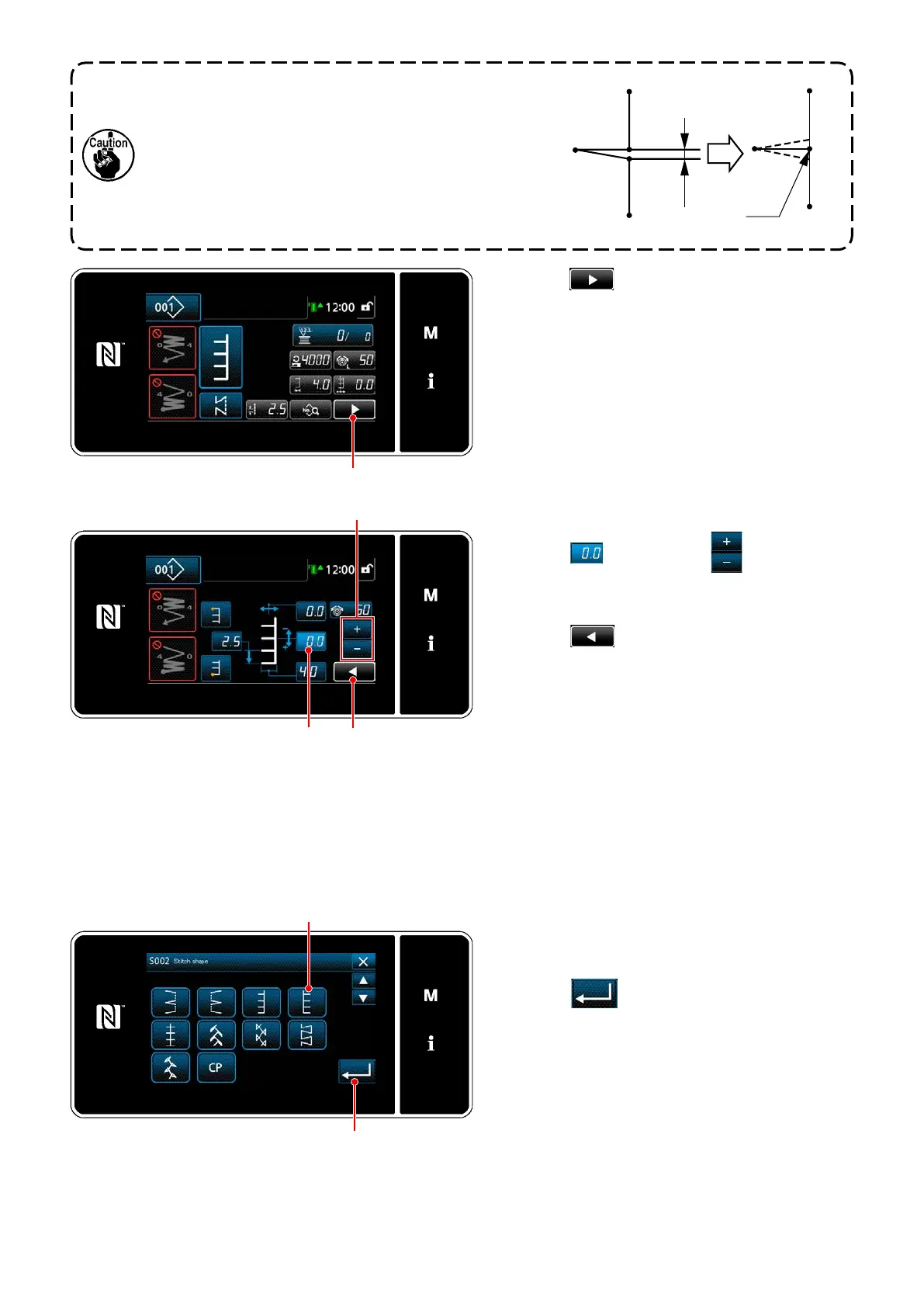
5) Press
on the sewing screen.
The "Second sewing screen" is displayed.
<Sewing screen>
<Second sewing screen>
6) When
is pressed,
is dis-
played. Now, enter a correction value.
7) When
is pressed, the entered value
is conrmed and the screen is returned to the
"Sewing screen".
The feed amount cannot be set to 0 and the T stitch
pattern may be deformed due to materials, height of fed
dog or gauges. (2nd stitch does not correspond with
4th stitch.)
In this case, carry out correction following the steps of
procedure described below so as to align the needle
entry positions of the second and fourth stitches in the
case the feed amount is 0 (zero).
Clearance
Correspon-
dence
3
1
4
2
1
2
3
4
–
+
5-3-6. T stitch, right
<Sewing shape selection screen>
1) Select T stitch, right
on the sewing shape
selection screen.
2) When
is pressed, the entered value
is conrmed and the screen is returned to the
"Sewing screen".


 To Next Page
 Loading...