– 136 –
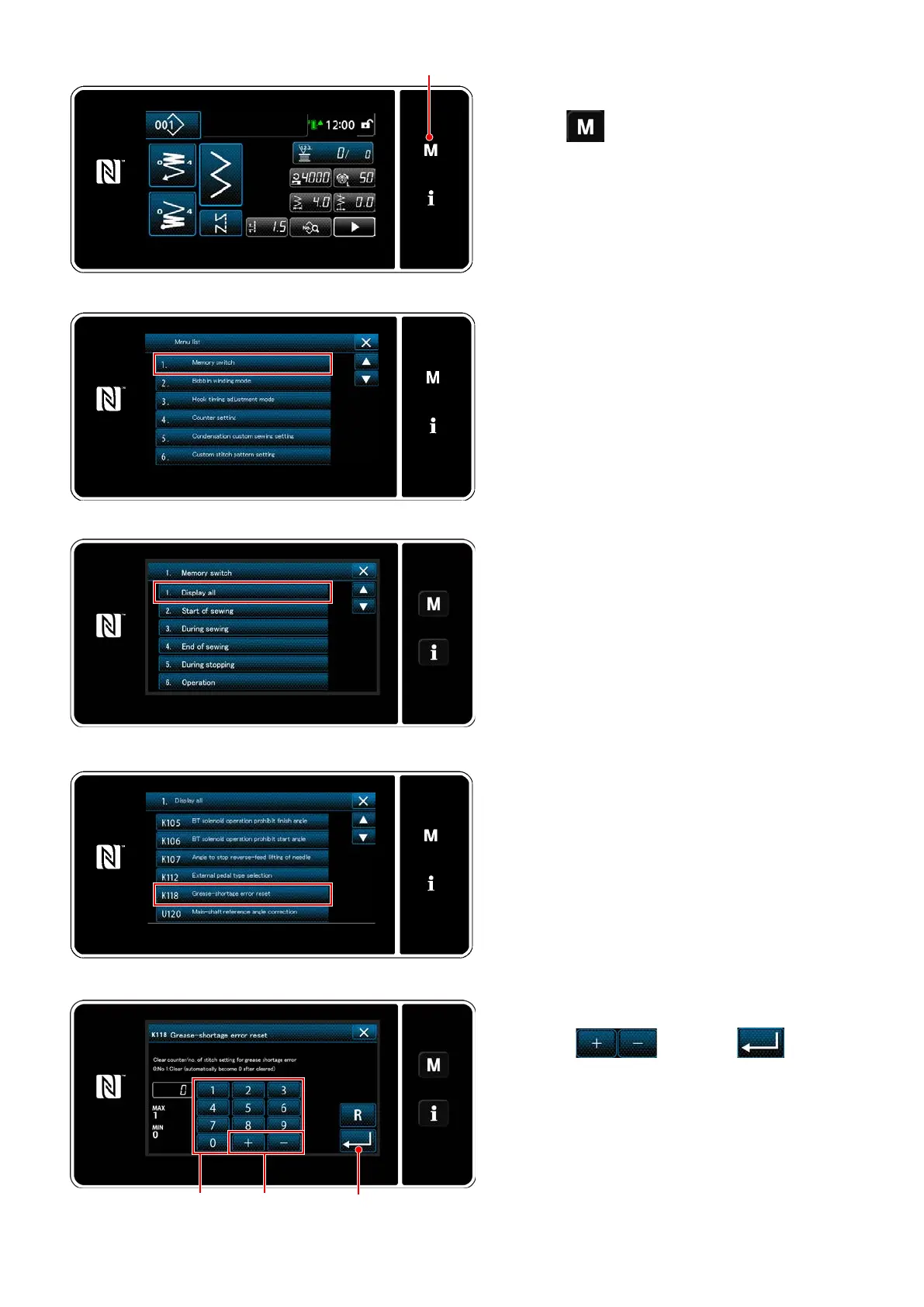
<Mode screen>
<Memory switch type selection screen>
<Memory switch edit screen>
7-9-3. Regarding K118 error resetting proce-
dure
1) Keep
held pressed for three sec-
onds.
The "mode screen" is displayed.
2) Select the "1. Memory switch".
The "memory switch type selection screen" is
displayed.
3) Select the "1. Display all".
The "memory switch edit screen" is displayed.
4) Select the "K118 Grease-shortage error re-
set".
The "Grease-shortage error reset screen" is
displayed.
<Sewing screen>
<Grease-shortage error reset screen>
5) Set the set value to "1" using numeric keypad
and
. Press
to
conrm the setting.
This resets the error to bring the sewing ma-
chine back to the normal operation. The sewing
machine can run normally until the next mainte-
nance period is reached.


 To Next Page
 Loading...