– 163 –
8-5-3. Editing the custom pattern
Selecting the custom pattern edit function
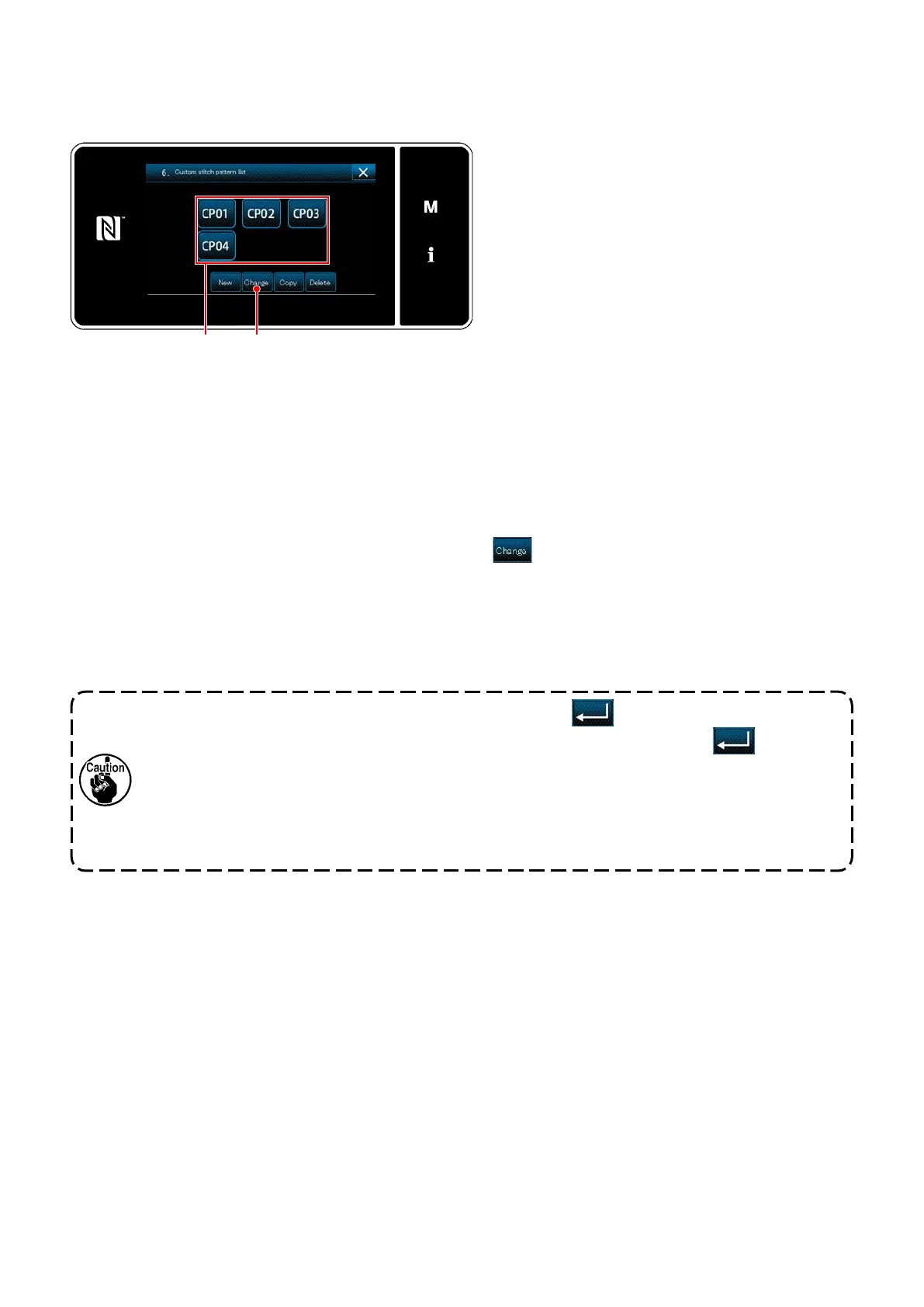
<Custom pattern list screen>
Editing the custom pattern value
Display the "Custom pattern list screen" referring
to
"8-5-2. Creating a new custom pattern" p.
160
.
Editing the custom pattern value.
Refer to
"8-5-2. Creating a new custom pattern" p. 160
for the explanation of screen.
1) Select custom pattern
you want to edit. Then, press
.
The "Custom pattern edit screen" is displayed.
Steps of procedure to be taken after the aforementioned step are same as those described in
"8-5-2. Creat-
ing a new custom pattern" p. 160
.
1. When the power source is turned OFF without pressing key, the inputted data returns
to the former one. When you desire to determine the data, be sure to press key.
2. When the setting of the feed direction of the custom pattern is set to the reverse direction,
the max. speed is limited in accordance with the feed amount used.
3. In the case the stitch length diers between the normal feed and the reverse feed, correct
the stitch length appropriately with the memory switch K330 (normal direction stitch length
correction) and K331 (reverse direction stitch length correction).


 To Next Page
 Loading...