Operating procedures
14
Warning:
For supervised or unsupervised operation with the AUTOSTART function, avoid
any hazardous situation to persons or property.
The circulator does no longer conform to N.A.M.U.R. recommendations.
Take care you fully observe the safety and warning functions of the circulator.
If the setpoint is given via the serial interface, no AUTOSTART is possible.
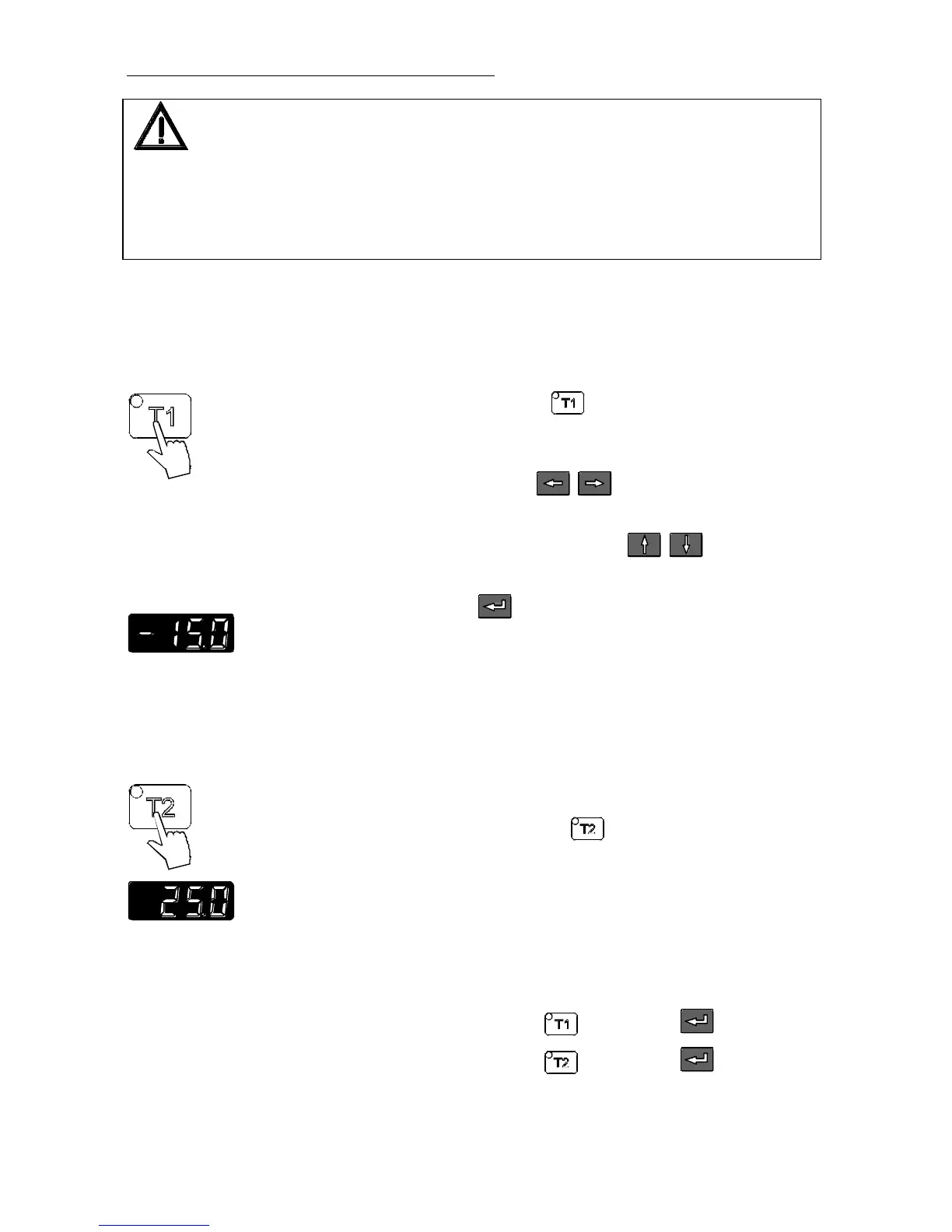
6.3. Setting the temperatures
Setting the working temperature "T1":
Press the setpoint key
.
The indicator light blinks and the value previously set appears
on the MULTI-DISPLAY (LED).
Use the cursor keys to move left or right on the
display until the numeral you wish to change is blinking.
Use the increase/decrease arrows to change the
selected numeral (-, 0, 1, 2, 3, ... 9).
Press enter to store the selected value
(example: -15.0 °C).
The working temperature is maintained constant after a short heat-
up time (e. g. -15.0 °C).
Setting the working temperature "T2":
Press the setpoint key .
Same procedure
as with "T1"
(example: 25.0 °C).
Selecting the working temperature:
• Press the setpoint key and then enter .
• Press the setpoint key and then enter .



 To Next Page