29
10. Electrical connections
RS232
RS485
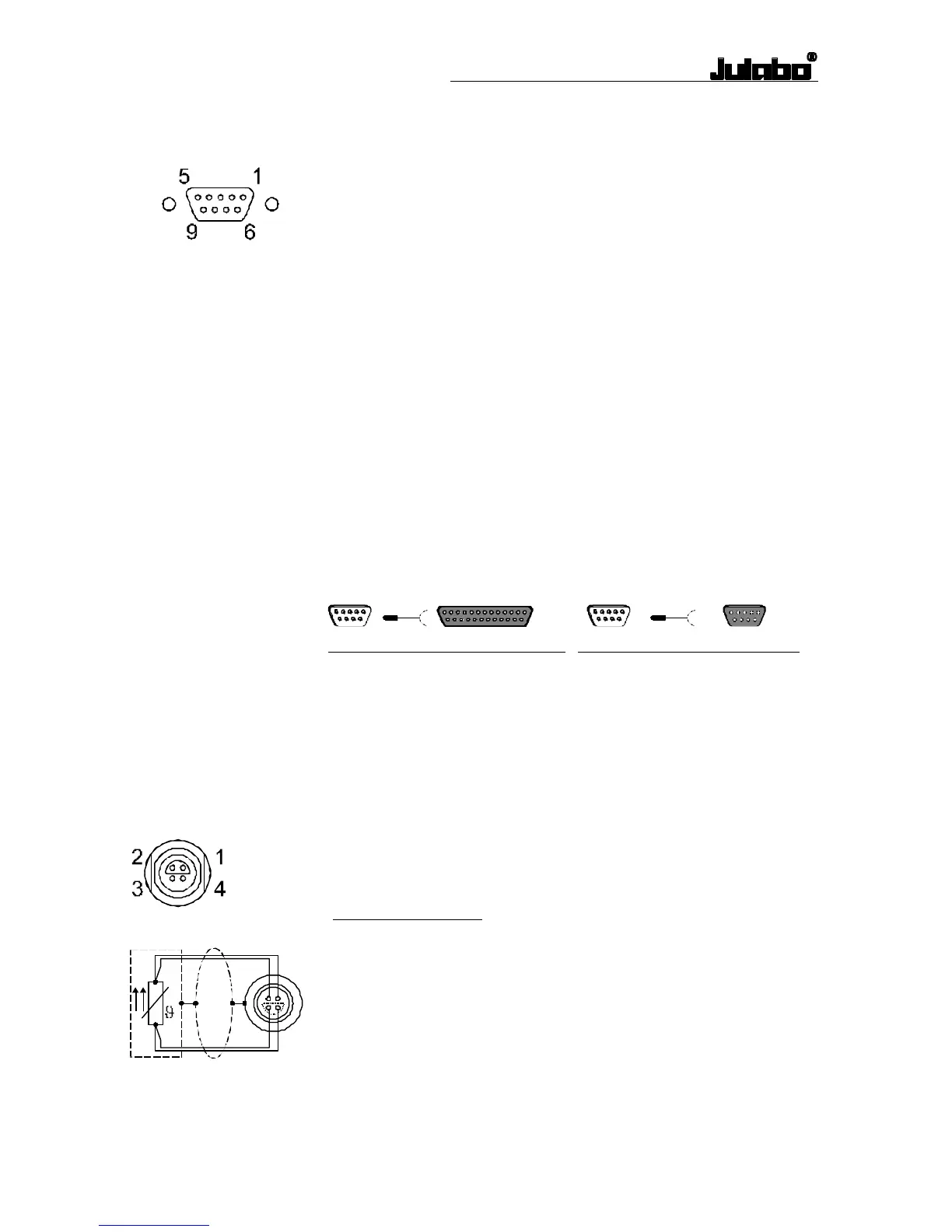
Serial RS232/RS485 interface (20)
This port can be used to connect a computer with an RS232 or RS485
cable for remote control of the circulator.
Pin assignments: RS232
Pin 2 RxD Receive Data
Pin 3 TxD Transmit Data
Pin 5 0 VD Signal GND
Pin 6 DTR Data terminal ready
Pin 7 RTS Request to send
Pin 8 CTS Clear to send
Pin assignments: RS485
Pin 3 A
Pin 5 0 VD Signal GND
Pin 8 B
Pins 1, 2, 4, 6, 7, 9 Reserved - do not use!
Interface correspondence:
Circulator Computer Circulator Computer
9-pole 25-pole 9-pole 9-pole
Pin 2 RxD ⇔ Pin 2 TxD Pin 2 RxD ⇔ Pin 3 TxD
Pin 3 TxD ⇔ Pin 3 RxD Pin 3 TxD ⇔ Pin 2 RxD
Pin 5 GND ⇔ Pin 7 GND Pin 5 GND ⇔ Pin 5 GND
Pin 6 DTR ⇔ Pin 6 DSR Pin 6 DTR ⇔ Pin 6 DSR
Pin 7 RTS ⇔ Pin 5 CTS Pin 7 RTS ⇔ Pin 8 CTS
Pin 8 CTS ⇔ Pin 4 RTS Pin 8 CTS ⇔ Pin 7 RTS
RS232 interface cable 9-pin / 9-pin, 2,5 m Order No.: 8 980 073
Connector for external Pt100 sensor (25)
Pin assignment:
Pin Signal
1 Current+
2 Voltage+
3 Voltage-
4 Current-
The shield of the connecting cable is electrically connected to the plug
housing and the sensor tube.
Use shielded cables only.



 To Next Page