Menu functions
32
Menu level 1
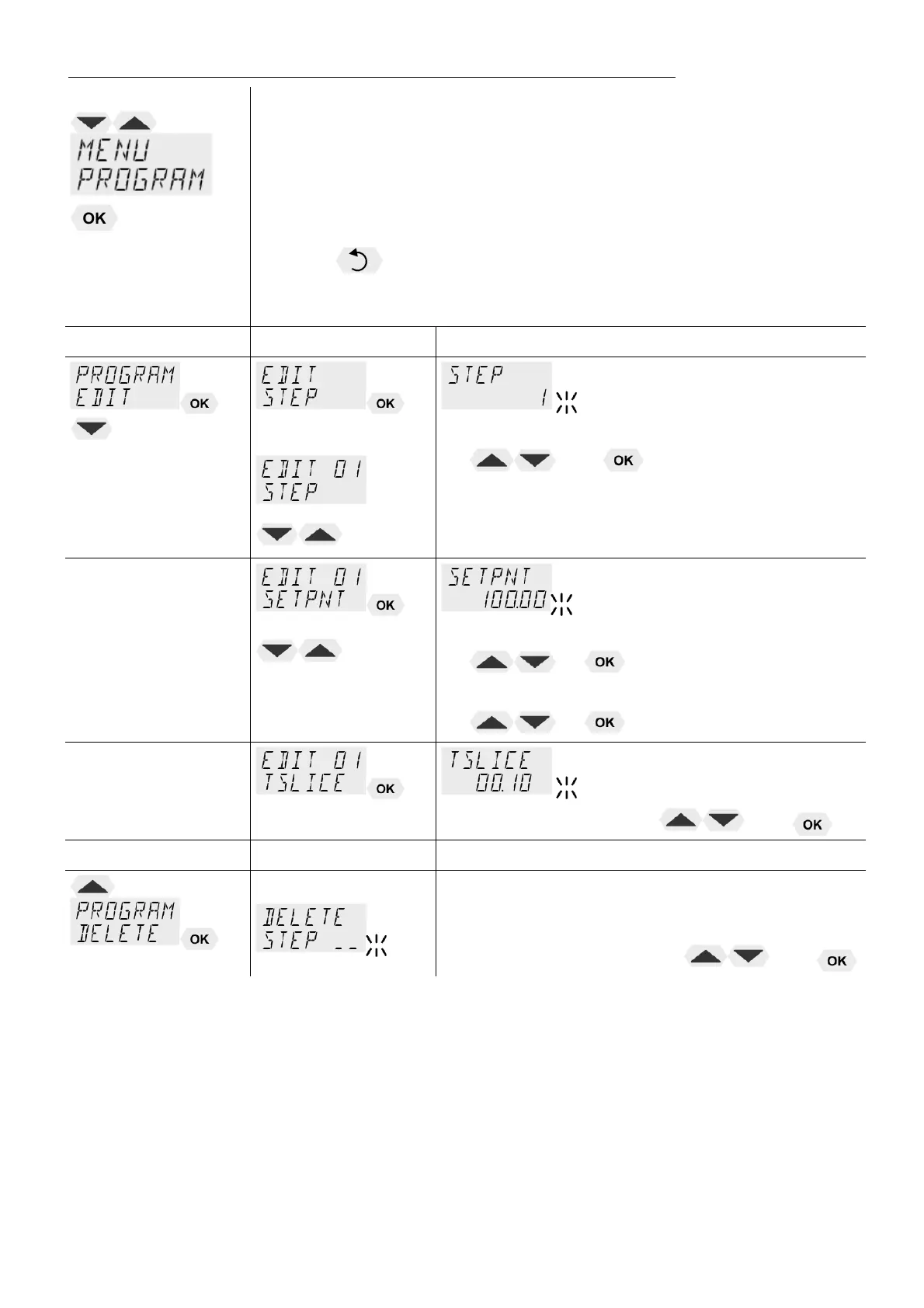
>EDIT< Create, administer program
> STEP< Program step (1 ... 10)
>SETPNT < Temperature setpoint of step ...
>TSLICE< Duration of step ...
> DELETE< delete program step (01 … 10, ALL)
L Press key, if a parameter is to be retained.
Correction function for parameters or values (prior to OK)
Level 2 Level 3 Parameter level
(STEP 1 … 10)
• Set program step with
and
(Example: EDIT STEP 01)
L For STEP 01 the values for SETPOINT 01 and
TSLICE 01 are set one after the other
(values within working temp. range)
• Integer digits flash, set by pressing
+
• Decimal digits flash, set by pressing
+
(time slice)
• Set duration by pressing and
L Delete program
Program steps can be deleted individually or
entirely. (STEP 01, 02,… 10, ALL).
• Set parameters by pressing and


 To Next Page