ME
33
9.3. MENU PUMP – Setting of pump pressure
Factory setting:
stage 2
The capacity of the circulating pump is set by adjusting the motor speed
Settings: stage / LEVEL 1 ... 4
Display:
with illuminated indicator
Flow rate: 11 ... 16 l/m
Pump pressure: 0,22 ... 0,45 bar
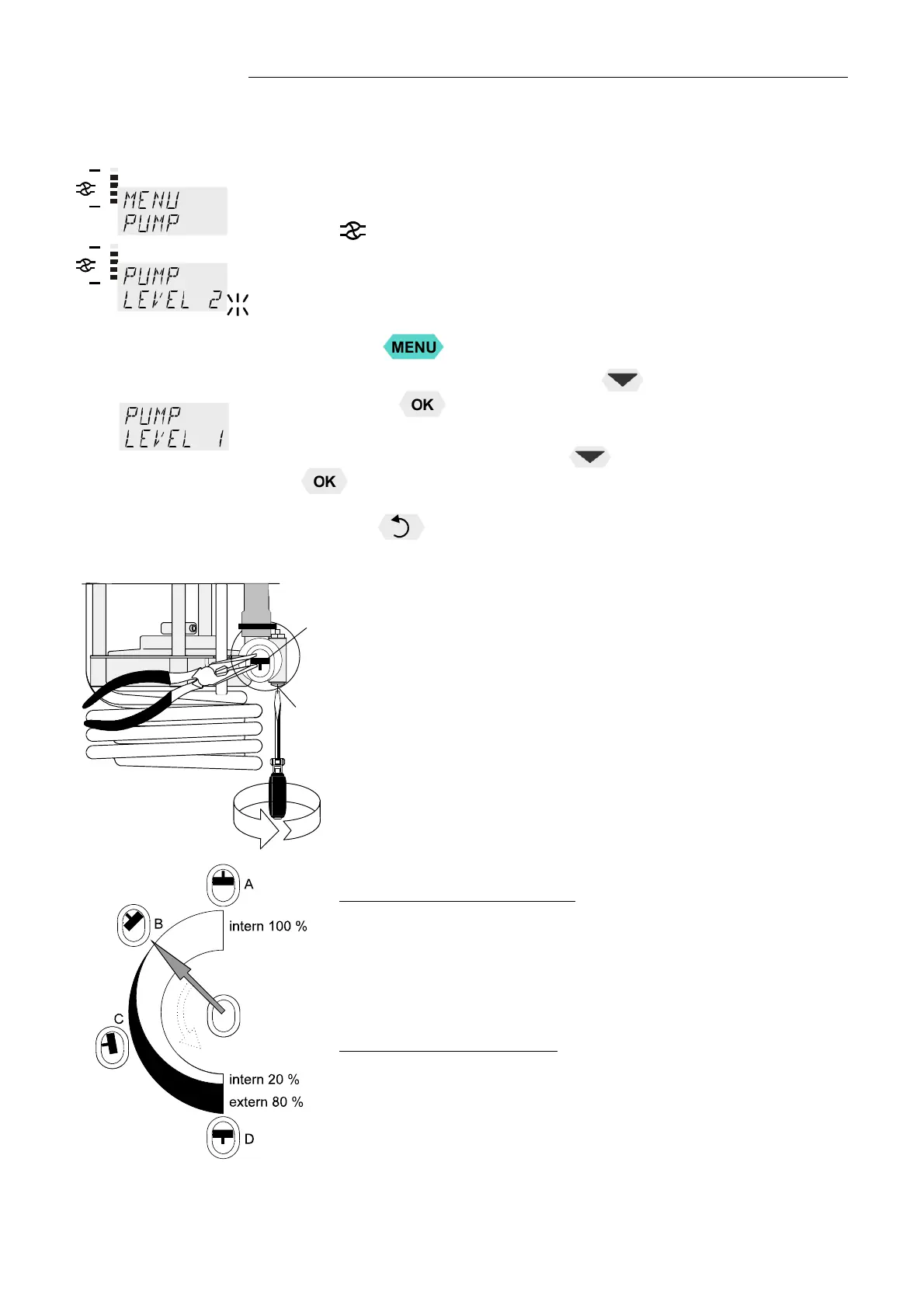
1. Press the
key.
2. Select the menu >PUMP< pressing the
key and confirm by
pressing the
key
The set parameter flashes (example: >LEVEL 2<)
3. Change the parameter by pressing
and confirm by pressing the
key.
or
Press the
key if the parameter is to be retained.
1
2
The pump flow is pre-adjusted in the factory and can be modified to
suit user requirements.
• Using a screwdriver turn the screw (1) anti-clockwise by 360 °.
• Using flat pliers turn the marking of the slide (2) to the desired
position.
• Tighten the screw.
Examples:
Internal applications in the bath
A 100 % internal bath circulation
(for large bath tanks)
B Reduced internal bath circulation
(for smooth surface of bath fluid)
External/internal applications
C 40 % external discharge,
60 % internal circulation
(for large bath tanks)
D 80 % external discharge,
20 % internal circulation
(for small bath tanks)


 To Next Page