4 Operation
22
4.2 Level concept
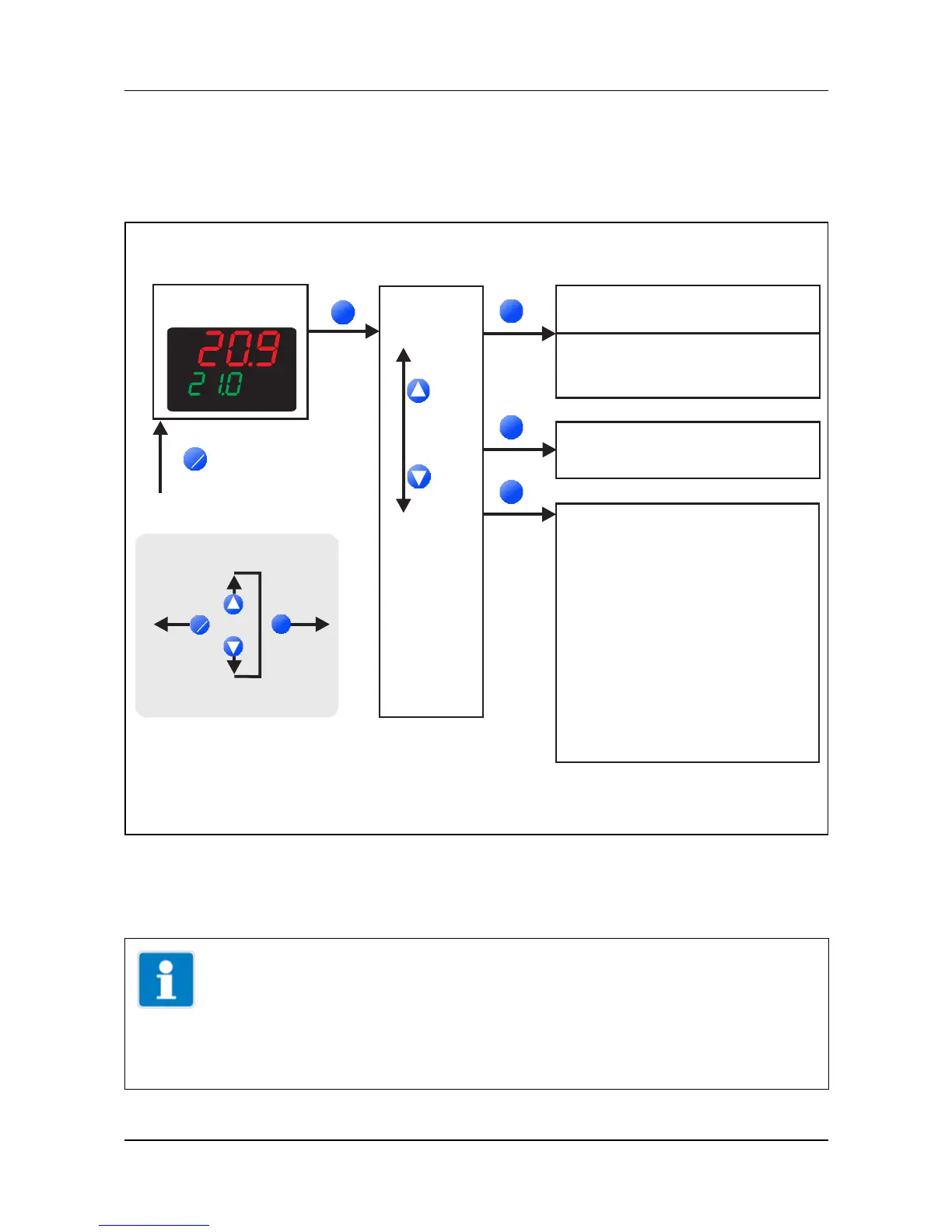
The parameters for device setting are organised at different levels.
Ö Chapter 5 „Operator level“
Ö Chapter 6 „Parameter level“
Ö Chapter 7 „Configuration level“
TIP!
If no key is pressed for 180s the device changes back to
normal display (factory-setting). The setting can be
changed in the setup program (Display/Operation/Service
counter -> Operation -> Time-out).
User level USEr
Operator level OPr
- , , . . .Pb1 dt rt
Parameter level PArA
Up to any eigth parameters
(ex-factory empty)
Set points, process data, ...
Normal display
- Analog input
- Controller
- Ramp function
- Limit comparators
- Binary functions
- Display
- Interface
InP
Cntr
rFCt
LC
binF
diSP
IntF
- Timer
Outputs
tFCt
- OutP
Configuration level ConF
ConF
>2s
or timeout
1. Either the operator ( ) or
the user level ( ) exists
OPr
USEr
PArA
1
P
P
F
EXIT
P
P
Navigation principle
F
EXIT
P
P
one level
backward
one level
forward
next/previous
parameter
P
P
P
P
OPr/USEr



 To Next Page