39
4 Memory presentation (History)
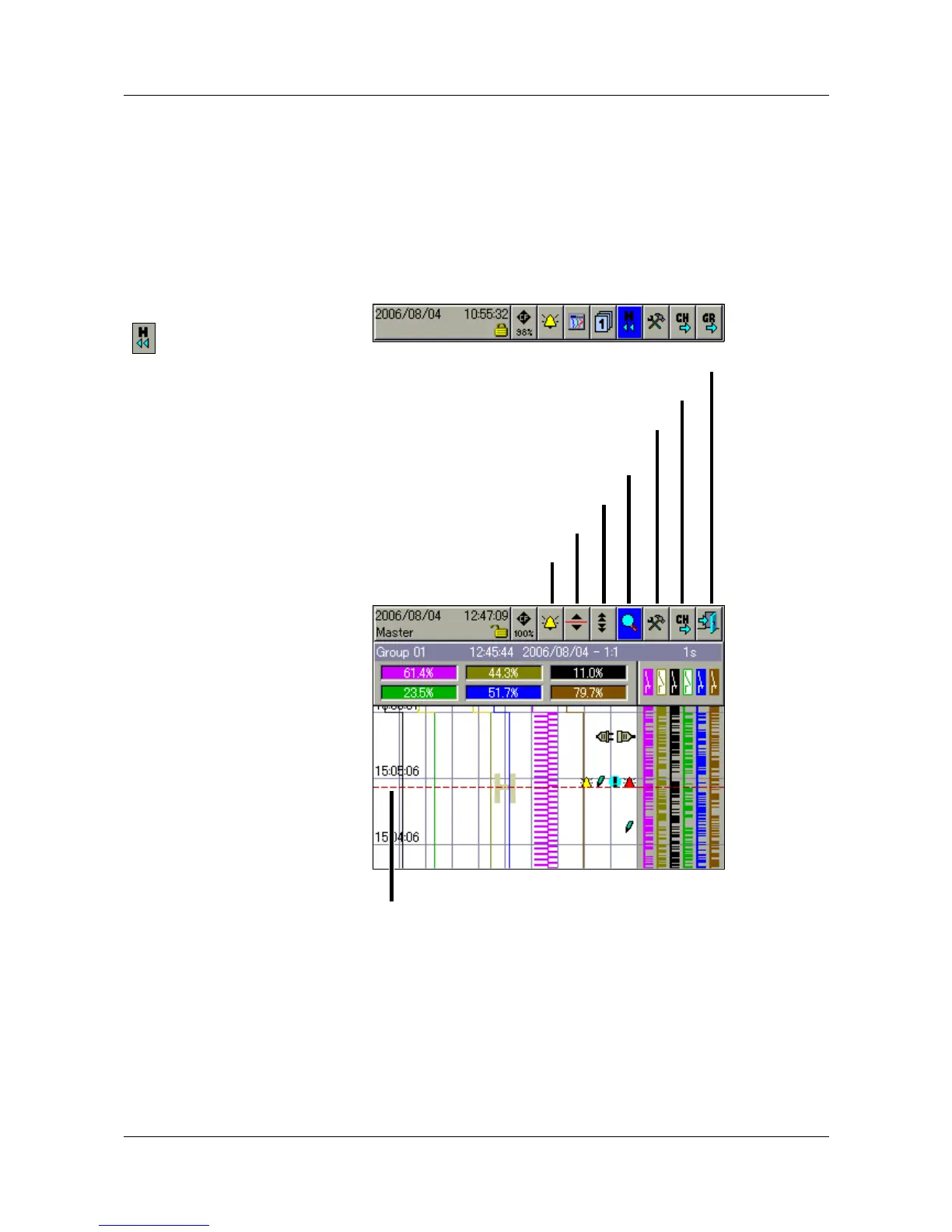
The memory presentation (History) function can be used to display and check
data from the internal main memory of the instrument. The size of the memory
for memory presentation can be configured.
The memory presentation can be activated in the visualization modes “Curve
display” and “Digital presentation”, and is also used for the display of
completed batches.
Activate
memory
presentation
h In “Curve display” or “Digital presentation”, rotate and press the “H”
symbol to select and activate the History presentation.
A cursor is now shown in the center of the visualization window. The
corresponding measurements are shown in the line for “Numerical
measurement display”.
Alarm and
event lists
This function is used to present the alarm and event lists for the group that is
being displayed.
v Chapter 5 “Alarm and event lists”
Alarm and event list
Scroll lines
Scroll pages
Zoom and Search
Numerical measurement display
(MIN / MAX changeover)
Channel step-on
End memory presentation
Present cursor position



 To Next Page