8.14.6 Displaying the Log-in Process
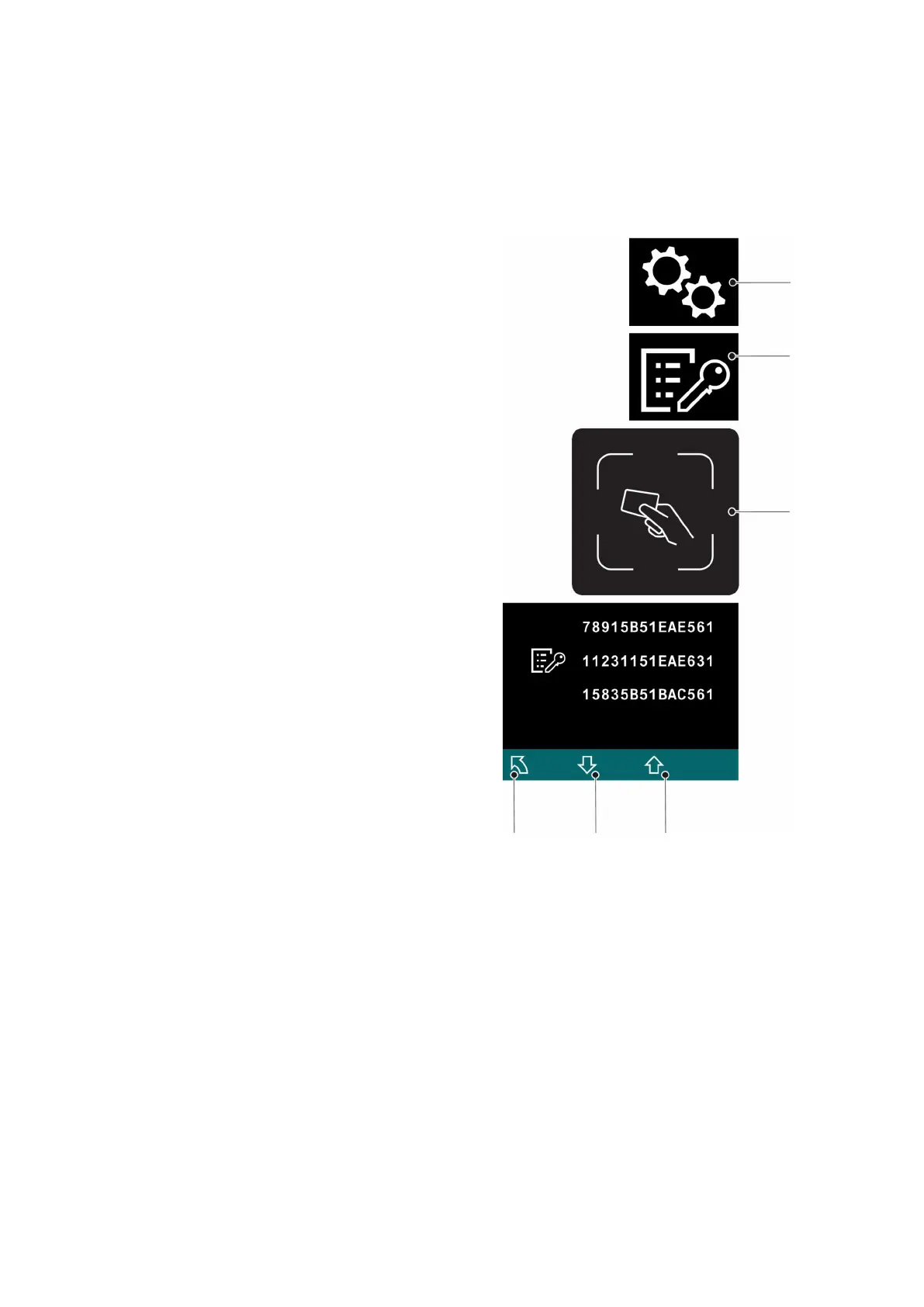
The use of the last different transponders is displayed during the log-in process. The
last log-in is displayed first.
Z
If multiple transponders are logged as being displayable simultaneously, the display
area can be moved by scrolling forward or back.
Requirements
– The truck is switched on, see
page 165.
Procedure
• Press the key below the "Settings"
symbol (100).
• Press the key below the "Log-in
process" symbol (109).
• Place the set-up transponder on the
transponder reader (99).
• To scroll forward, press the button
under the "Down selection"
symbol (108) as many times as
necessary.
The display area moves: Additional
earlier log-ins are displayed.
• To scroll back, press the button under
the "Up selection" symbol (110) as
many times as necessary.
The display area moves: More recent
log-ins are displayed.
• To return to the main menu, press the
key below the "Back" symbol (104).
The log-in process is displayed.
8.15
ISM access module (o)
Z
If the truck is equipped with an ISM access module refer to the “ISM Access Module”
operator manual.
174
04.19 en-GB


 To Next Page
 Loading...