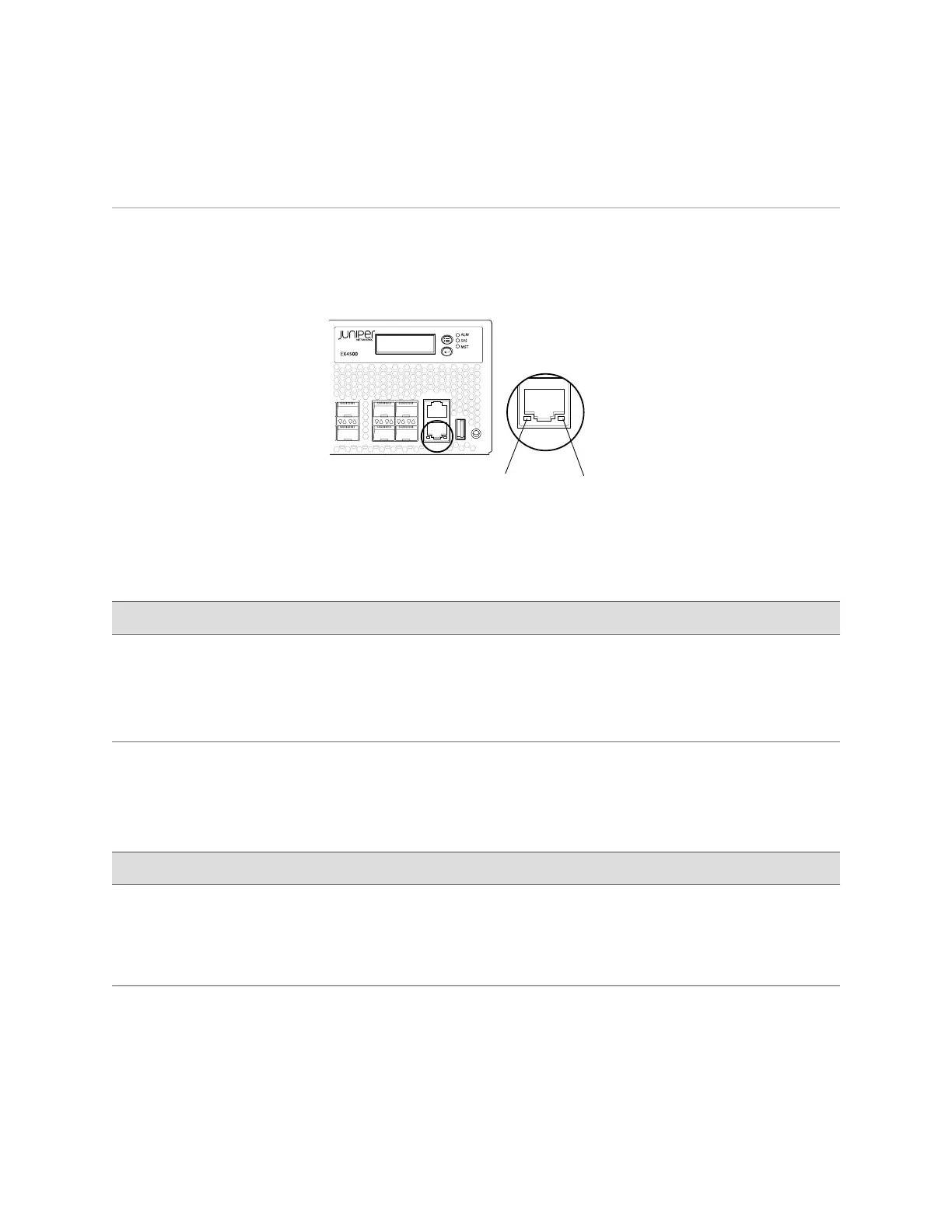
Management Port LEDs in EX4500 Switches
The management port on the front panel of an EX4500 switch has two LEDs that
indicate link/activity and port status (see Figure 9 on page 17).
Figure 9: LEDs on the Management Port on an EX4500 Switch
g020805
34
35
36 38
CON
MGMT
37 39
Management
port
Link/Activity
LED
Status
LED
Table 7 on page 17 describes the Link/Activity LED.
Table 7: Link/Activity LED on the Management Port on an EX4500 Switch
State and DescriptionColorLED
■
Blinking—The port and the link are active, and there is
link activity.
■
On steadily—The port and the link are active, but there
is no link activity.
■
Off—The port is not active.
GreenLink/Activity
Table 8 on page 17 describes the Status LED.
Table 8: Status LED on the Management Port on an EX4500 Switch
State and DescriptionColorLED
Indicates the speed. The speed indicators are:
■
One blink per second—10 Mbps
■
Two blinks per second—100 Mbps
■
Three blinks per second—1000 Mbps
GreenStatus
Related Topics Front Panel of an EX4500 Switch on page 7■
■ Connecting an EX Series Switch to a Network for Out-of-Band Management on
page 91
Management Port LEDs in EX4500 Switches ■ 17
Chapter 2: Component Descriptions




 To Next Page